
Ask Steve - The 1-Click AI Assistant and Tool Belt for your Browser Chrome 插件, crx 扩展下载

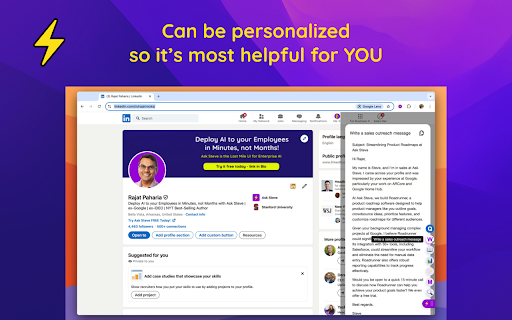
Add AI buttons to your browser that give you 1-click access to one of our 100+ powerful AI Tools - or easily make your own!
GET STUFF DONE FASTER WITH 1-CLICK AI
INCLUDES OUR FREE FACT CHECKER
http://FreeFactChecker.com
Ask Steve:
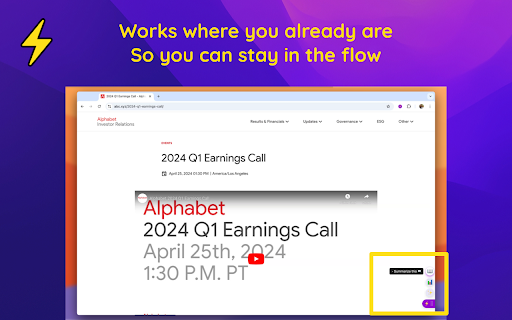
✅ Works where you already already are, so you can stay in the flow
Ask Steve integrates seamlessly into any website or web application. Now you can access AI help wherever you are.
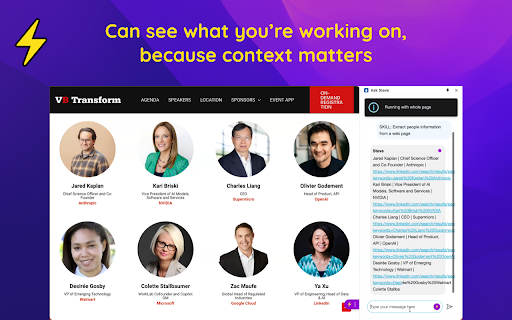
✅ Can see what you're working on, because context matters
Eliminate hours of tedious copying and pasting. Steve can read the current page or text selection and use that as context for your request, saving you time and effort.
✅ Is personalized for YOU
- Add 1-click buttons to any website or web application - no more messing around with prompts
- Create your own Tools and Buttons
✅ Can help you write better and faster
Right where you're already working
- Ask the Writing Helper to write something for you
- Or analyze and suggest improvements to something you've already written
- Or just rewrite it for you, right over your original
✅ Gets you answers FAST
Asked and answered in seconds
- Chat with any web page, PDF, YouTube video, Google Doc or Google Slide deck
- Ask anything that you would ask ChatGPT or Gemini
- But without all the copying and pasting
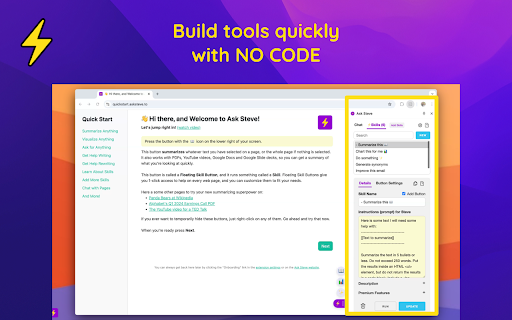
✅ Build tools quickly with NO CODE
- Create new Tools in English
- Add Buttons to websites in seconds
- Connect to any LLM: public, private, on-premise or on-computer with no code
- Connect to any Webhook or API with no code
- Easily share Tools and Buttons
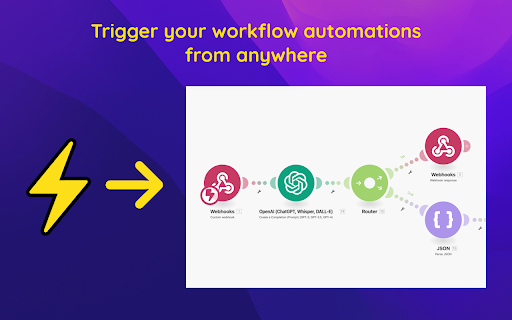
✅ Is a great front-end for RPA and workflow automation
Made a workflow automation in a tool like Zapier, n8n, Make, Pipedream, MindStudio or Activepieces? Connect it to Ask Steve and run it from anywhere with 1-click.
✅ Works in the enterprise - secure, private and customizable by design
- Ask Steve is the only AI browser extension suitable for enterprise deployment - it runs on the employee's computer and connects directly to the LLM, Webhook or API that you specify. None of your data is ever sent to or through Ask Steve.
- Customize the Ask Steve experience for your employees with your own branding, custom Tools and Buttons, and more.
*** WHO IS IT FOR? ***
- For Individuals: The FREE 1-Click AI assistant and tool belt for your browser
Choose from 100+ AI tools to add to your browser's tool belt, and get stuff done lightning fast with AI help! No more copy/pasting into a chatbot in a different window. FREE with your own free Google Gemini or Mistral Key, or with a connection to a local model.
- For Businesses: Deploy AI to your employees in minutes, not months
Ask Steve enables AI, IT & Ops teams to quickly create & deploy solutions that give employees access to enterprise AI in the flow of work, enabling them to work better and faster.
- For Site Owners: Add FREE AI superpowers to your site with NO CODE
Adding AI to your website can be a daunting task! Have your users install Ask Steve and your customized AI Tools (5 clicks, 10 seconds), and you can have AI superpowers on your site in minutes, for FREE.
*** FREE TO TRY ***
- You get 100 FREE requests right away to try things out, with no login required.
- After that put in your own FREE Gemini or Mistral API Key or connect to a local model and get FREE UNLIMITED use on our Standard plan.
- Google and Mistral reserve the right to use your data for training.
*** PREMIUM PLAN ***
- To keep your data from being used for training, subscribe to our Premium plan to connect to any other LLM provider where you have an account
- Alternately connect to any on-premise model or to any API or Webhook
- Free 30 day trial with no credit card required
*** PERMISSIONS & YOUR PRIVACY: ***
We take your privacy seriously. When you install Ask Steve it will ask for permission to "Read and change all your data on all websites". It needs this permission in order to be helpful on any web page. We do not store any of your data. See more details here: https://www.asksteve.to/docs/permissions
*** TRY ASK STEVE TODAY! ***
Read to take your browser and your productivity to the next level? Install Ask Steve today!
| 分类 | 🛠️工具 |
| 插件标识 | gldebcpkoojijledacjeboaehblhfbjg |
| 平台 | Chrome |
| 评分 |
★★★★☆
4.8
|
| 评分人数 | 318 |
| 插件主页 | https://chromewebstore.google.com/detail/ask-steve-the-1-click-ai/gldebcpkoojijledacjeboaehblhfbjg |
| 版本号 | 2.1.1 |
| 大小 | 901KiB |
| 官网下载次数 | 1000 |
| 下载地址 | |
| 更新时间 | 2025-02-21 00:00:00 |
CRX扩展文件安装方法
第1步: 打开Chrome浏览器的扩展程序
第2步:
在地址栏输入: chrome://extensions/
第3步: 开启右上角的【开发者模式】
第4步: 重启Chrome浏览器 (重要操作)
第5步: 重新打开扩展程序管理界面
第6步: 将下载的crx文件直接拖入页面完成安装
注意:请确保使用最新版本的Chrome浏览器
同类插件推荐
Copilotly: Your Personal AI Copilot
Unlock your potential with Copilotly. Navigate the
Ask Steve - The 1-Click AI Assistant and Tool Belt for your Browser
Add AI buttons to your browser that give you 1-cli

TextGPT - Smarter Text Input by OpenAI
TextGPT: Your Virtual Co-Pilot for Smarter Text In

iWeaver AI - Summarize YouTube, PDF and Web Articles.
Summarize YouTube videos, Web articles and PDFs wi
GPT-UA: AI Assistants
Side-panel with all best AI assistants, carefully

Javy: GPT-4 powered assistant
GPT-4 powered tool for quick access to the answer

Ask Gemini
Effortlessly Access Google Gemini AI - Enhance pro

The Dive: AI Summary & Chat for YouTube, PDF, & Web — Privacy-First
In-depth summary & chat w/ jump-to-section, li

AI Blaze: Instantly Use AI in Any Webpage
Blazing fast AI copilot on any website: write emai

Syncia - Power of ChatGPT on any website
Syncia is a browser extension that allows you to u
TinaMind - GPT-4o驱动的AI助手!
您的AI助手,由GPT-4o提供支持。聊天、互联网搜索、翻译、写作、总结等更多功能。您的AI助手由G

Definio: Multi-modal AI Copilot - Claude3 Opus, ChatGPT 4o, Gemini 1.5 Pro
Access latest AI models in your sidebar, translate
FutureWrite AI for Writing & More w/ ChatGPT
Free-Boost writing w/ AI! FutureWrite w/ ChatGPT f