
Pixelay for Figma Chrome 插件, crx 扩展下载
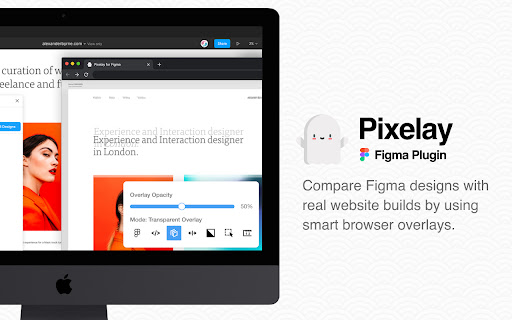
Compare your Figma designs with real websites.
NOTE: This extension is designed to be used in collaboration with the Pixelay Figma Plugin, and it won't do anything on its own without the Figma plugin installed to upload your designs first - https://www.figma.com/community/plugin/816424186244407164/
Never hear excuses for your designs being messed up again. Pixelay allows you to effortlessly visually compare your Figma designs and your real website URLs with a single click.
| 分类 | 💻开发者工具 |
| 插件标识 | gnbafbeabkbkecmbedfgebgboicpnkpp |
| 平台 | Chrome |
| 评分 |
★★★★★
5
|
| 评分人数 | 1 |
| 插件主页 | https://chromewebstore.google.com/detail/pixelay-for-figma/gnbafbeabkbkecmbedfgebgboicpnkpp |
| 版本号 | 1.1.11 |
| 大小 | 391KiB |
| 官网下载次数 | 3000 |
| 下载地址 | |
| 更新时间 | 2024-08-20 00:00:00 |
CRX扩展文件安装方法
第1步: 打开Chrome浏览器的扩展程序
第2步:
在地址栏输入: chrome://extensions/
第3步: 开启右上角的【开发者模式】
第4步: 重启Chrome浏览器 (重要操作)
第5步: 重新打开扩展程序管理界面
第6步: 将下载的crx文件直接拖入页面完成安装
注意:请确保使用最新版本的Chrome浏览器
同类插件推荐

Pixel Perfect Pro
Helps developers to make pixel perfect site layout

Ghost Screen
Easier comparing Figma design with its implementat

PixelParallel by htmlBurger
PixelParallel by htmlBurger - Pixel perfect HTML v

Pixelay for Figma
Compare your Figma designs with real websites.NOTE
Figma UI Mod
Figma UI enhancements and Analytics CSV exportProv

PerfectPixel by WellDoneCode (pixel perfect)
This extension helps develop your websites with pi

Designer Tools
A collection of tools to help you design and devel

Element to Figma
Copy page elements to figmaExtension to select the

html.to.design
Convert any website into fully editable Figma desi
Dimensions
A tool for designers to measure screen dimensionsT

Page Ruler
Measure page elements size in pixel with an easy-t

Figma
FigmaStart meetings off on the right foot by conne

Web to Figma
Web to Figma extension to capture pages and compon