
JavaScript Switch ON|OFF Chrome 插件, crx 扩展下载

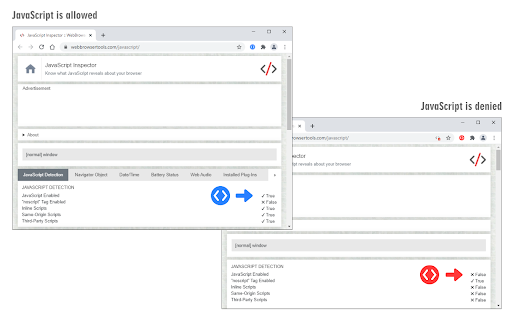
Switch JavaScript engine ON or OFF with just one click!
JavaScript Switch ON|OFF is an extension that helps you quickly turn the JavaScript engine in your browser ON or OFF via the toolbar button.
When the toolbar icon color is green, JavaScript is allowed in the browser, and when it turns red, it means JavaScript is denied globally. Now you can reload any website without JavaScript running. If you need to whitelist a domain (i.e. www.example.com) please right-click on any page and then click on the - Add domain to the whitelist - context menu item. Alternatively, you can open the options page and add the desired domain to the designated area (text area). Please note, domains need to be added comma-separated (domain1.com, domain2.com, etc). You can also enter URLs and the addon will convert them to a domain.
To report bugs, please fill the bug report form on the addon's homepage (https://mybrowseraddon.com/javascript-switch.html).
| 分类 | 🛠️工具 |
| 插件标识 | gnlnegoejhbljhpbajbichoabfahjekp |
| 平台 | Chrome |
| 评分 |
★★★☆☆
3.7
|
| 评分人数 | 11 |
| 插件主页 | https://chromewebstore.google.com/detail/javascript-switch-onoff/gnlnegoejhbljhpbajbichoabfahjekp |
| 版本号 | 0.1.9 |
| 大小 | 41.36KiB |
| 官网下载次数 | 3000 |
| 下载地址 | |
| 更新时间 | 2025-01-28 00:00:00 |
CRX扩展文件安装方法
第1步: 打开Chrome浏览器的扩展程序
第2步:
在地址栏输入: chrome://extensions/
第3步: 开启右上角的【开发者模式】
第4步: 重启Chrome浏览器 (重要操作)
第5步: 重新打开扩展程序管理界面
第6步: 将下载的crx文件直接拖入页面完成安装
注意:请确保使用最新版本的Chrome浏览器
同类插件推荐

JavaScript switcher for SEO and development
An easy way to disable or enable JavaScript for SE

Javascript Switch
Toggle Javascript with one click.

Cookie Switch ON|OFF
Switch cookies ON or OFF with just one click!Cooki

Stop JavaScript
Stop JavaScript execution in current tab.** Yet An

JavaScript Toggle On and Off
以简单的方式切换JavaScript引擎(内联、数据URL、远程和外部)的开启和关闭此扩展程序在所有
Quick Javascript Switcher
Disable JavaScript on any site in one clickQuick J

JavaScript Switch ON|OFF
Switch JavaScript engine ON or OFF with just one c

Toggle JavaScript
Enable or disable JavaScript without the hassle.To

JavaScript Switch - JS Toggle On and Off
Developers and users can switch JavaScript ON/OFF

Enable JavaScript
An easily way to turn ON/OFF website's JavaScr

Simple JavaScript Toggle
Enable or disable JavaScript on a site-by-site bas

Policy Control
Gain complete control over all content settings (c

Privacy Guard & Manager
Easily control settings in your browser to improve