
Distraction Free YouTube Chrome 插件, crx 扩展下载
Take back control of your YouTube experience.
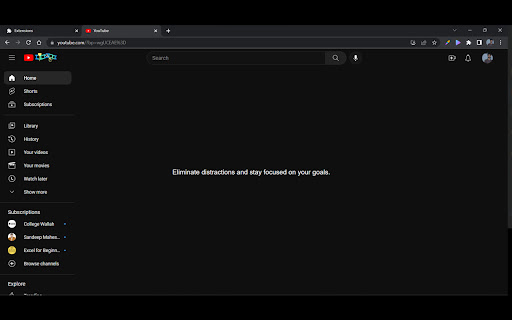
Looking to improve your productivity and stay on task? Our YouTube extension is the perfect solution. Take control of your recommendations, avoid distractions, and achieve your goals.
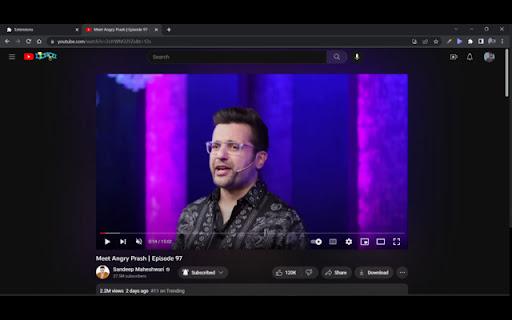
This extension will give you a focusMode button on click of which you can hide suggested videos on youtube homepage and youtube watch screen right side suggestions.
While user will still be able to use other app exactly like before like searching videos and watching videos etc.
| 分类 | 📝工作流程与规划 |
| 插件标识 | godkkdinnjbknjohhhiglfhmojipcpml |
| 平台 | Chrome |
| 评分 |
★★★★☆
4
|
| 评分人数 | 1 |
| 插件主页 | https://chromewebstore.google.com/detail/distraction-free-youtube/godkkdinnjbknjohhhiglfhmojipcpml |
| 版本号 | 0.0.1 |
| 大小 | 43.1KiB |
| 官网下载次数 | 579 |
| 下载地址 | |
| 更新时间 | 2023-04-25 00:00:00 |
CRX扩展文件安装方法
第1步: 打开Chrome浏览器的扩展程序
第2步:
在地址栏输入: chrome://extensions/
第3步: 开启右上角的【开发者模式】
第4步: 重启Chrome浏览器 (重要操作)
第5步: 重新打开扩展程序管理界面
第6步: 将下载的crx文件直接拖入页面完成安装
注意:请确保使用最新版本的Chrome浏览器
同类插件推荐

Distraction Free YouTube
Are you distracted while watching educational vide

YouTube Distraction Blocker
Blocks YouTube comments and/or watch recommendatio

FocusTube - Distraction Remover for YouTube
Eliminate Shorts videos and irrelevant recommendat
Distraction Free YouTube
Take back control of your YouTube experience.Looki

Distraction Free YouTube
YouTube with less distraction!This extension block

DF UTube (Distraction Free on YouTube™)
Help you stay focus while using YouTube™ for work,

YouTube Focus
Hide recommended videos on YouTube for distraction

YT Distraction Remover
Removes all recommendations from youtubeA really s

YouFocus - Hide YouTube Distractions
Hide YouTube suggested videos, comments, and more

Zen YouTube: Distraction free youtube
Removes feed and recommendations from YouTube so t

UnTrap for YouTube
隐藏 YouTube 推荐、短片、评论、建议、相关视频、趋势和其他干扰。UnTrap 是一款浏览器扩

DF Tube (Distraction Free for YouTube™)
Allow yourself to focus while using YouTube™ for w

Youtube Study Mode
No distractions on Youtube when studying. Click th