
Batch Reply for Gmail™ Chrome 插件, crx 扩展下载
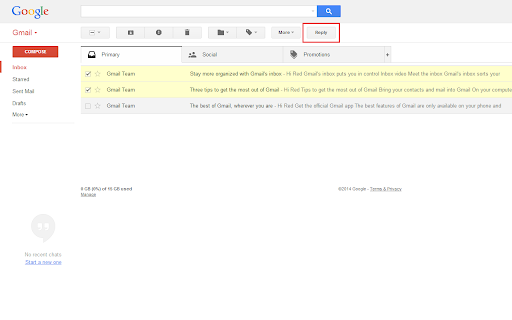
A chrome extension that makes it possible to reply to all selected conversations in Gmail™ at once.
Simply go to https://mail.google.com/, select conversations you want to reply to, and click the "Reply" button at the top of the screen!
This extension is open-source.
https://github.com/eladnava/batch-reply-for-gmail
Gmail™ is a registered trademark of Google. This extension is unaffiliated with Google.
| 分类 | 📝工作流程与规划 |
| 插件标识 | hclnmjfbjpemfjgcakmbpjkbclchmaig |
| 平台 | Chrome |
| 评分 |
★★★★☆
4.7
|
| 评分人数 | 38 |
| 插件主页 | https://chromewebstore.google.com/detail/batch-reply-for-gmail/hclnmjfbjpemfjgcakmbpjkbclchmaig |
| 版本号 | 1.4 |
| 大小 | 67.57KiB |
| 官网下载次数 | 9000 |
| 下载地址 | |
| 更新时间 | 2024-12-17 00:00:00 |
CRX扩展文件安装方法
第1步: 打开Chrome浏览器的扩展程序
第2步:
在地址栏输入: chrome://extensions/
第3步: 开启右上角的【开发者模式】
第4步: 重启Chrome浏览器 (重要操作)
第5步: 重新打开扩展程序管理界面
第6步: 将下载的crx文件直接拖入页面完成安装
注意:请确保使用最新版本的Chrome浏览器
同类插件推荐
Batch Reply for Gmail™
A chrome extension that makes it possible to reply

Sender Icons for Gmail™
Add a sender icon for all emails in your Gmail inb

Gmail Email Thread Reverse
A quick, easy, one-click way to reverse the messag

Gmail™ 的反向对话
此浏览器扩展可在对话视图中反转电子邮件。想要在 Gmail 中反转您的电子邮件线程,以便电子邮件线程