
ChatGPT Optimizer Chrome 插件, crx 扩展下载
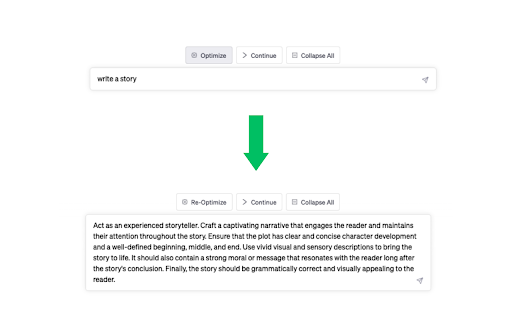
Optimize your ChatGPT experience
Unleash the true potential of ChatGPT with Prompt Ready's ChatGPT Optimizer, the ultimate Chrome extension that revolutionizes your AI-assisted conversations. With our cutting-edge features, experience a seamless and optimized ChatGPT journey that goes beyond your imagination.
Discover the true power of AI with the one-click "Optimize" button. Transform your basic prompts into engaging and refined questions, taking your ChatGPT experience to the next level. Say goodbye to time-consuming and repetitive manual edits, and let the magic of optimization unfold in seconds.
Keep the conversation flowing effortlessly with the "Continue" button. With just a single click, unravel the unfinished thoughts and ideas that ChatGPT has to offer. No more typing "continue" manually—embrace the uninterrupted exchange of ideas and knowledge.
Navigate through your conversations with ease using the Collapse buttons. Minimize and maximize chats on-the-go, allowing you to have a bird's-eye view of your entire conversation history. Dive into individual chats as you please, and enjoy a clutter-free ChatGPT experience.
Never miss a beat with the Auto Reveal feature. Say goodbye to the "Show More" button and unlock your entire chat history in an instant. Save time and stay focused on the conversation, as we improve usability for you.
Embrace a spacious and sleek design with the Expanded Sidebar and Full-width Conversation Area. Utilize every inch of your screen, allowing for a more comfortable and visually appealing experience.
Don't let limitations hold you back—optimize, streamline, and elevate your ChatGPT experience with the Prompt Ready - ChatGPT Optimizer Chrome extension. Download now and let the future of AI-assisted conversations begin!
| 分类 | 📝工作流程与规划 |
| 插件标识 | hdahfhnfkbpghgaifadgaoionhnghjjf |
| 平台 | Chrome |
| 评分 |
★★★★★
5
|
| 评分人数 | 7 |
| 插件主页 | https://chromewebstore.google.com/detail/chatgpt-optimizer/hdahfhnfkbpghgaifadgaoionhnghjjf |
| 版本号 | 1.1.2 |
| 大小 | 64.5KiB |
| 官网下载次数 | 325 |
| 下载地址 | |
| 更新时间 | 2023-05-06 00:00:00 |
CRX扩展文件安装方法
第1步: 打开Chrome浏览器的扩展程序
第2步:
在地址栏输入: chrome://extensions/
第3步: 开启右上角的【开发者模式】
第4步: 重启Chrome浏览器 (重要操作)
第5步: 重新打开扩展程序管理界面
第6步: 将下载的crx文件直接拖入页面完成安装
注意:请确保使用最新版本的Chrome浏览器
同类插件推荐

ChatGPT Continue Button
Add a continue button to ChatGPT"ChatGPT Cont
ChatGPT Optimizer
Optimize your ChatGPT experienceUnleash the true p
CountGPT
Adds a counter to the ChatGPT site to keep track o

ChatGPTCustomizer
Customize your assistant using ChatGPT API with mu

Enhancer for ChatGPT
Better ChatGPT experience. Hide annoyances.Better

TACQ AI | Linkedin Prospecting
Ultimate LinkedIn AI Tool for Smart, Elevated Lead

ChatGPT Utilities by innaton.com
ChatGPT Utilities to make working with ChatGPT mor

RenderGPT
A Chrome extension to render HTML/JavaScript/CSS f

ChatGPT Assistant - Autocomplete Prompts
A Chrome Extension for Autofilling prompts in Chat

Prompti
Elevate your ChatGPT conversations with Prompti, a

ChatGPT AutoPrompt
Automatically insert a predefined text into every

Power Prompt For ChatGPT & OpenAi
Power Prompt - Enhance ChatGPT interaction. Seamle

ChatGPT Optimizer - Boost Your AI Workflow
Enhance the Chat GPT interface and bring GPT troug