
GTMFixer - Google Tag Manager Enhancements Chrome 插件, crx 扩展下载
Google Tag Manager enhancements for easier tag, trigger and variable organization.
GTMFixer is a powerful Chrome extension designed to streamline and enhance your Google Tag Manager (GTM) workflow. This extension provides a suite of tools that make it easier to organize and manage your tags, triggers, and variables, ensuring a more efficient and error-free tagging process.
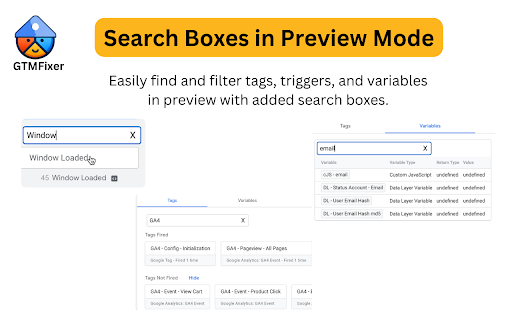
Search Boxes in Preview:
Easily find and filter tags, triggers, and variables with added search boxes. This feature saves time and reduces the hassle of manually scrolling through long lists.
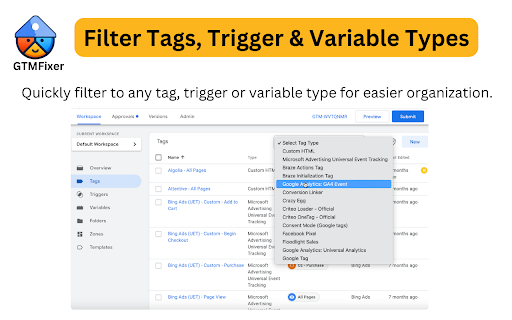
Filter Tags, Trigger & Variable Types:
Quickly filter to any tag, trigger or variable type for easier organization.
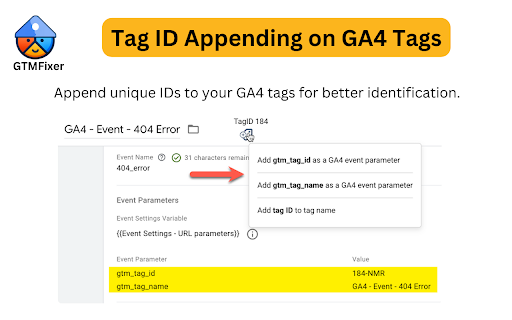
Tag ID Appending on GA4 Tags:
Append unique IDs to your GA4 tags for better identification and management.
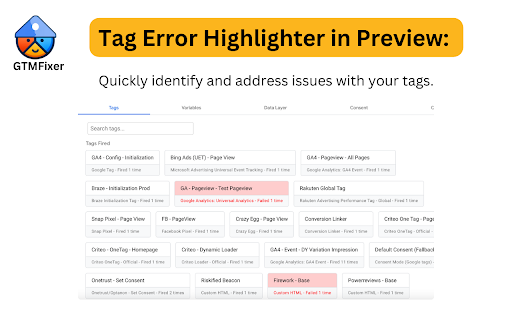
Tag Error Highlighter in Preview:
Quickly identify and address issues with your tags. The tag error highlighter visually marks tags with errors, helping you to promptly fix them and maintain a clean and functional GTM setup.
Hide Built-In Variables:
Simplify your workspace by hiding built-in variables that you don't use. This feature helps you focus on the variables that matter most to your specific implementation.
Event Name Checker:
Ensure that your event names follow a consistent naming convention. The event name checker helps you avoid discrepancies and maintain a standardized approach to event tracking.
Hide Container Quality:
Optionally hide the container quality score to reduce distractions and focus on the essential aspects of your GTM setup.
| 分类 | 💻开发者工具 |
| 插件标识 | henoooadlnkicamlpjbkenolnhgnochc |
| 平台 | Chrome |
| 评分 |
★★★★☆
4.1
|
| 评分人数 | 56 |
| 插件主页 | https://chromewebstore.google.com/detail/gtmfixer-google-tag-manag/henoooadlnkicamlpjbkenolnhgnochc |
| 版本号 | 1.0.8 |
| 大小 | 571KiB |
| 官网下载次数 | 4000 |
| 下载地址 | |
| 更新时间 | 2025-01-20 00:00:00 |
CRX扩展文件安装方法
第1步: 打开Chrome浏览器的扩展程序
第2步:
在地址栏输入: chrome://extensions/
第3步: 开启右上角的【开发者模式】
第4步: 重启Chrome浏览器 (重要操作)
第5步: 重新打开扩展程序管理界面
第6步: 将下载的crx文件直接拖入页面完成安装
注意:请确保使用最新版本的Chrome浏览器
同类插件推荐

EC Assist
Enhanced Conversions validation and troubleshootin

Consent Mode Inspector by InfoTrust
Check the status of Consent Mode, display gcs &
Looker Studio Companion
Boosting Looker Studio (formerly Google Data Studi
GTMFixer - Google Tag Manager Enhancements
Google Tag Manager enhancements for easier tag, tr

GTM Plus
GTM Plus enables hotkeys and the utility features

GTM Variable Builder
From Chrome Developer Console, highlight elements

Omnibug
Omnibug is a browser extension to decode and displ

GA4 Fixer
Patch holes in GA4 for better reporting. Adds '

dataslayer
Debug and test tag management (Google Tag Manager,

Tag Assistant Companion
The Tag Assistant Companion extension works with T

UET Tag Helper (by Microsoft Advertising)
This extension helps to identify issues in Microso

Adswerve - dataLayer Inspector+
DataLayer Tools for Digital AnalystsThe Adswerve d

Google Analytics Debugger
Prints useful information to the JavaScript consol