
Biometric Device Serial Number Finder Tool Chrome 插件, crx 扩展下载
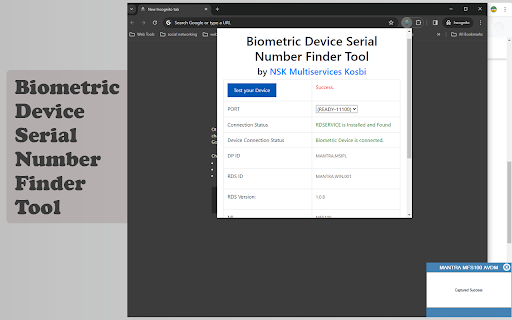
This Chrome extension helps users locate serial numbers for biometric devices, It also helps to diagnose the Installation Issues.
Extension Name: Biometric Device Serial Number Finder Tool for Mantra MFS 100
Publisher: Nandeshwar Katenga (NSK Multiservices)
Description:
The Biometric Device Serial Number Finder Tool is a handy extension developed by NSK Multiservices to simplify the process of locating serial numbers for biometric devices. Whether you're a technician, IT professional, or system administrator, this tool streamlines the task of identifying serial numbers, saving you time and effort.
Features:
Efficient Search: Quickly search for the serial number of your biometric device with just a few clicks.
User-Friendly Interface: The extension offers a simple and intuitive interface, making it easy for users of all levels to navigate and use effectively.
Comprehensive Support: Currently, it support only Mantra MFS 100 Device, In furute we will add multiple devices.
Time-Saving: Eliminates the need for manual searching or troubleshooting, allowing you to retrieve serial numbers swiftly and efficiently.
Reliable Results: Provides accurate and reliable results, ensuring that you have the correct serial number for your biometric device.
How to Use:
Install the Biometric Device Serial Number Finder Tool from the Chrome Web Store.
Click on the extension icon in the browser toolbar to open the tool.
Device information will be shown on extension page.
Click on the "Test your Device" button to test your Mantra MFS100 Device.
Copy or note down the serial number for your reference or further use.
| 分类 | 🛠️工具 |
| 插件标识 | hhocjpebocpfhahgbphdohhoamkbcijl |
| 平台 | Chrome |
| 评分 |
☆☆☆☆☆
0
|
| 评分人数 | 1 |
| 插件主页 | https://chromewebstore.google.com/detail/biometric-device-serial-n/hhocjpebocpfhahgbphdohhoamkbcijl |
| 版本号 | 1.0 |
| 大小 | 169KiB |
| 官网下载次数 | 495 |
| 下载地址 | |
| 更新时间 | 2024-03-13 00:00:00 |
CRX扩展文件安装方法
第1步: 打开Chrome浏览器的扩展程序
第2步:
在地址栏输入: chrome://extensions/
第3步: 开启右上角的【开发者模式】
第4步: 重启Chrome浏览器 (重要操作)
第5步: 重新打开扩展程序管理界面
第6步: 将下载的crx文件直接拖入页面完成安装
注意:请确保使用最新版本的Chrome浏览器
同类插件推荐

Mantra Manager
It help you to update MantraMantra manager, Help y

Biometric Device Serial Number Finder Tool
This Chrome extension helps users locate serial nu

Computer Serial Number Finder
A tool to help you find your computer's serial
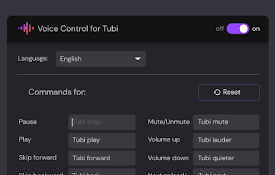
Voice Control for Tubi TV
?Voice Control for Tubi ? Play, pause, fast-forwar

HindiSync
This Chrome extension facilitates on-the-fly trans
SwiftDial YN
主页 | 新标签 | ? 现代 | ? 易于定制 | ?️ 尊重隐私 |基于Chromium的Yan

EliteHunter: Linkedin Auto Connector
Scrape & ConnectLinkedIn Auto Connector for Re

GitHub Red Issues
Revert closed GitHub issues from purple back to re

SustEarn
Reduce your carbon footprint. Earn rewards for sus

Default profile for Disney+
Default profile for Disney+, auto-logs chosen prof

HUB Network Connector
Find the right connections, at the right time, and

The Big Gift List
Easily add items to your 'The Big Gift List

brocrobes
Browser plugin for https://transcrob.esBrocrobes i