
WebNote Chrome 插件, crx 扩展下载
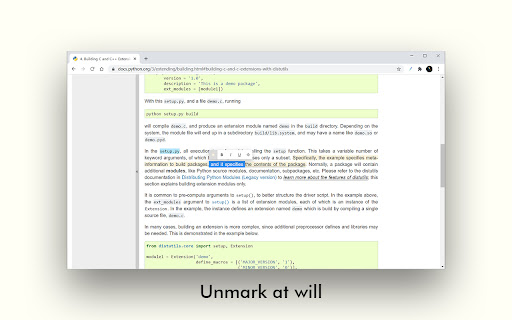
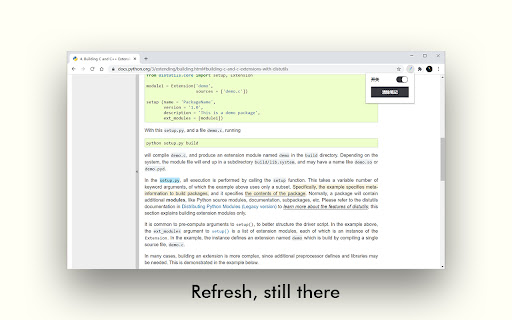
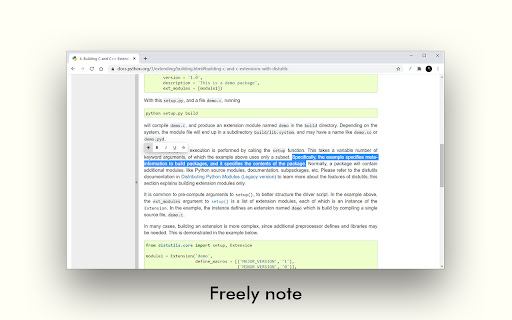
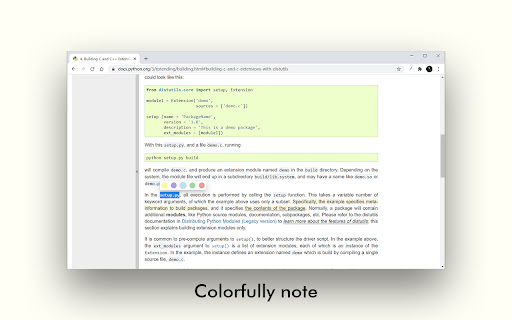
Take notes directly in the page.
A Chrome extension that allows you to note freely on web pages and save it persistently
> Mainly used to solve the problem of "notes" when viewing documents and browsing web pages
How to use?
1. Click the extension icon in the status bar to turn on the switch (enable extension on the current page)
2. Select the target text with the mouse to start text annotation
3. In the pop-up toolbar, press and hold the first button to call up the secondary highlight color bar, providing a variety of highlight color options
4. For the existing mark, select arbitrarily to partially cancel
5. If you want to clear all notes on the current page, click the extension icon and click "Clear Notes" in the pop-up box
GitHub Repository: https://github.com/Hogan-TR/WebNote
一个可以让你在网页上自由“圈画”,并且能够持久保存的 Chrome 插件
> 主要用于解决查阅文档,浏览网页时的“笔记”问题
使用
1. 点击状态栏的扩展图标,打开开关(在当前页启用)
2. 鼠标选中目标文字,即可开始文本标注
3. 弹出工具栏中,长按第一个按钮,即可唤出二级高亮颜色栏,提供多种高亮颜色选择
4. 对于已有标记,任意选择即可部分取消
5. 若想清除当前页所有笔记,点击扩展图标,弹出框中点击“清除笔记”即可
反馈
如果您在使用过程中遇到了任何问题,希望您能够即时反馈,并附上出现问题时地相关信息(比如:浏览的网页、相关操作过程、截图等),期待您的反馈 :)。以下是我的邮件地址:[email protected],当然您也可以加入 QQ 群聊给出建议:794760692
| 分类 | 📝工作流程与规划 |
| 插件标识 | hkicaocjinbpfkollonmickokmfmokkp |
| 平台 | Chrome |
| 评分 |
★★★★☆
4
|
| 评分人数 | 25 |
| 插件主页 | https://chromewebstore.google.com/detail/webnote/hkicaocjinbpfkollonmickokmfmokkp |
| 版本号 | 0.0.4 |
| 大小 | 31.56KiB |
| 官网下载次数 | 461 |
| 下载地址 | |
| 更新时间 | 2023-02-27 00:00:00 |
CRX扩展文件安装方法
第1步: 打开Chrome浏览器的扩展程序
第2步:
在地址栏输入: chrome://extensions/
第3步: 开启右上角的【开发者模式】
第4步: 重启Chrome浏览器 (重要操作)
第5步: 重新打开扩展程序管理界面
第6步: 将下载的crx文件直接拖入页面完成安装
注意:请确保使用最新版本的Chrome浏览器
同类插件推荐

WebNote Highlighter
Are you someone who finds it difficult to remember

Docamatic - Add Sticky Notes to the Web
Want to add your own sticky notes to any webpage?
WebNotes
This app is used for saving notes for each website
WebNote
Take notes directly in the page.A Chrome extension

Web Notes
Allows user to stick notes for specific url.Web No

Chrome Note Keeper
Chrome Note Keeper: keep notes on specific website

pipebox-侧边栏网页笔记
深度阅读,在线学习必备插件,网页内做笔记&高亮马克,强大的笔记管理后台1.0.4更新:

AnyPage Sticky Note
With AnyPage Sticky Note, You can make resizeable

Backnote
Saving text snippets made easy. Call a tab on hotk

Beanote - Note Taking on Web Pages
This extension helps you to highlight, take notes

Page Notes
Take notes for web pages and access them with a si

웹갈피 (WEBGALPI) - Highlight & Clip
웹사이트에 책갈피를 더하다.⭐️Updated ([email protected]) - 하이
五彩 - 网页划线高亮批注工具
网页划线、高亮、批注、记笔记一键完成文字高亮,就像拿着笔,边阅读边划线,所有重点,一个不落。 用【想