
TDS Credential Manager Chrome 插件, crx 扩展下载
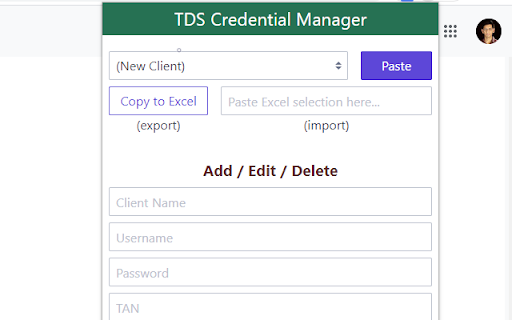

Browser Extension for managing TDS website credentials with one-click copy-paste functionality
This extension is a one-click solution for automated copy-paste (or auto-populate in technical terms) of various fields on login page of tdscpc.gov.in website, which otherwise manually takes almost 40-60 seconds. Extension manages and store list of client with respective information/credentials list in browser storage for quick selection of client. It supports import of client information/credential list from Excel into extension memory using by grabing Excel clipboard data. Also export for backup is supported in the form of copy to clipboard in the form of Excel data
Source of the add-in availble on GitHub
https://github.com/dhananjay1405/tds-credential-manager-extension
Latest Version: 1.1
Bug Fixes: Copy to Excel button was not working, hence its functionality is now fixed.
| 分类 | 📝工作流程与规划 |
| 插件标识 | hmcgibgejmeoolpgjcjfmlphldpgjpce |
| 平台 | Chrome |
| 评分 |
★★★★☆
4
|
| 评分人数 | 2 |
| 插件主页 | https://chromewebstore.google.com/detail/tds-credential-manager/hmcgibgejmeoolpgjcjfmlphldpgjpce |
| 版本号 | 1.2 |
| 大小 | 21.19KiB |
| 官网下载次数 | 222 |
| 下载地址 | |
| 更新时间 | 2024-12-26 00:00:00 |
CRX扩展文件安装方法
第1步: 打开Chrome浏览器的扩展程序
第2步:
在地址栏输入: chrome://extensions/
第3步: 开启右上角的【开发者模式】
第4步: 重启Chrome浏览器 (重要操作)
第5步: 重新打开扩展程序管理界面
第6步: 将下载的crx文件直接拖入页面完成安装
注意:请确保使用最新版本的Chrome浏览器
同类插件推荐

GST Invoice Builder
An Online Invoice Utility To Help you Build GST Ba

CompuOffice Online Extension
This extension will be used by 'CompuOffice On
TDS Credential Manager
Browser Extension for managing TDS website credent

GST Credential Manager
An extension for one to fill-up username / passwor

LR GST Helper
This extension allows the user to seemless login t

Finexo Login Tool
Finexo Login Tool allow to login into client's

DueTax GST Login Info Manager
A system to save GST username and password in Tall

Login Extension
Login Extension allow to login into client's a

Taxtribute GST Assistant
GST Extension to quickly download GST returns from