
Gumloop Chrome 插件, crx 扩展下载
Automate any web browsing workflow with AI.
Gumloop: Turn Any Browser Action into an Automation
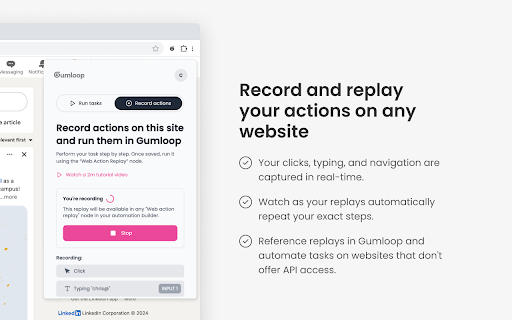
Introducing Gumloop's new Chrome extension - your key to unlocking web automation everywhere. We've made it possible to record any action you take in your browser and turn it into a repeatable automation. You can now record and run custom workflows without leaving your current webpage. Our web replays work seamlessly with your Gumloop automations, allowing you to build complex, AI-powered automations that go beyond traditional API limitations. With Gumloop, if you can do it in your browser, you can automate it.
What it does:
- Records your actions on any website
- Replays your recorded actions in Chrome
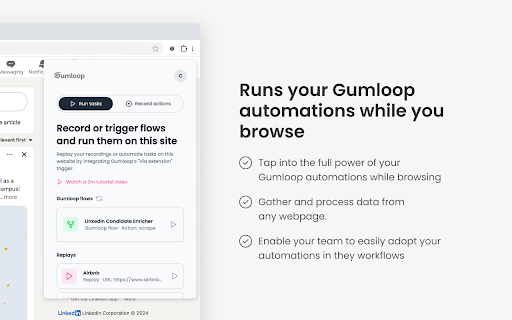
- Runs your Gumloop automations on any webpage
Tap into the full power of your Gumloop automations while browsing
How it helps:
- Gather and process data from any webpage
- Automate tasks on websites that don't offer API access by using Web Replays
- Automate form filling and data entries
Recording actions is easy:
1. Click “start recording” to begin capturing your actions with just one click in the extension
2. Perform your usual actions while Gumloop observes in the background.
3. Finish your sequence with another click on "Stop Recording" when you're done.
4. Run your recording in Chrome or reference it in Gumloop.
This is an early release of our Chrome extension, and we're excited to have you try it out. We're continuously improving and adding features based on user feedback. We'd love to hear your thoughts and experiences - reach out to us anytime at: [email protected]
| 分类 | 📝工作流程与规划 |
| 插件标识 | hpkeijgchoedhhdfjdjlaimanpmbnhjm |
| 平台 | Chrome |
| 评分 |
★★★★☆
4.3
|
| 评分人数 | 17 |
| 插件主页 | https://chromewebstore.google.com/detail/gumloop/hpkeijgchoedhhdfjdjlaimanpmbnhjm |
| 版本号 | 1.4.3 |
| 大小 | 782KiB |
| 官网下载次数 | 2000 |
| 下载地址 | |
| 更新时间 | 2025-01-29 00:00:00 |
CRX扩展文件安装方法
第1步: 打开Chrome浏览器的扩展程序
第2步:
在地址栏输入: chrome://extensions/
第3步: 开启右上角的【开发者模式】
第4步: 重启Chrome浏览器 (重要操作)
第5步: 重新打开扩展程序管理界面
第6步: 将下载的crx文件直接拖入页面完成安装
注意:请确保使用最新版本的Chrome浏览器
同类插件推荐

Gumloop
Automate any web browsing workflow with AI.Gumloop

Zapier Agents
Take personalized AI agents anywhere you go in you

Guidde - Magically create video documentation
Magically create video documentation with AIguidde

HyperWrite - AI Assistant
Personal Assistant by HyperWrite is the first AI a

Attio
Bring relationship insights into Attio from Linked

mymind — An extension for your mind
Add images, bookmarks, notes, quotes or text highl

Kleo
Kleo is the browser extension that helps you disco

Tweet Hunter X: Sidebar for Twitter
Stop doomscrolling and start exploring. A browser

Axiom Browser Automation & Web Scraping
Automate websites and scrape data. Quickly, withou
Simplescraper — a fast and free web scraper
A web scraper that's fast, free and simple to

Browserflow - Web Scraping & Web Automation
Automate your work on any website.Imagine if you c

folkX
folkX lets you add contacts to your folk from anyw

Bardeen - 自动化你的手动工作 & 提高你的生产力
一键自动化你的手动工作!链接超过30个apps,抓取网页信息,以及提高你的生产力描述 ? 使用B