
Steam ID Finder Chrome 插件, crx 扩展下载

Display Steam users' IDs. One-click to copy.
Features:
1. Visit a Steam profile to see & copy the user's IDs
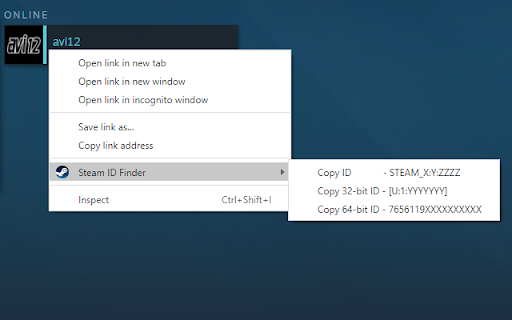
2. Right-click a profile URL to copy an associated ID
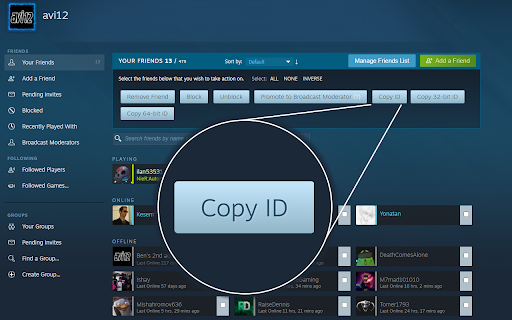
3. Visit the Friends Manager to copy multiple user IDs at once
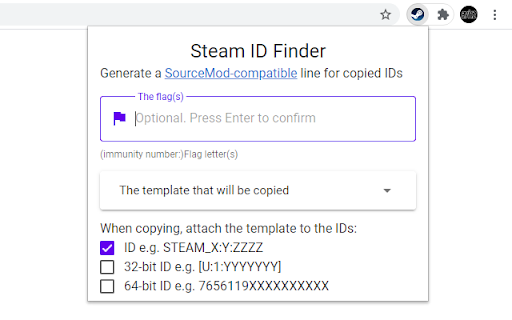
4. Generate a line for SourceMod admin configuration when copying an ID
Source code: https://github.com/avi12/steam-id-finder
| 分类 | 📝工作流程与规划 |
| 插件标识 | iaeodlelphecgkpneeifmgcjgeoobjah |
| 平台 | Chrome |
| 评分 |
★★★★★
5
|
| 评分人数 | 2 |
| 插件主页 | https://chromewebstore.google.com/detail/steam-id-finder/iaeodlelphecgkpneeifmgcjgeoobjah |
| 版本号 | 1.0.1 |
| 大小 | 83.48KiB |
| 官网下载次数 | 1000 |
| 下载地址 | |
| 更新时间 | 2022-12-14 00:00:00 |
CRX扩展文件安装方法
第1步: 打开Chrome浏览器的扩展程序
第2步:
在地址栏输入: chrome://extensions/
第3步: 开启右上角的【开发者模式】
第4步: 重启Chrome浏览器 (重要操作)
第5步: 重新打开扩展程序管理界面
第6步: 将下载的crx文件直接拖入页面完成安装
注意:请确保使用最新版本的Chrome浏览器
同类插件推荐

Steam Anti-Scam Project
The Project should help the User to get not scamme

Faceit Stats by Eloking
Faceit Stats by Eloking is a Google Chrome extensi

Steam ID Finder
Display Steam users' IDs. One-click to copy.Fe

Grapher for Steam
A browser extension to graph your steam wallet bal

steamID Display
Display of steam users IDs.You will see steamIDs o

Steam Market History Plus
Provides a more useful Steam Market History, allow

Steam Context Menu
Search Steam using the context menuSearch for game

Augmented Steam
Augments your Steam ExperienceAugmented Steam is a

SteamDB
在 Steam 商店和社区页面中添加 SteamDB 链接和新功能,可查阅游戏史低价格和在线统计数据

Steam Activity Filter
Filter for friends' activity in Steam. Allows

Open in Steam
An extension to open a Steam website page directly

Steam Hover
Show Steam app details with mouse hover on a Steam

Ban Checker for Steam
Automatically check bans of people you recently pl