
GPT-Write! Chrome 插件, crx 扩展下载

GPT-Write is an innovative browser extension that brings the power of ChatGPT 's natural language processing technology to your…
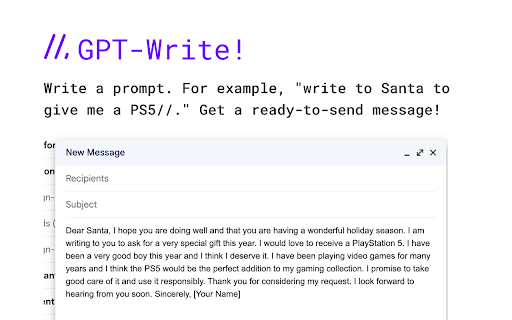
GPT-Write is an innovative browser extension that brings the power of ChatGPT 's natural language processing technology to your webmail clients such as GMail. With GPT-Write, you can compose emails, responses, and drafts more efficiently and effectively, saving you time and effort.
GPT-Write is built on top of GPT-3, one of the most advanced language models available today. This means that the extension can generate high-quality, coherent, and contextually-appropriate responses in real time based on your input. The extension understands natural language, so you can communicate with it as you would with a human assistant.
One of the most significant benefits of GPT-Write is that it can help you overcome writer's block. If you are struggling to find the right words, GPT-Write can provide suggestions and options for what to write, based on the context of your email. This can help you avoid the frustration and delay that can come with writing a response from scratch.
With GPT-Write, you can also customize the style, tone, and voice of your writing. Whether you want to sound professional, friendly, or persuasive, the extension can adapt to your preferences and deliver content that matches your desired style.
Overall, GPT-Write is a powerful tool for anyone who uses webmail clients for communication. It can improve productivity, save time, and help you communicate more effectively with your colleagues, friends, and family. Get GPT-Write today and start enjoying the benefits of ChatGPT's advanced natural language processing technology!
| 分类 | 📝工作流程与规划 |
| 插件标识 | iahjdhcoigkpcpjeoflmkpalepmldigi |
| 平台 | Chrome |
| 评分 |
★★★★☆
4.4
|
| 评分人数 | 13 |
| 插件主页 | https://chromewebstore.google.com/detail/gpt-write/iahjdhcoigkpcpjeoflmkpalepmldigi |
| 版本号 | 1.0.2 |
| 大小 | 16.74KiB |
| 官网下载次数 | 234 |
| 下载地址 | |
| 更新时间 | 2023-02-21 00:00:00 |
CRX扩展文件安装方法
第1步: 打开Chrome浏览器的扩展程序
第2步:
在地址栏输入: chrome://extensions/
第3步: 开启右上角的【开发者模式】
第4步: 重启Chrome浏览器 (重要操作)
第5步: 重新打开扩展程序管理界面
第6步: 将下载的crx文件直接拖入页面完成安装
注意:请确保使用最新版本的Chrome浏览器
同类插件推荐

Compozee - ChatGPT Email Writer
Compozee - ChatGPT Powered Email WriterCompozee is
GPT-Write!
GPT-Write is an innovative browser extension that

DeftGPT - AI Chat GPT Writing Companion
DeftGPT is the advanced and upgraded version of Ch

GPT+ (GPT Plus)
Uses the power of OpenAI gpt-turbo-3.5 to generate

ChatGPT vs Bard
Put ChatGPT vs Bard side by side for comparison.Co
Vio - 您的ChatGPT智能伙伴
由ChatGPT驱动的智能伙伴,可在任何网页上为您提供即时答案并帮助生成文本。Vio?,您的 Cha

ChatGPT, Bing & Bard For Chrome: Kursor
Ask KursorDiscover an unparalleled web browsing ex

Javy: GPT-4 powered assistant
GPT-4 powered tool for quick access to the answer

Phrasely - ChatGPT Writing Tool
ChatGPT Writing ToolPhrasely helps you make your w

TurboGPT For ChatGPT
Fast custom prompts to ChatGPT-3 APIIntroducing Tu

ChatGPT: Prompt Mate
A powerful tool for generating high-quality prompt

Autowriter | ChatGPT on Every Website
Your own AI assistant, everywhere you go.✨ Just ty

FutureWrite AI for Writing & More w/ ChatGPT
Free-Boost writing w/ AI! FutureWrite w/ ChatGPT f