
HBO Max Episode Selector: HBO episode list. Chrome 插件, crx 扩展下载


Extension adds an episode list button to select the episode while watching HBOMax series.
Go to the next episode smoothly with HBOMax Episode Selector. No more searching for the series through the home page, no more going back and forth to change the episode.
This extension improves HBOMax navigation by adding 2 new Netflix-like buttons. Now you’ll be able to go to the next episode straight from the one you're watching or see the episode list and choose one of them.
How to use HBOMax Episode Selector?
1. Add the extension to your Chrome browser.
2. Go to HBOMax and pick a TV show to watch.
3. Navigate to the playback options (at the bottom of the player). You should see 2 new icons next to the volume icon - Next episode and Select Episode.
4. Click on the next episode button to start the next episode. Click on the select episode button to navigate through the episodes. The list will show the current episode, 3 previous, and 3 next ones.
Entertainment shouldn't be complicated. Enjoy watching your favorite series with easy access to more episodes.
Changelog:
Version 1.2.19 (2024-11-29)
Improved overall performance.
Added support for additional shows (Hard Knocks).
Version 1.2.18 (2024-10-15)
Fixed minor bugs.
Enhanced support for newly released shows (Salem's Lot).
Version 1.2.17 (2024-09-10)
Fixed minor UI bugs.
Version 1.2.16 (2024-08-14)
Resolved a rare issue causing crashes.
Added support for additional shows (The Penguin).
Version 1.2.15 (2024-07-16)
Added support for additional shows (Last Week Tonight with John Oliver).
Version 1.2.14 (2024-06-04)
Addressed minor bugs reported by users.
Version 1.2.13 (2024-05-13)
Fixed a bug affecting playback controls.
Version 1.2.12 (2024-04-01)
Optimized compatibility issues with various titles.
Version 1.2.11 (2024-02-17)
Added compatibility for additional shows (South Park).
Fixed minor issues with languages.
Version 1.2.10 (2024-02-02)
Enhanced compatibility for newer browsers.
Version 1.2.9 (2024-01-12)
Added support for additional shows (Game of Thrones).
Version 1.2.8 (2023-12-01)
Fixed minor issues with extension icon display.
Version 1.2.7 (2023-10-01)
Various bug fixes.
Version 1.2.6 (2023-08-03)
Resolved a bug causing errors in specific regional settings.
Version 1.2.5 (2023-06-15)
Addressed various bugs and issues.
Optimized performance.
Version 1.2.4 (2023-05-07)
Added support for additional shows (Friends).
Version 1.2.3 (2023-04-23)
Fixed minor UI glitches.
Version 1.2.2 (2023-02-01)
Resolved compatibility issues with specific movie titles.
Version 1.2.1 (2022-09-08)
Added support for additional shows (Rick and Morty).
Fixed minor bugs.
Version 1.2.0 (2022-07-19)
Added support for new titles (The Big Bang Theory, Sex and the City).
Improved performance and resolved minor issues.
Version 1.1.0 (2022-05-01)
Added support for new titles (Gossip Girl).
Implemented bug fixes for various movies (Batman: The Dark Knight Rises, Harry Potter series).
Version 1.0.0 (2022-04-15)
Initial release with core functionality.
Disclaimer: HBO is a trademark of Home Box Office, Inc. This website & extension hold no association or affiliation with HBO Max or any third-party companies.
| 分类 | 🎉趣味休闲 |
| 插件标识 | ibjmkalgoapiiagmjapkjhonhaeomkgi |
| 平台 | Chrome |
| 评分 |
★★★★★
5
|
| 评分人数 | 7 |
| 插件主页 | https://chromewebstore.google.com/detail/hbo-max-episode-selector/ibjmkalgoapiiagmjapkjhonhaeomkgi |
| 版本号 | 1.2.20 |
| 大小 | 67.41KiB |
| 官网下载次数 | 395 |
| 下载地址 | |
| 更新时间 | 2025-02-20 00:00:00 |
CRX扩展文件安装方法
第1步: 打开Chrome浏览器的扩展程序
第2步:
在地址栏输入: chrome://extensions/
第3步: 开启右上角的【开发者模式】
第4步: 重启Chrome浏览器 (重要操作)
第5步: 重新打开扩展程序管理界面
第6步: 将下载的crx文件直接拖入页面完成安装
注意:请确保使用最新版本的Chrome浏览器
同类插件推荐

Hide Mouse for HBO Max
Hide the mouse while viewing a HBO Max videoNo mor

HBO Max Picture in Picture
Extension to watch HBOMax in Picture in Picture mo

HBOMax Keyboard Control
Control HBOMax video playback with the keyboard, l

Film Scores for HBO Max : IMDB ratings & more
View movie ratings directly on HBO Max. Based on s

HBOMax SubStyler : customize subtitles
Extension to customize captions and subtitles on H

HBO Max Speeder: adjust playback speed
Extension allows to adjust the playback speed on H

Mouse Off for HBO Max: hide cursor
Hide the mouse cursor on HBO Max. New features: go

HBO Max Episode Selector: HBO episode list.
Extension adds an episode list button to select th

Prime Video Skipper: skip intros & recaps
Automatically skip intros, recaps, and click next

HBO Max Extended: tools to fix HBO
Useful tool to fix your HBO Max watching experienc

HBOMax Video Bender: rotate and zoom video
Extension to rotate the screen while watching HBO

Netflix™ Extended
Extension for Netflix™ to skip intros, recaps, sta
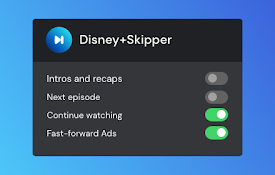
Disney+ Skipper
Automatically skip ads, intros, recaps, and click