
TriplEye Safeguard Chrome 插件, crx 扩展下载
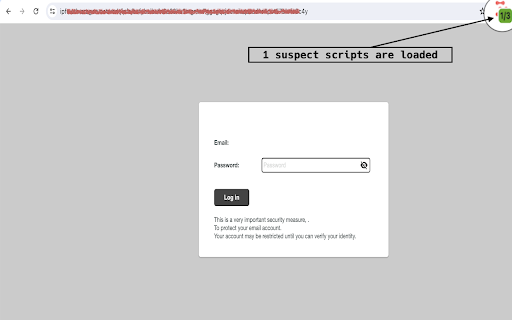
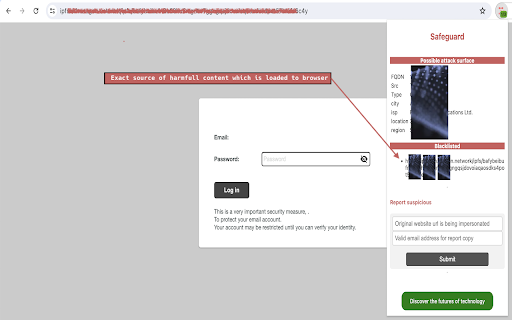


TriplEye's plugin enhances web safety by scanning for threats like phishing and malware, ensuring secure and fast browsing.
The security algorithm of our plugin thoroughly inspects all websites you visit. By leveraging cutting-edge technology, TriplEye integrates advanced algorithms with real-time data to determine the safety of each site, offering you unparalleled protection. This innovative solution detects a wide range of internet risks, from phishing scams to malware-infected domains, ensuring your browsing remains secure.
TriplEye’s proactive security system is designed to stay ahead of emerging threats, continuously updating to shield you from new vulnerabilities in the digital landscape. Whether you're a casual browser or a professional, this browser extension caters to the needs of security-conscious users who demand both speed and reliability. By installing the TriplEye extension, you can enhance your browsing experience in a way that is fast, seamless, and secure.
One of the standout features of TriplEye is its intuitive one-click reporting system, empowering you to notify domain registrars and hosting providers about suspicious, harmful, or fraudulent websites instantly just in one click. This not only protects you but also contributes to a safer internet for everyone.
When you pin TriplEye's safeguard extension to your browser's toolbar, you gain access to real-time insights about the number of harmful and benign external elements loaded by websites. Our extension visually represents your exposed attack surface, giving you actionable information at a glance. The badge background dynamically changes color—from green to red—based on the ratio of total external components to malicious ones, providing an immediate indication of your browsing safety.
TriplEye isn’t just a browser extension; it’s a comprehensive security companion, designed to empower you with the knowledge and tools to navigate the internet confidently and safely.
| 分类 | 🔒隐私 |
| 插件标识 | idmpnnnmamkbbfjillndbopphmaopokm |
| 平台 | Chrome |
| 评分 |
★★★★☆
4.8
|
| 评分人数 | 20 |
| 插件主页 | https://chromewebstore.google.com/detail/tripleye-safeguard/idmpnnnmamkbbfjillndbopphmaopokm |
| 版本号 | 5.1 |
| 大小 | 80.97KiB |
| 官网下载次数 | 42 |
| 下载地址 | |
| 更新时间 | 2024-12-23 00:00:00 |
CRX扩展文件安装方法
第1步: 打开Chrome浏览器的扩展程序
第2步:
在地址栏输入: chrome://extensions/
第3步: 开启右上角的【开发者模式】
第4步: 重启Chrome浏览器 (重要操作)
第5步: 重新打开扩展程序管理界面
第6步: 将下载的crx文件直接拖入页面完成安装
注意:请确保使用最新版本的Chrome浏览器
同类插件推荐

CtrlBlock
Experience True Web Freedom with CtrlBlockTake Ctr
TriplEye Safeguard
TriplEye's plugin enhances web safety by scann

Security Surf
Raising awareness of dangerous websites as you sur

Criminal IP: AI-based Phishing Link Checker
A web browsing guard against malicious, scam, or p

Privacy Protector Plus
Removes all forms of tracking including web-bugs,

AegisWeb3
自动检测诈骗加密代币和钓鱼网站AegisWeb3—Safeguard Your Web3 Explo

Inxtinct Online Security
Protect your digital life with enterprise-grade on

BrowserWall
BrowserWall is a security add-on that will improve

Malware Protection
RR Malware Protection automatically scans webpages

MalwareAI Browser Security
The MalwareAI Browser Security extension provides

SafeToOpen Online Security
SafeToOpen Online Security 保护您免受诈骗、病毒和网络钓鱼网页的侵害。Sa

Emsisoft Browser Security
Blocks dangerous websites that distribute malware

Malware & URL Scanner
Malware & URL Scanner Chrome extension helps t