
Date Stamp Chrome 插件, crx 扩展下载
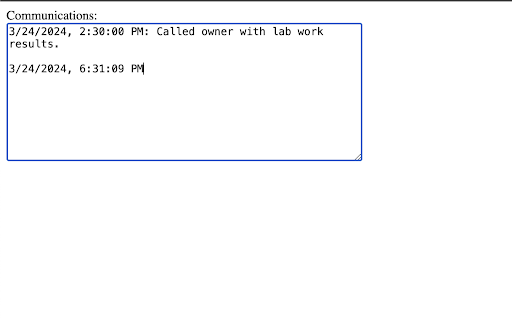
Inserts the current date and time at the cursor.
Date Stamp tool: add the current date and time to editable fields.
Pending Stamp tool: adds "PENDING month/day" to the top of the text field.
TO USE:
Simply right-click on the field you would like to add a stamp and select one of the options under "Date Stamp".
Can also be triggered with shortcut. No setup required.
New in 0.90: You can now toggle which of the tools you would like to use in the popup.
| 分类 | 🛠️工具 |
| 插件标识 | iellafhafghhpjjmolndilnlfkkpigco |
| 平台 | Chrome |
| 评分 |
★★★★★
5
|
| 评分人数 | 1 |
| 插件主页 | https://chromewebstore.google.com/detail/date-stamp/iellafhafghhpjjmolndilnlfkkpigco |
| 版本号 | 0.90.2 |
| 大小 | 23.85KiB |
| 官网下载次数 | 92 |
| 下载地址 | |
| 更新时间 | 2024-09-27 00:00:00 |
CRX扩展文件安装方法
第1步: 打开Chrome浏览器的扩展程序
第2步:
在地址栏输入: chrome://extensions/
第3步: 开启右上角的【开发者模式】
第4步: 重启Chrome浏览器 (重要操作)
第5步: 重新打开扩展程序管理界面
第6步: 将下载的crx文件直接拖入页面完成安装
注意:请确保使用最新版本的Chrome浏览器
同类插件推荐

Time and date
Extension to display time and dateThis extension d

Text inserter
By pressing F2 Text inserter will insert a definab

toCalendar
Add new events to Google Calendar from every websi

Rotato - Rotate Images in Chrome
Rotate any image in Chrome with ease!Rotato allows
Date Stamp
Inserts the current date and time at the cursor.Da

Time Stamper
Quick and easy adding of a timestamp to an input f

Timestamp My Page
The extension adds timestamp to all your pages. Th

Pico-Save highlights
Pico is a Google Chrome extension for saving text

Rest API Inspector
This will inspect all the REST API calls and downl

Chrome Extension Icon Generator By Coditude
This is a simple tool to generate icons for Chrome

Autofocus
Search faster - Puts the cursor in the search box
Date Today for Google Chrome
今天日期使用 Date Today,保持井井有条,永远不会忘记时间,它是在工具栏上显示模拟时钟的完美