
MetaClean for Gmail Chrome 插件, crx 扩展下载
Removes metadata and hidden data in email attachments preventing the leakage of confidential information.
MetaClean for Gmail automatically removes, adds, or modifies metadata in email attachments, preventing the leak of confidential information that occurs continuously in this type of communication and avoiding possible economic and reputational damages derived from the malicious use of metadata.
Why I should use MetaClean for Gmail?
• Data Breach Prevention: Every document contains metadata. For example, metadata is embedded in the file and is different to the information that is typed on the page – such as Author, track changes or comments. It can tell the reader who created the document, how long was spent editing it, and where the document is saved. Cleaning a document of metadata means that the recipient will only be sent what would be printed. Removing potentially harmful forms of metadata from the attached files is a risk area that should be considered when investigating ways to prevent email-related data leaks.
• Phishing Attack Prevention: MetaClean prevents the exfiltration of information through metadata which is commonly used to generate phishing attacks.
• Ease of use and there is no user registration required: MetaClean for Gmail is Fully integrated with Gmail, just install and enjoy it!
How to use MetaClean for Gmail?
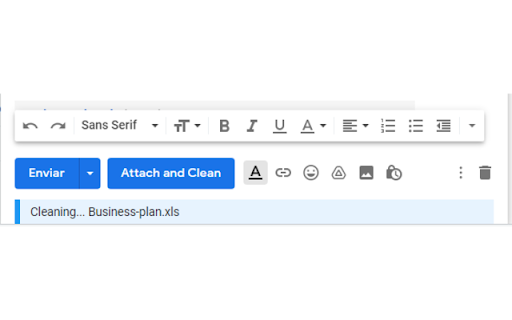
• This extension automatically processes the document's metadata when it is attached, you don't need to take any additional action, ensuring that the attachments you send are free of metadata and personal information.
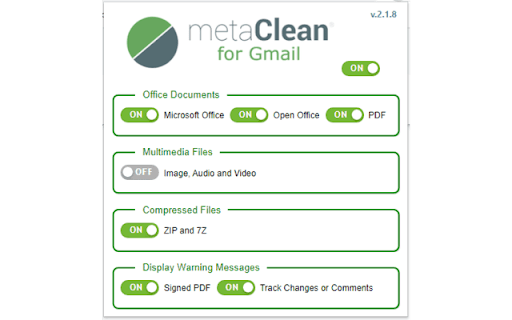
• It allows you to quickly and intuitively select the types of files to process (see screenshot).
• It shows information of interest to the user, for example, when a PDF file is digitally signed.
➤ Standard Functionalities:
• FREE FOR PERSONAL USE.
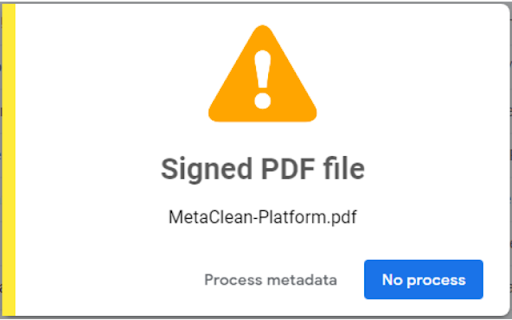
• Detection of signed PDF files: To avoid invalidation of the signature, a warning will be displayed indicating whether you want to process the metadata of the signed PDF file (see screenshot).
• Displays a warning when attaching Microsoft Office files with Track Changes and/or Comments enabled.
• Removes metadata from all versions of Microsoft Office, Open/Libre Office, PDF, RTF and Image, Audio and Video files.
• Supports ZIP and 7z files: compressed documents will be processed by MetaClean.
• Delete hidden data such as: Printer routes, history of document changes, etc.
• For free version, the tag "Metadata removed by MetaClean (www.adarsus.com)" will be added to the keyword metadata in processed documents.
➤ Enterprise Functionalities:
• Creation of metadata templates to remove, add or modify standard and customized metadata tags.
• The text: "Metadata removed by MetaClean (www.adarsus.com)" will be removed from the metadata tag: keyword.
For business use contact us at: [email protected]
How to view PDF document metadata?
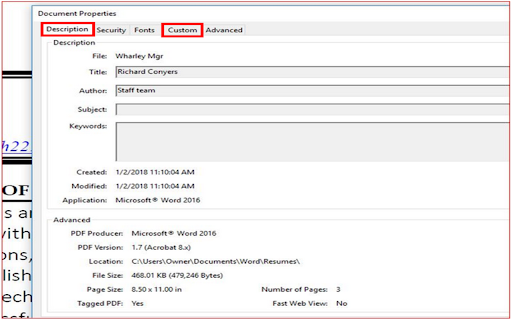
Open the concerned PDF document in Adobe Acrobat and go to File > Properties > Description and Custom tabs. It will show you a window that consists of different components of the metadata of the concerned PDF document.
How to view Microsoft Word/Excel/PowerPoint document metadata?
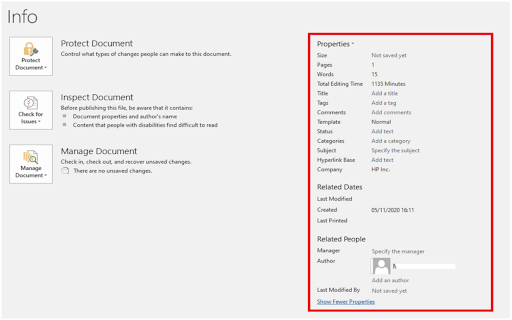
Open the Word/Excel/PowerPoint document and go to "File" menu. Click "Info" and then click "Show all Properties" to view the metadata entries for the document.
| 分类 | 📝工作流程与规划 |
| 插件标识 | ifhaebfhlkmamahknibbbpfddoeidimi |
| 平台 | Chrome |
| 评分 |
★★★★☆
4.5
|
| 评分人数 | 34 |
| 插件主页 | https://chromewebstore.google.com/detail/metaclean-for-gmail/ifhaebfhlkmamahknibbbpfddoeidimi |
| 版本号 | 3.0.3 |
| 大小 | 235KiB |
| 官网下载次数 | 1000 |
| 下载地址 | |
| 更新时间 | 2024-10-17 00:00:00 |
CRX扩展文件安装方法
第1步: 打开Chrome浏览器的扩展程序
第2步:
在地址栏输入: chrome://extensions/
第3步: 开启右上角的【开发者模式】
第4步: 重启Chrome浏览器 (重要操作)
第5步: 重新打开扩展程序管理界面
第6步: 将下载的crx文件直接拖入页面完成安装
注意:请确保使用最新版本的Chrome浏览器
同类插件推荐

Attachment Metadata Removal for Gmail
Attachment Metadata Removal for Gmail that cleans
移除元数据
安全移除照片中的元数据 本地处理图片,无需上传。主要功能 ✔ 本地处理: 直接在电脑上处理图像,确

Double Shot Search: Query side-by-side
Allows searching in both Bing and Google at the sa

Gmail AI Malware & Phishing Detector
Extracts Gmails from Gmail pages and then feeds it

AudioContext Fingerprint Defender
Defending against AudioContext fingerprinting by r
MetaClean for Gmail
Removes metadata and hidden data in email attachme

PopUpOFF - Popup and overlay blocker
Removes and prevents popups, overlays and cookie n

Quick Delete for Gmail
Clean your mailbox 5 times faster. Hover anywhere

Fresh Inbox: Clean Gmail with Total Privacy
Your go-to Chrome extension for a clutter-free Gma

Gmail Mass Unsubscribe & Delete Emails - InboxPurge
Mass unsubscribe and delete unwanted emails in Gma

Chaff
Generate random web browsing traffic to obfuscate

Trace - Online Tracking Protection
Browse online without leaving a Trace, because who

Foragear- Quick Search Tool
Autoscroll to relevant sections of a page and have