
Allurt - Secure screen sharing on google meet Chrome 插件, crx 扩展下载
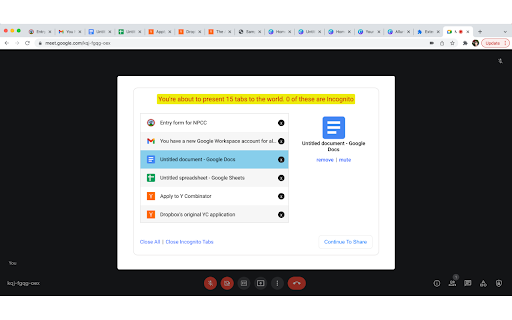
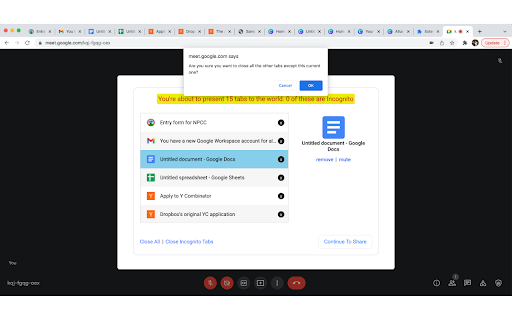

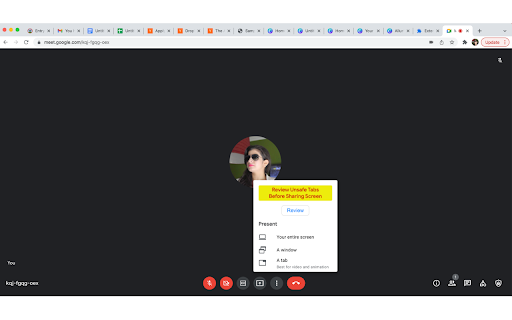
Allurt lets you securely review confidential tabs in your browser before sharing screen on google meet
ALLURT is perfect for Software Engineers, Teachers, Designers pretty much anyone who shares screens in meetings
Sharing screens sometimes exposes un-necessary information that we don't our colleagues, teachers, investors or managers to know.
- Allurt automatically hides your visible bookmarks every time you share screen on google meet
- Allurt lets you preview all open tabs in < 5 seconds when you're about to share screens on google meet. You get to close these tabs runtime, even the Cognito ones.
- Allurt automatically puts you're chrome into Do Not Disturb mode when you start sharing screens on google meet. It prevents apps like whats app or slack from sending you beeping notifications while you present your desktop to the world. Reverts back to the default state when the screen sharing stops.
Allurt can save you several minutes before every screen sharing session. Instead of hastily going through different chrome tabs and windows, you now have a very clean interface that lets you do that in seconds. And it only takes a few milliseconds to prepare the list of all the tabs for you because the extension does that in the background when you're working on other things.
| 分类 | 📝工作流程与规划 |
| 插件标识 | igfmiclefjlnfogddikkkllpnoanjhap |
| 平台 | Chrome |
| 评分 |
★★★★☆
4.3
|
| 评分人数 | 7 |
| 插件主页 | https://chromewebstore.google.com/detail/allurt-secure-screen-shar/igfmiclefjlnfogddikkkllpnoanjhap |
| 版本号 | 1.7.0 |
| 大小 | 356KiB |
| 官网下载次数 | 99 |
| 下载地址 | |
| 更新时间 | 2022-10-27 00:00:00 |
CRX扩展文件安装方法
第1步: 打开Chrome浏览器的扩展程序
第2步:
在地址栏输入: chrome://extensions/
第3步: 开启右上角的【开发者模式】
第4步: 重启Chrome浏览器 (重要操作)
第5步: 重新打开扩展程序管理界面
第6步: 将下载的crx文件直接拖入页面完成安装
注意:请确保使用最新版本的Chrome浏览器
同类插件推荐
Allurt - Secure screen sharing on google meet
Allurt lets you securely review confidential tabs

Talk Web - Talk to any website
Talk Web let's you talk to and ask questions f

Secure screen sharing
Share the screen from your computer in a video mee
EmailOnGitHub
EmailOnGitHub Chrome extension allows you to disco

GitHubber
Detailed View of Github Profile Search ResultsThis

OctoHR
OctoHR - GitHub profile pages for Recruiters. Hel

timeOS: AI Meeting & Calendar Assistant
Automate note-taking for Google Meet, Zoom, Micros

ChatGPT助手 for Google Meet
Google Meet上的ChatGPT-4助手,用于在Google Meet平台上的通话期间提供即
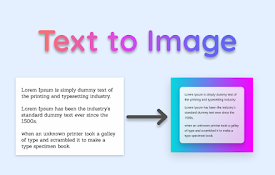
Text to image
Convert text to images on the fly——— ☆ • ♧ • ????

Omni - Bookmark, History, & Tab Manager
Supercharge Chrome with commands, shortcuts, and m

Suggesty
Get human-like answers powered by GPT-3 to your Go

Fabric web clipper – save anything from the web
? All your stuff in one place. ? Collaborate on an

BlackMagic.so Extension
Magic Sidebar by BlackMagic.soBlackMagic.so extens