
YouTube Comment Reader Chrome 插件, crx 扩展下载
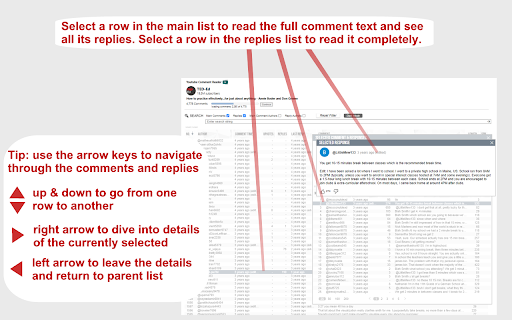
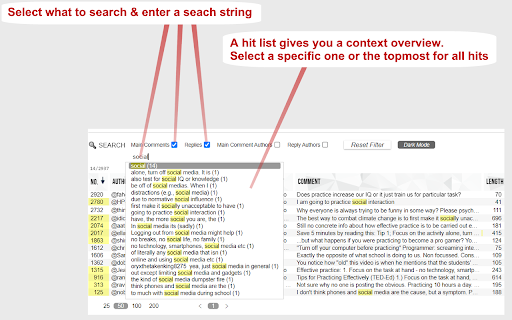
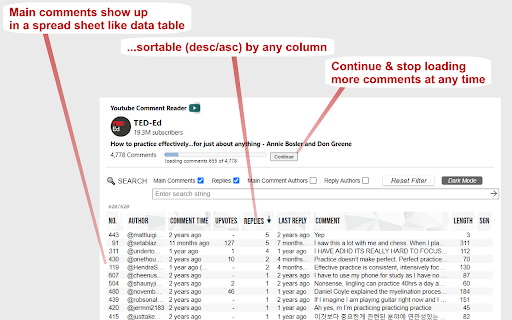
Search, Sort, Filter, Read YouTube Comments in spreadsheet format. Navigate through Comments & Responses with arrow keys.
+++ New in version 1.0.20 +++
translate buttons in the comment popups (listening to Alt+Y) ..translating every foreign language comment into your language (back and forth).
+++ New in version 1.0.17 +++
+ Shortcut key now is Ctrl+Shift+Y (for extension popup) ..which can be changed in extension settings
+ Any short video can quickly be opened in a regular video player (where timeline, speed, volume etc. can be adjusted) by clicking the video title in the extension's popup.
+++ New in version 1.0.16 +++
Comments now also visible and sortable ascending by timestamps appearing in comments
Features:
➤ Youtube comment presented in multi-functional spreadsheet format
➤ Sort comments (by table header click) ascending or descending by author, comment time, upvotes count, replies count, last reply time, timestamps appearing in comments, comment length, or channel owner's upvotes (heart symbol)
➤ Search main comments and/or replies by author and/or text content
...e.g. filter for an author's main comments and/or responses
...e.g. filter for comments and/or responses containing a specific text phrase
➤ Works in every language
➤ Works with YouTube Shorts as well
➤ Quickly navigate through comments and responses by (left, right, up, down) arrow keys
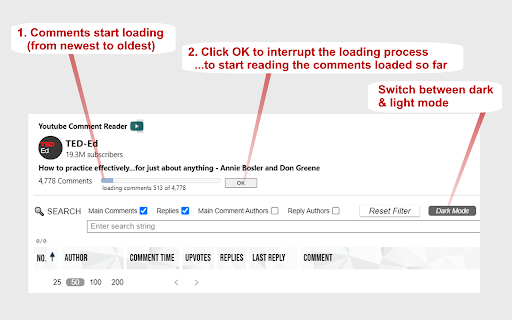
➤ Easily switch between light and dark mode
Instructions:
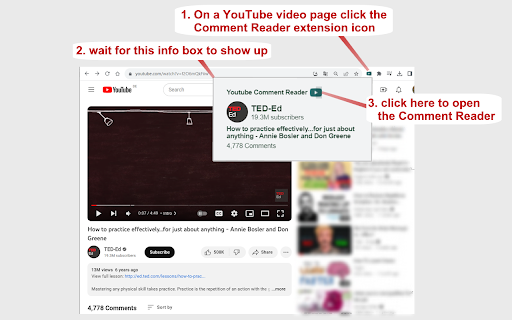
1. Open a YouTube video.
2. Click on the extension icon (in the chrome extensions toolbar, to the right of the address bar).
3. Wait for the extension popup to load a brief overview containing the YouTube channel, video title, total comments count etc.
4. In the info popup click on the Comment Reader icon. The Comment Reader opens in a new tab and starts loading comments (from newest to oldest).
5. Watch the progress while comments are loading.
6. Click OK to interrupt the loading process at any time to start reading the comments that has been loaded till then. When all comments are loaded, the progress view and interrupt button will disappear.
7. An interrupted loading process can be continued at any time if loading more comments is desired.
Tips:
Use (left, right, up, down) arrow keys to quickly navigate through comments and replies (although, of course, mouse clicks work as well).
➤ use up & down keys to go from one row to another
➤ use the right arrow key to dive into details (of a currently selected row)
➤ use the left arrow key to leave the details and return to parent list
➤ Quickly open any short video in a regular player (..so you can adjust the timeline, speed, volume etc.) by clicking the video description in the extension's popup
8. To reply to or upvote a comment you may click on the comment time (e.g. "6 hours ago") above the comment text. This will open a new regular YouTube window with the targeted comment (as the "highlighted comment") appearing immediately under the video player. That way you can interact via the regular YouTube user interface.
| 分类 | 👥社交 |
| 插件标识 | jbjbjeceipecokoeocnkcfjpanlipamf |
| 平台 | Chrome |
| 评分 |
★★★☆☆
3.2
|
| 评分人数 | 9 |
| 插件主页 | https://chromewebstore.google.com/detail/youtube-comment-reader/jbjbjeceipecokoeocnkcfjpanlipamf |
| 版本号 | 1.0.21 |
| 大小 | 185KiB |
| 官网下载次数 | 2000 |
| 下载地址 | |
| 更新时间 | 2024-10-14 00:00:00 |
CRX扩展文件安装方法
第1步: 打开Chrome浏览器的扩展程序
第2步:
在地址栏输入: chrome://extensions/
第3步: 开启右上角的【开发者模式】
第4步: 重启Chrome浏览器 (重要操作)
第5步: 重新打开扩展程序管理界面
第6步: 将下载的crx文件直接拖入页面完成安装
注意:请确保使用最新版本的Chrome浏览器
同类插件推荐

YCS - YouTube Comment Search (Continued)
Search comments, replies, chat replay, video trans

Sort Youtube Comments
Sort youtube comments with one clickThis extension

YouTube Comment Navigator 95
Search and filter YouTube comments with a nostalgi

Youtube Comment Sort And Filter
Youtube 댓글 입맛대로 정렬 및 필터링(Custom Sorting and Filter

Comment Exporter for Youtube
Best way to Export Youtube Comments to Text, CSV o

Timestamped YouTube Comments
See timestamped comments as you watchPlease use yo

Youtube™ Actual Top Comments
Sort YouTube™ comments by most liked and search al

Youtube Popup Comments
A way to see comments while watching videos, witho

YCS - YouTube Comment Search
Search comments, replies, chat replay, video trans

YouTube Comment Reader
Search, Sort, Filter, Read YouTube Comments in spr

YouTube Timestamp Comments
An extension that lists timestamp comments on YouT
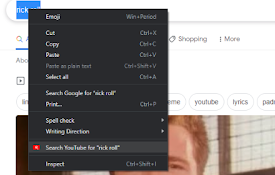
Search on YouTube
Search for anything on YouTube by selecting the te