
Parameters Editor Chrome 插件, crx 扩展下载
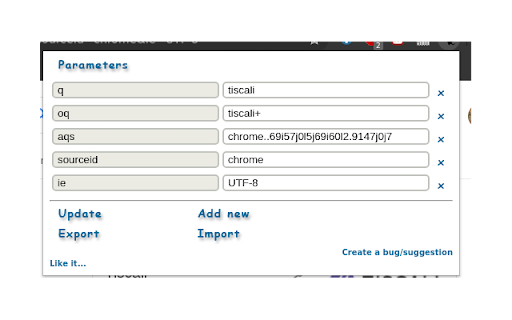
Shows parameters used in the URL and allows to update, export and import them
This extension, let you to manage the url parameters in your address bar, you can show/edit/add/delete them with just one click, you can also export them in csv and json format, or import them parameter list in CSV format.
This is how it works:
A small icon appears in each tab address bar, if you click on it you can see the list of all parameters for that url, that you can modify, export or import.
If the url has no parameter you can press "add new" and add as many parameters as you want and click update to reload the page with new parameters
Everything is just two click away...
If you are importing parameters from csv, be aware that if the first row contains parameter_name in the first column that line will be ignored, but if the above string appear in a different row, it will be treated as a normal parameter.
If you experience any bug or you want to suggest any new feature to be implemented in chrome parameters, you can click "report bug", and then enter your bug, or your suggestion (you can also add a label to classify it as a task or bug).
Te Source code of the extension is available here:
https://github.com/dreamos82/chrome_parameters
| 分类 | 💻开发者工具 |
| 插件标识 | jcfdalmioobeifbpcgjghhaifimaeaca |
| 平台 | Chrome |
| 评分 |
☆☆☆☆☆
|
| 评分人数 | |
| 插件主页 | https://chromewebstore.google.com/detail/parameters-editor/jcfdalmioobeifbpcgjghhaifimaeaca |
| 版本号 | 1.0.2 |
| 大小 | 61.5KiB |
| 官网下载次数 | 1000 |
| 下载地址 | |
| 更新时间 | 2021-06-17 00:00:00 |
CRX扩展文件安装方法
第1步: 打开Chrome浏览器的扩展程序
第2步:
在地址栏输入: chrome://extensions/
第3步: 开启右上角的【开发者模式】
第4步: 重启Chrome浏览器 (重要操作)
第5步: 重新打开扩展程序管理界面
第6步: 将下载的crx文件直接拖入页面完成安装
注意:请确保使用最新版本的Chrome浏览器