
Highlights to Notion Chrome 插件, crx 扩展下载
Save highlighted text to Notion
Highlights to Notion is a browser extension that allows you to easily save highlights from any webpage directly into your Notion database. With a straightforward and smooth user experience, you can effortlessly save important information while browsing the web and keep it organized in your Notion workspace.
Key features:
Highlight text on any webpage
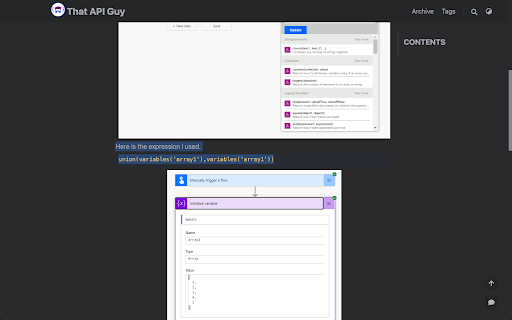
Save the selected text to a Notion database with just a few clicks
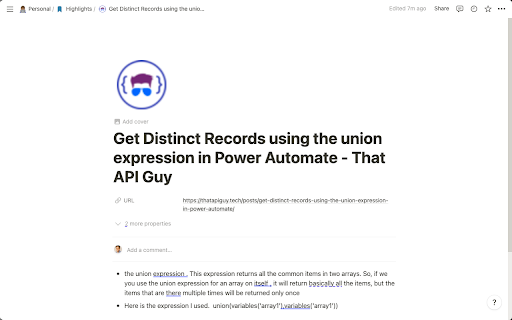
Automatically save associated metadata, such as page title, URL, and favicon
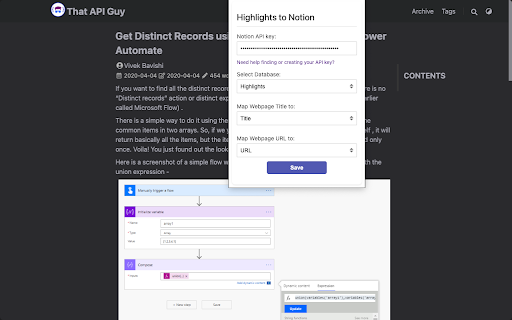
Customize the Notion database you want to save to
Choose your preferred property mapping for title and URL in your selected database
Save multiple highlights from the same webpage as bullets in the Notion page
Using Highlights to Notion, you can greatly enhance your web browsing experience and ensure that you never lose any important information. Boost your productivity and knowledge organization with Highlights to Notion!
Instructions:
Install the extension and click on the extension icon to open the popup.
Enter your Notion API key and choose the Notion database that you want to save highlights to.
Map the Title and URL properties in your selected database.
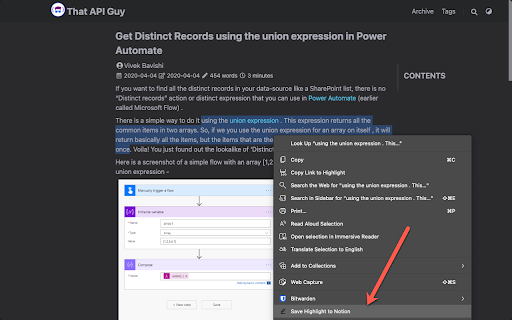
Browse the web and highlight any text you want to save to your Notion database.
Right-click on the highlighted text and select "Save Highlight to Notion" to save the selected text along with the page title, URL, and favicon to your Notion database.
Start using Highlights to Notion today, and make web browsing more productive and organized!
| 分类 | 📝工作流程与规划 |
| 插件标识 | jciaajikhlfbhoacombmgahnkienjbhf |
| 平台 | Chrome |
| 评分 |
★★★★★
5
|
| 评分人数 | 1 |
| 插件主页 | https://chromewebstore.google.com/detail/highlights-to-notion/jciaajikhlfbhoacombmgahnkienjbhf |
| 版本号 | 1.0 |
| 大小 | 11.46KiB |
| 官网下载次数 | 160 |
| 下载地址 | |
| 更新时间 | 2023-08-14 00:00:00 |
CRX扩展文件安装方法
第1步: 打开Chrome浏览器的扩展程序
第2步:
在地址栏输入: chrome://extensions/
第3步: 开启右上角的【开发者模式】
第4步: 重启Chrome浏览器 (重要操作)
第5步: 重新打开扩展程序管理界面
第6步: 将下载的crx文件直接拖入页面完成安装
注意:请确保使用最新版本的Chrome浏览器
同类插件推荐
Highlights to Notion
Save highlighted text to NotionHighlights to Notio

Dictionary to Notion
Saving Dicionary vocabularies to Notion, now suppo

Notion助手
Notion 工具, 快速添加链接稍后阅读Notion助手 ≡ 特性 - 右键保存当前页面或超链接到

Open in Notion Desktop
A extention open Notion Links (https://www.notion.
Zenclip - Save to Notion
Save to Notion from anywhere on the web.Introducin

Notion Sidebar Tamer
Disable the hover sidebar in Notion.The sidebar in
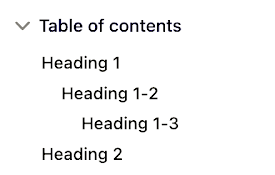
Notion Table of Contents (Outline)
Show table of contents (outline) in the sidebar fo

Highlightion - 将 Highlights 保存到 Notion
将任何网页上 Highlight 的内容保存到 Notion 数据库。Highlightion是一种

Notion Highlighter
A chrome extension for saving highlighs to your no

Bookmarker for Notion
Eye-candy 21st century bookmarks, straight into yo

Notix: Notion Web Clipper
Save the Web to Notion. Use AI to create summaries

Bookmarks to Notion
将浏览器书签与 Notion 数据库同步。集中您的书签。Bookmarks to Notion 用于

Copy To Notion: Clip anything to Notion
Easily capture, organize, and access all your onli