
Screen Ruler - Measure The Web Chrome 插件, crx 扩展下载
Measure sizes, distances, margins and paddings of any element on any web page.
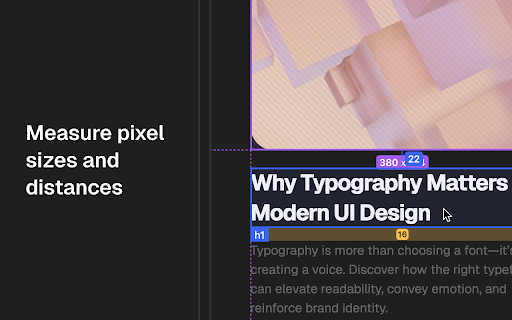
Screen Ruler is the perfect companion for web developers and designers wanting to validate the implementation of their websites. Once activated, Screen Ruler allows you to view the sizes, margins, paddings, tag names, IDs, and classes simply by hovering over any element. You can also select an element to measure distances to other elements.
Usage
- Toggle Screen Ruler by clicking the extension icon, selecting “Screen Ruler” from the right-click context menu, or using the shortcut `Alt/Option + Shift + R`.
- Hover over elements on web pages to display their sizes, margins, paddings, tag names, IDs, and classes.
- Select an element by clicking on it directly, this will turn the highlight red. To deselect, click again, press Escape or select a different element.
- To select the parent of an element, use `Alt/Option + Up`, moving your selection to the parent element instead, use `Alt/Option + Down` to reverse your selection.
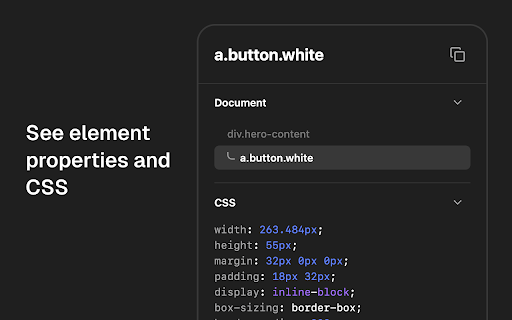
- View the computed CSS of the currently selected element in the side panel. Click the "Copy CSS" button to copy the computed CSS of the currently selected item to your clipboard.
Features
- Measure the pixel size of any element.
- Measure the pixel distance between any two elements.
- HTML tag names, class names and IDs.
- Parent/child selection shortcuts.
- Responsive selections resize with your browser window.
- Access from the context menu.
- Computed CSS inspect.
- Copy CSS to clipboard.
- Works on any web page.
- Customize keyboard shortcuts by visiting `chrome://extensions/shortcuts`.
Screen Ruler PRO
Screen Ruler also offers a PRO tier which unlocks additional features.
1. Element Inspect: See an element's properties when you move your mouse over it. Includes information about element position, size, rendered font, colors and more.
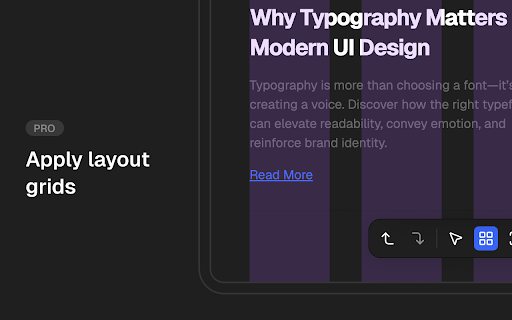
2. Layout Grid: Superimpose a layout grid on top of the site to validate the alignment of your designs.
3. Capture a screenshot of the currently highlighted area by clicking the screenshot control or using the `Ctrl/Command + Shift + S` keyboard shortcut. Perfect for documentation or attaching to Github tickets.
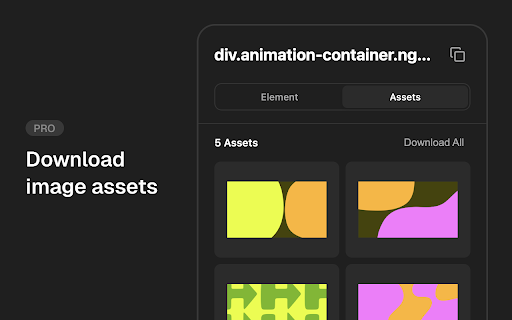
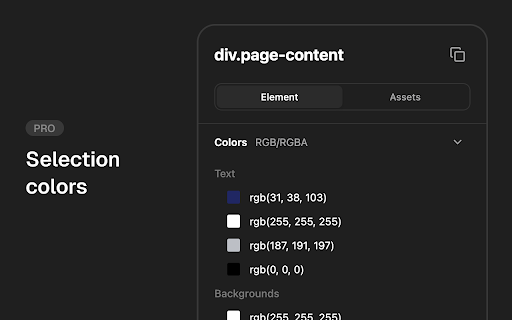
4. See advanced properties in the browser side panel including element box model, selection colors, assets and more.
Screen Ruler PRO requires a one-off payment for lifetime access. To upgrade to PRO, click "Upgrade to PRO" in the context menu or right-click the extension icon for upgrade options.
Screen Ruler is Made For
- Developers: Spotting layout issues or identify alignment problems. Whether you're tweaking margins and paddings, or just making sure everything lines up correctly, Screen Ruler becomes an indispensable addition of your development toolkit.
- Designers: Ensure your designs have been implemented with pixel-perfect accuracy. Screen Ruler acts as a bridge between design and development, allowing you to check is every element aligns exactly as you intended.
Installation
- Screen Ruler is designed specifically for stability in Google Chrome 116+.
- Screen Ruler is installable on any Chromium browser however, for the best experience make sure your browser supports all the required APIs (like Side Panel and Offscreen). If there are any issues with installation, update your browser to the latest version and try again.
| 分类 | 💻开发者工具 |
| 插件标识 | jfbbgijjljfbolelfkopkhbfjajjampm |
| 平台 | Chrome |
| 评分 |
★★★★☆
4.7
|
| 评分人数 | 230 |
| 插件主页 | https://chromewebstore.google.com/detail/screen-ruler-measure-the/jfbbgijjljfbolelfkopkhbfjajjampm |
| 版本号 | 2.4.0 |
| 大小 | 1.97MiB |
| 官网下载次数 | 20000 |
| 下载地址 | |
| 更新时间 | 2024-12-12 00:00:00 |
CRX扩展文件安装方法
第1步: 打开Chrome浏览器的扩展程序
第2步:
在地址栏输入: chrome://extensions/
第3步: 开启右上角的【开发者模式】
第4步: 重启Chrome浏览器 (重要操作)
第5步: 重新打开扩展程序管理界面
第6步: 将下载的crx文件直接拖入页面完成安装
注意:请确保使用最新版本的Chrome浏览器
同类插件推荐

Page Grid Ruler
Draw a grid view, get page dimensions in pixel (px

Better Ruler
一款网页测量工具,支持吸附测量。为前端开发和ui设计提供便利。一款网页测量工具,支持吸附测量。为前端

数字尺
用于精确屏幕测量的终极在线标尺应用程序:数字标尺 - 轻松测量像素完美的尺寸!无论您是 Web 开发

Grid Lines Ruler
Create grids on pages that provide the developers

Simple Ruler
A very simple ruler to check your webpage, without

Grid Ruler
Create grids and measure their distance easily.It

Page Ruler
Page ruler extension to measure elements on web pa
页面标尺
使用页面标尺轻松测量像素大小。嘿,好奇的朋友们! ? 你是否曾希望在网页上有一个魔法在线标尺来测量

Measure Everything
Element distance measurement tool.Measure Everythi

Screen Ruler - Measure The Web
Measure sizes, distances, margins and paddings of

Designer Tools
A collection of tools to help you design and devel
Dimensions
A tool for designers to measure screen dimensionsT

Page Ruler
Measure page elements size in pixel with an easy-t