
Dark mode for Google™ docs Chrome 插件, crx 扩展下载

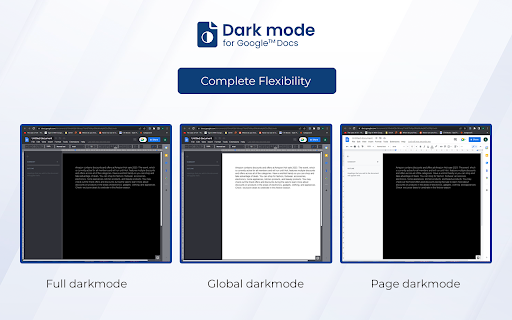
Enable dark mode on Google Docs to reduce eye strain while working on your documents.
In 2025, long hours on Google Docs don’t have to mean strained eyes. Quickly turn on Dark mode for Google Docs to minimize eye fatigue and improve your overall productivity in low-light conditions while working on documents. This extension replaces the current bright white background of Google Docs with a more calming dark background, offering an effective bid to combat the blue light reduction effect.
Key Features of Dark Mode for Google Docs
Reduce Eye Strain:
The primary benefit of Dark mode for Google Docs is that it reduces the production of blue light, thus reducing eye strain on Google Docs and preventing inadvertent eye fatigue for users.
Comfortable Long-Term Use:
Especially useful for those who spend many hours at work in Google Docs and do not want to strain their vision during extended sessions, offering comfortable document editing.
Simple & User-Friendly:
Enabling the Google Docs dark theme is easy as it is located in the settings bar on the user interface and browser, making it a convenient dark theme for Chrome extensions.
How to Use Dark Mode for Google Docs
Install the Extension: To install Dark mode for Google Docs, simply click on the button labeled “Add to Chrome” above.
Open Google Docs: Go to any file in Google Docs that you want to make the appearance of the interface as dark as possible.
Activate Dark Mode: Navigate to the user icon on the upper right of the browser, and you’ll find the option to enable dark mode Google Docs beside the switch.
Enjoy a Comfortable Workspace: Enjoy greatly reduced eye strain, and the overall comfort provided in an environment optimized for successful work, thanks to the Google Docs dark theme
FAQs
1. What does Dark Mode on Google Docs do?
Dark Mode transforms the background of Google Docs from bright white to a dark gray or black tone, reducing screen glare and blue light exposure, which can help ease eye strain.
2. How can I enable Dark Mode on Google Docs?
To enable Dark Mode, simply install the extension, open Google Docs, click the extension icon in your browser, and toggle Dark Mode on.
3. Does Dark Mode affect my document’s formatting?
No, Dark Mode only changes the background for your viewing comfort. It does not alter your document’s formatting, colors, or content when shared or printed.
| 分类 | 📝工作流程与规划 |
| 插件标识 | jjgfcpnblnoedjnepaapnonoklgafpfb |
| 平台 | Chrome |
| 评分 |
★★★★☆
4.4
|
| 评分人数 | 2461 |
| 插件主页 | https://chromewebstore.google.com/detail/dark-mode-for-google-docs/jjgfcpnblnoedjnepaapnonoklgafpfb |
| 版本号 | 1.2.1 |
| 大小 | 507KiB |
| 官网下载次数 | 50000 |
| 下载地址 | |
| 更新时间 | 2025-01-21 00:00:00 |
CRX扩展文件安装方法
第1步: 打开Chrome浏览器的扩展程序
第2步:
在地址栏输入: chrome://extensions/
第3步: 开启右上角的【开发者模式】
第4步: 重启Chrome浏览器 (重要操作)
第5步: 重新打开扩展程序管理界面
第6步: 将下载的crx文件直接拖入页面完成安装
注意:请确保使用最新版本的Chrome浏览器
同类插件推荐

Google Docs Dark Mode
Just another Google Docs dark mode without all the

Docs Dark 2.0
Dark Theme for Docs with high contrast!Dark Theme
Canvas Dark Mode
Dark Mode for Canvas.Dark mode for Canvas. Stayin

Dark mode for Google™ docs
Enable dark mode on Google Docs to reduce eye stra

Google Docs In Dark
Says what it does or does what it says.It's ju

Google Docs Dark Mode
Dark Mode for Google Docs + UI UpgradeTheme: Dark

Better Google Docs Dark Mode
Reduce brightness on google docsImproved Google Do

DocsAfterDark
Beyond dark mode for Google DocsCustomize the look

Google Drive Dark Mode
Dark mode for Google Drive!Dark mode for Google Dr

Google Docs Dark Mode
Dark mode for Google Docs!Dark mode for those long
黑暗模式 - 夜眼
根据需要将每个网站切换到暗模式/亮模式。用夜眼呵护您的眼睛。Night Eye 允许您在几乎所有网站
日历暗模式
在清新的暗模式中体验谷歌日历!以全新的视角发现谷歌日历,或者更确切地说,在黑暗中,借助日历暗模式扩展
深色模式 - Сhrome 的深色閱讀器
黑暗主題是每個網站的經典黑暗模式。 深色主題將網站切換為深色閱讀器、夜班模式、夜間和日常瀏覽。 夜班