
Teeto Chrome 插件, crx 扩展下载

Your Web App Security Companion - Easily identify endpoints, secrets, and parameters.
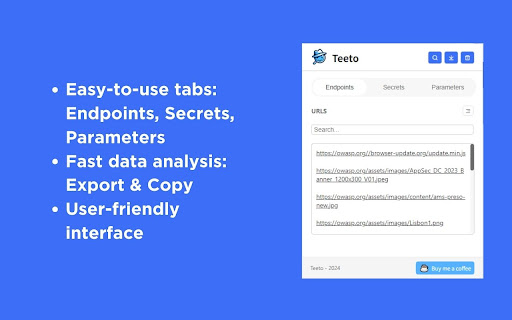
Teeto is designed to enhance web application security and development by scanning for and identifying endpoints, secrets, and parameters embedded within web applications.
? Teeto offers a range of functionalities:
▸ Web Page Scanning: Automatically detects and lists endpoints, secrets, and parameters found in a web page.
▸ Data Export: Provides options to download the found data or copy it to the clipboard for external use.
▸ Interactive UI: Results are neatly displayed in the extension's user interface for easy review.
▸ Cumulative Data Scanning: Allows repeated scans across different sessions, accumulating and updating data.
▸ Tab-Specific Data Storage: Maintains separate data sets for each tab, ensuring domain-specific organization.
? Contact Us:
▸ Twitter: @DodirSec
▸ GitHub: https://github.com/dodir-sec/teeto
▸ Email: [email protected]
| 分类 | 🛠️工具 |
| 插件标识 | jkonpljnfkapenfcfdhmilkbmnbalnml |
| 平台 | Chrome |
| 评分 |
☆☆☆☆☆
0
|
| 评分人数 | 53 |
| 插件主页 | https://chromewebstore.google.com/detail/teeto/jkonpljnfkapenfcfdhmilkbmnbalnml |
| 版本号 | 1.2 |
| 大小 | 34.25MiB |
| 官网下载次数 | 241 |
| 下载地址 | |
| 更新时间 | 2024-05-23 00:00:00 |
CRX扩展文件安装方法
第1步: 打开Chrome浏览器的扩展程序
第2步:
在地址栏输入: chrome://extensions/
第3步: 开启右上角的【开发者模式】
第4步: 重启Chrome浏览器 (重要操作)
第5步: 重新打开扩展程序管理界面
第6步: 将下载的crx文件直接拖入页面完成安装
注意:请确保使用最新版本的Chrome浏览器
同类插件推荐

Teeto
Your Web App Security Companion - Easily identify

DotGit
An extension for checking if .git is exposed in vi

Trufflehog
Sniffing out credentialsThe TruffleHog chrome exte

Street View Tracker
Unlock the potential of Open Source Intelligence (

Who Am I
A chrome extension for doing username enumeration

Bellingcat Filename Finder
Display filenames for images uploaded to Google Ma

Vulners Web Scanner
Tiny vulnerability scanner based on vulners.com vu

HackBar
A browser extension for Penetration Testing## Cont

Hack-Tools
The all in one Red team extension for web penteste

Shodan
The Shodan plugin tells you where the website is h

Sputnik
OSINT web extensionSputnik is an extension to quic

PhotOSINT
OSINT tool for images. Scans page for images with

Vortimo OSINT-tool
OSINT Swiss army knife:bookmark/record pages, stor