
PLANERGY CheckOut Chrome 插件, crx 扩展下载
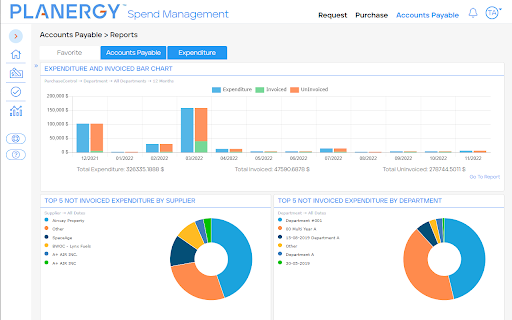
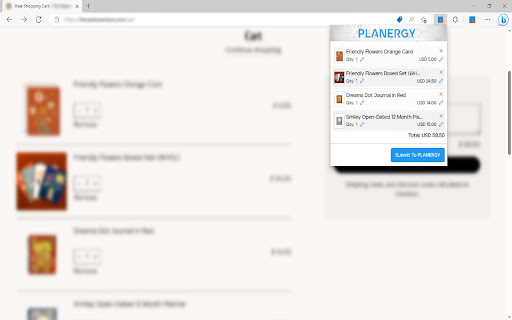
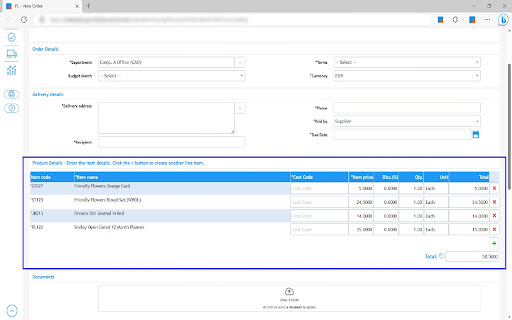
The extension submits products from shopping cart to PLANERGY
Use the PLANERGY CheckOut extension to create purchase requisitions in PLANERGY from your shopping cart on thousands of ecommerce websites.
What does PLANERGY CheckOut do?
-----------------------------------------------------------
PLANERGY CheckOut allows you to shop on your supplier’s website, then with the click of a button, import the entire shopping cart into a purchase requisition in PLANERGY ready to go through your company’s approval workflows.
✓ Save Time
No more time wasted with copy & paste of item details into purchase requisitions.
✓ Accurate Information
Correct data imported into PLANERGY every time with no manual errors.
✓ Consumer Experience
Prepare your order just like you are used to on any leading ecommerce website.
✓ Millions of products
Across thousands of sites you have access to millions of products to choose from.
Which supplier websites can I use with PLANERGY CheckOut?
--------------------------------------------------------------------------------------------------
PLANERGY CheckOut will work with the majority of supplier websites. The extension is compatible with 13 of the ecommerce platforms most commonly used by suppliers including Shopify, 3DCart, BigCommerce, and WooCommerce. It also works with Amazon as well as many custom ecommerce sites.
This includes some of the largest global suppliers, key niche industry suppliers, and even many smaller local suppliers. Here is just a small sample of suppliers that are compatible with PLANERGY CheckOut:
• Staples (Office Supplies): Staples.com
• Lowes (Construction & DIY): Lowes.com
• Wayfair (Furniture & Decor): wayfair.com
• Fisher Scientific (Scientific & Biotechnology): www.fishersci.com
• Henry Schein (Medical and Dental Supplies): henryschein.com
How do I start using PLANERGY CheckOut?
---------------------------------------------------------------------
PLANERGY CheckOut requires that you have an active PLANERGY account. If you do not have active PLANERGY account, please visit planergy.com. If you already have PLANERGY account, follow these steps:
1. Request your PLANERGY account owner to enable PLANERGY CheckOut on your account in the ‘Control Panel > Integrations’ section
2. Make sure you’re using Google Chrome (or Microsoft Edge) as your browser
3. Download the PLANERGY CheckOut Chrome Extension from the Chrome Web Store
4. Login to your PLANERGY account in a Chrome browser tab
5. Shop on websites using any of the major ecommerce platforms, then import your shopping cart into a PLANERGY purchase requisition by pressing the ‘Submit To PLANERGY’ button in the PLANERGY CheckOut Chrome Extension
| 分类 | 🛍️购物 |
| 插件标识 | jnjgljhkgipcggegpgfipdedpihbfgfn |
| 平台 | Chrome |
| 评分 |
☆☆☆☆☆
0
|
| 评分人数 | 2 |
| 插件主页 | https://chromewebstore.google.com/detail/planergy-checkout/jnjgljhkgipcggegpgfipdedpihbfgfn |
| 版本号 | 1.5 |
| 大小 | 6.69MiB |
| 官网下载次数 | 1000 |
| 下载地址 | |
| 更新时间 | 2025-02-01 00:00:00 |
CRX扩展文件安装方法
第1步: 打开Chrome浏览器的扩展程序
第2步:
在地址栏输入: chrome://extensions/
第3步: 开启右上角的【开发者模式】
第4步: 重启Chrome浏览器 (重要操作)
第5步: 重新打开扩展程序管理界面
第6步: 将下载的crx文件直接拖入页面完成安装
注意:请确保使用最新版本的Chrome浏览器
同类插件推荐

PLANERGY CheckOut
The extension submits products from shopping cart
Copy Text
You can copy selected text and save it, when you n

Blue Mark Removal
This extension removes any tweets on Twitter that
Numeric Calculator
A simple numeric calculatorA fast numeric calculat

Reaction Free Extension
Add a youtube video reaction to your Streaming ser

Yabbit
Yabbit CRM integrationYabbit is your crm integrati

PulseHax
Hacking pulsus has never been so easyA collection

Cross Copy
A simple application to instantly share media and

TinyNote
TinyNote is a simple and completely free note taki

Shortcuts
Perform common tasks with your keyboard.Shortcuts

SustEarn
Reduce your carbon footprint. Earn rewards for sus

The Big Gift List
Easily add items to your 'The Big Gift List

Verse Medical Orders
Conveniently submit orders to versemedical.com by