
Export ChatGPT - image&Screenshot Chrome 插件, crx 扩展下载
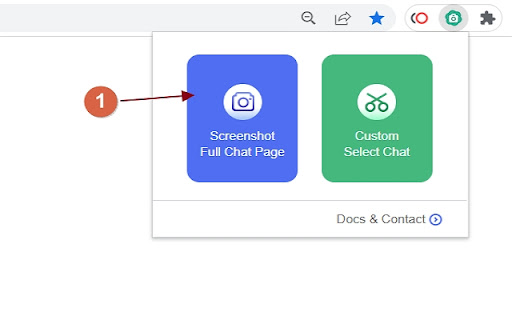
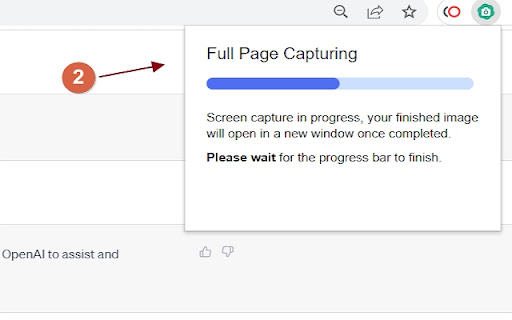

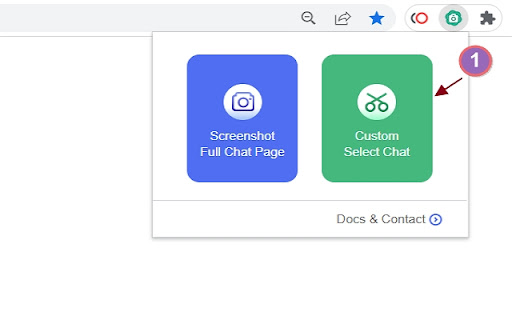
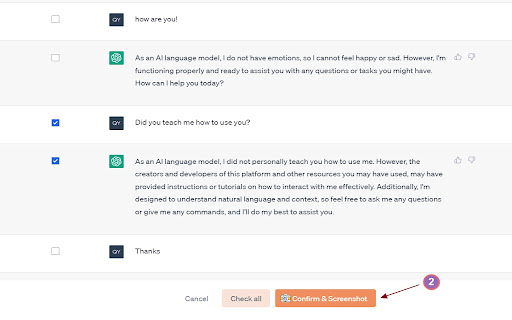
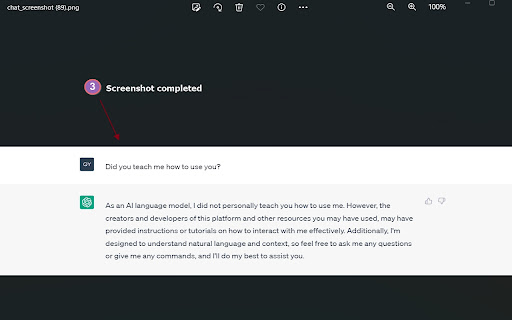
Capture a screenshot of the entire ChatGPT page or selectively capture specific conversations.
ChatGPT 聊天内容截图插件&自定义更灵活
Selectable chat history screenshot extension
支持功能:
* 一键生成完整的聊天记录截图&导出
* 自定义选择聊天记录生成截图&导出
-----FAQ:-----
1.What is ChatGPT Screen Capture ?
ChatGPT Screen Capture can help you generate a screenshot of the entire chat history with just one click. More importantly, it also supports custom selection of specific chat messages to create a customized chat screenshot.
ChatGPT Screen Capture可以帮助你一键生成整个聊天记录的截图。更重要的是,它也支持自定义选择想要截取的某几条聊天记录,生成一张自定义聊天截图。
2. Is ChatGPT Screen Capture free to use?
Yes, the extension is free to use.
是的,我们的扩展是免费使用的。
3.How do I report issues?
This tool is completely free to use. If you encounter any issues or have suggestions, please feel free to contact me by leaving a message. To reach me, click on the extension icon and then click on 'ChatGPT Screen Capture' at the bottom of the pop-up window. It will open a webpage where you can find our contact information.
该工具是完全免费的,大家在使用过程中如果遇到问题,或者您有好的建议,都联系我给我留言。如何联系你我:请点击扩展的图标在弹出的页面中最下方点击“ChatGPT Screen Capture” 会打开一个网页,里面有我们的联系方式。
4. What are ChatGPT Screen Capture's plans for the future?
We will update and iterate this tool from time to time to optimize its user experience, enhance its functionality, support more export formats, and offer more flexible export options. If you have any requirements or ideas, please feel free to contact us.
我们将不时更新和迭代该工具,以优化用户体验,增强功能,支持更多的导出格式,并提供更灵活的导出选项。如果您有任何要求或想法,请随时与我们联系。
5, 是否会窃取用户的聊天记录信息?
This extension adopts the policy of generating exported content locally and does not upload it to the server, which is very secure.
该扩展采取的是本地生成导出内容的策略,不会上传到服务器,是非常安全的。
| 分类 | 📝工作流程与规划 |
| 插件标识 | kagjkiiecagemklhmhkabbalfpbianbe |
| 平台 | Chrome |
| 评分 |
★★★★☆
4.8
|
| 评分人数 | 350 |
| 插件主页 | https://chromewebstore.google.com/detail/export-chatgpt-imagescree/kagjkiiecagemklhmhkabbalfpbianbe |
| 版本号 | 2.2.0 |
| 大小 | 3.41MiB |
| 官网下载次数 | 1000 |
| 下载地址 | |
| 更新时间 | 2024-12-04 00:00:00 |
CRX扩展文件安装方法
第1步: 打开Chrome浏览器的扩展程序
第2步:
在地址栏输入: chrome://extensions/
第3步: 开启右上角的【开发者模式】
第4步: 重启Chrome浏览器 (重要操作)
第5步: 重新打开扩展程序管理界面
第6步: 将下载的crx文件直接拖入页面完成安装
注意:请确保使用最新版本的Chrome浏览器
同类插件推荐

Export ChatGPT Conversation
Export ChatGPT conversations and save to NotionInt

Gemoo Snap - ChatGPT Screenshot
Screenshot ChatGPT, Full Page, or Selected AreaGem

ChatGPT Conversation Exporter
A simple extension to export ChatGPT conversation

chatGPT snapshot
Capture ChatGPT magic, thread by thread, pic by pi
ChatPDF - ChatGPT to PDF
ChatGPT to PDF, Save ChatGPT content to PDF file a

ChatGPT Plus - 批量导出 GPT 对话内容
ChatGPT的AI助手。支持下载、分享GPT对话内容和多语言切换。准备好让您的 ChatGPT 更

ChatGPT Screenshot Ex
Easily capture, edit, and share ChatGPT conversati

ChatGPT Screenshot
Capture screenshots of your ChatGPT conversations
Export ChatGPT - image&Screenshot
Capture a screenshot of the entire ChatGPT page or

ExportGPT: Export ChatGPT Conversation
All-in-one ChatGPT conversation export plugin, cop

ChatGPT 导出器 - ChatGPT 转换为 PDF、MD 等
免费下载 ChatGPT 会话为 PDF、Markdown 等格式。将 ChatGPT 结果下载为

GPTBLOX - 保存ChatGPT对话记录 & 下载网页图片
探索GPT Store发布的GPTs,下载图片,保存ChatGPT、Gemini、Claude、Hu

FindSCI
FindSCI,更全面的学术辅助插件,支持信息展示、文献下载、文献管理、科研导航等多种功能。Find