
Quick Search Wiktionary Chrome 插件, crx 扩展下载
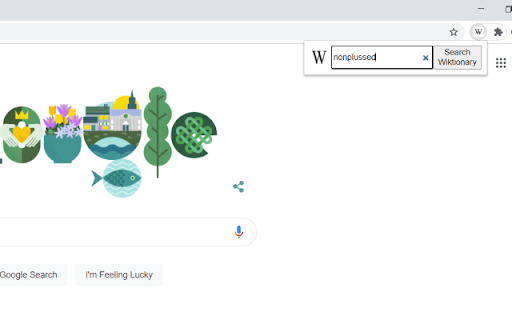
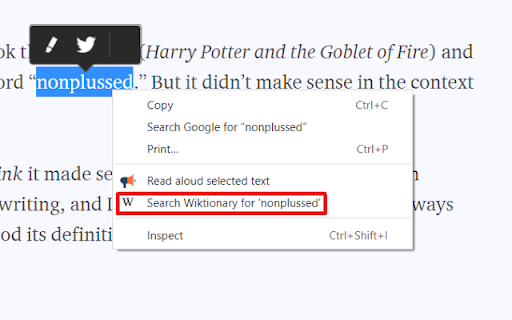
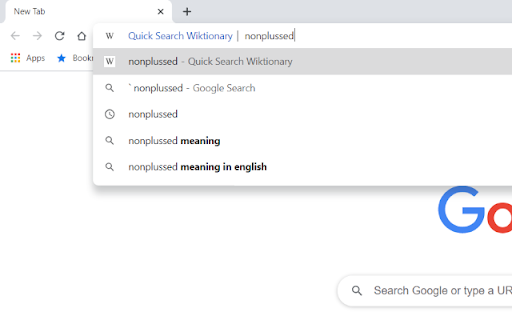
Provides quick access to Wiktionary from any page.
Extension that allows users to quickly and easily query Wiktionary.
Features:
Search by typing ` and space in the address bar.
Search by clicking on the extension and typing in the search box.
Search by right clicking a highlighted word.
Supports active Wiktionaries (150+ languages). Change which Wiktionary you would like to use in the options menu.
--
Update 1.0.1: Right clicking now opens in a new tab
| 分类 | 🛠️工具 |
| 插件标识 | kgchoibflodmphihffmogncijonmpmce |
| 平台 | Chrome |
| 评分 |
★★★☆☆
3.5
|
| 评分人数 | 4 |
| 插件主页 | https://chromewebstore.google.com/detail/quick-search-wiktionary/kgchoibflodmphihffmogncijonmpmce |
| 版本号 | 1.0.1 |
| 大小 | 14.59KiB |
| 官网下载次数 | 342 |
| 下载地址 | |
| 更新时间 | 2022-09-19 00:00:00 |
CRX扩展文件安装方法
第1步: 打开Chrome浏览器的扩展程序
第2步:
在地址栏输入: chrome://extensions/
第3步: 开启右上角的【开发者模式】
第4步: 重启Chrome浏览器 (重要操作)
第5步: 重新打开扩展程序管理界面
第6步: 将下载的crx文件直接拖入页面完成安装
注意:请确保使用最新版本的Chrome浏览器
同类插件推荐

Wiktionary Pronounce Selection
Show pronunciation of selected word from en.wiktio
Quick Search Wiktionary
Provides quick access to Wiktionary from any page.

Поиск в Википедии
Расширение добавляет в контекстное меню пункт для

Wiktionary Search
This extension allows you to perform a quick searc

Better Wiktionary
Makes it more convenient to use Wiktionary.It curr

Wiktionary Translator
Quickly look up words in wiktionary as you readWik
Etymonline
Online Etymology DictionarySkip the home page. Sea
Black Menu for Wikipedia
一个让您轻松访问维基宇宙的插件Black Menu for Wikipedia lets you a

Wikipedia Search
Search Wikipedia in every language from the addres

Definer - 弹出词典和翻译器
您选择或键入的单词和短语的即时定义、翻译和搜索结果Double-click a word or hi

Wiki Search
Display information from wikipedia relating to hig

Quick Wikipedia Search
Quick Wikipedia Search something on wikipedia webs

Dictionary Lookup
Look up any word in an inline frame with a simple