
PhoneMondo - CallerID and Click2Call Chrome 插件, crx 扩展下载
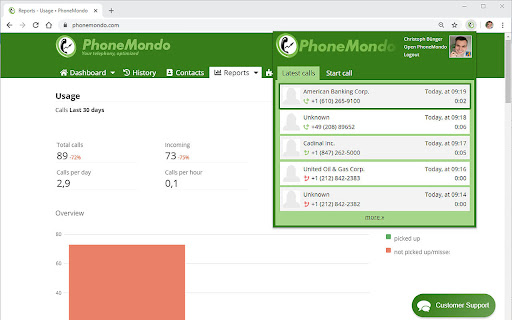
The PhoneMondo extension connects your browser to the PhoneMondo service.
• CallerID notification with data from your CRM or address books
• Click2Call
• Log calls, even in your CRM
PhoneMondo is a cloud CTI and callerID notification solution that helps making telephony much more effective in your company. When the phone rings, PhoneMondo looks up data in different data sources like online phone directories and CRM systems (like HubSpot, Salesforce, Pipedrive, Zoho CRM, Microsoft Outlook and many more). It then shows extra information for the call on your PC screen, in your web browser and/or on your mobile phone. So you can decide before picking up if you want to talk to the caller or not. Calls can be rejected and forwarded with a click.
Notes, tasks, opportunities and other helpful data will make it more easy to make the call a successful call instead of just wasting time while searching for the data of the caller or letting the caller spell his name and address. All calls are stored in a call history in the cloud.
Various reports help you to understand the telephony usage in your company and to detect any problems, i.e. on which time of day do the customers have to wait too long until the call is picked up.
CallerIDs can be compared to spam number listings and can be rejected automatically when PhoneMondo detects that the call is potential spam.
Basic version of PhoneMondo is free (max. 1 user and 3 monitored phone lines/numbers, call history only 30 days, max. 100 contacts stored). For additional storage, all addons included and more users/lines, the PhoneMondo Professional subscription is necessary. It starts at 14,90€ (+ VAT of your country) per month.
| 分类 | 💬沟通 |
| 插件标识 | kglcajmkelnbicjiibjpmmhmcjofdjpj |
| 平台 | Chrome |
| 评分 |
★★★★☆
4.3
|
| 评分人数 | 6 |
| 插件主页 | https://chromewebstore.google.com/detail/phonemondo-callerid-and-c/kglcajmkelnbicjiibjpmmhmcjofdjpj |
| 版本号 | 2024.10.1 |
| 大小 | 374KiB |
| 官网下载次数 | 1000 |
| 下载地址 | |
| 更新时间 | 2024-10-08 00:00:00 |
CRX扩展文件安装方法
第1步: 打开Chrome浏览器的扩展程序
第2步:
在地址栏输入: chrome://extensions/
第3步: 开启右上角的【开发者模式】
第4步: 重启Chrome浏览器 (重要操作)
第5步: 重新打开扩展程序管理界面
第6步: 将下载的crx文件直接拖入页面完成安装
注意:请确保使用最新版本的Chrome浏览器
同类插件推荐

sipgate App Click2Dial
Telefonieren Sie direkt aus Ihrem Browser.Mit der

PhoneMondo - CallerID and Click2Call
The PhoneMondo extension connects your browser to

Labelcall - Business Caller Id
Chrome extension integrated with Labelcall app tha

NIFB Toolkit
Various NIFB related tools.NIFB Toolkit is a simpl

Site Blocker
A powerful Chrome extension designed to block dist

Poundsqueeze
Poundsqueeze is an AI powered extension that helps

Tweetlio X: Twitter Companion
Tweetlio Explore: Elevate Twitter engagement with

Loop8 Privacy Manager
Browser extension for Loop8 Privacy Manager.Loop8

Anti FeR toolkit
Adds features and extensions for the bushtarion we

Hull University Buddy
The Hull University Buddy browser extension is a h

The Big Gift List
Easily add items to your 'The Big Gift List

brocrobes
Browser plugin for https://transcrob.esBrocrobes i

Stop It Grandpa
Prevents grandpa from lookin' at his favorite