
Sitemap Generator Chrome 插件, crx 扩展下载
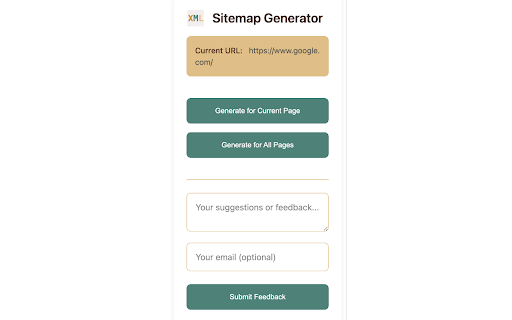
Generate sitemap for any website with one click
Sitemap Generator - Your One-Click Solution for Website Mapping
A lightweight yet powerful Chrome extension that helps website owners and SEO professionals generate sitemaps effortlessly.
Key Features:
✓ Generate sitemap for current page instantly
✓ Auto-crawl and create sitemap for entire website
✓ Standard XML format output
✓ Immediate sitemap file download
✓ Browser-based operation, no server required
Perfect For:
• Webmasters submitting sitemaps to search engines
• SEO specialists analyzing website structure
• Developers mapping page hierarchies
• Content auditors listing all website pages
Why Choose Us:
• Simple Interface: Install and use immediately
• Efficient Performance: Fast asynchronous crawling
• Lightweight: Minimal browser impact
• Privacy-Focused: All operations performed locally
How to Use:
1. Install the extension
2. Visit your target website
3. Click the extension icon
4. Choose generation mode (Current/All Pages)
5. Download your sitemap.xml file
Important Notes:
- All-pages mode limited to 100 pages by default
- Crawls same-domain pages only
- Requires website accessibility permissions
Have feedback? Use our built-in feedback box to help us improve.
| 分类 | 💻开发者工具 |
| 插件标识 | kgnhbllhhajnlhcnllcdopffpdebigfe |
| 平台 | Chrome |
| 评分 |
★★★★★
5
|
| 评分人数 | 401 |
| 插件主页 | https://chromewebstore.google.com/detail/sitemap-generator/kgnhbllhhajnlhcnllcdopffpdebigfe |
| 版本号 | 1.0 |
| 大小 | 12.39KiB |
| 官网下载次数 | 45 |
| 下载地址 | |
| 更新时间 | 2024-11-24 00:00:00 |
CRX扩展文件安装方法
第1步: 打开Chrome浏览器的扩展程序
第2步:
在地址栏输入: chrome://extensions/
第3步: 开启右上角的【开发者模式】
第4步: 重启Chrome浏览器 (重要操作)
第5步: 重新打开扩展程序管理界面
第6步: 将下载的crx文件直接拖入页面完成安装
注意:请确保使用最新版本的Chrome浏览器
同类插件推荐

Print Button
Easily print any page with just one click!With Pri

GUID Generator
Generate GUID and copy to clipboard with a single
Sitemap Generator
Generate sitemap for any website with one clickSit

Easy web scraper by Databar
A simple, no-code extension to collect data from a