
Fast Image Blocker Chrome 插件, crx 扩展下载
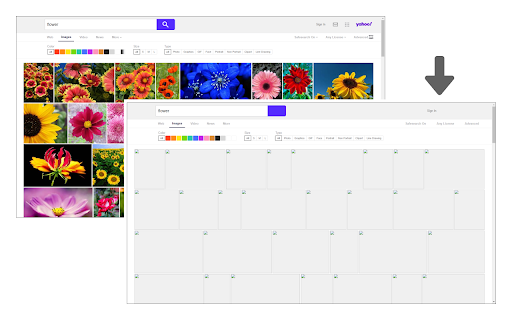
Blocks all images and visual content on desired websites.
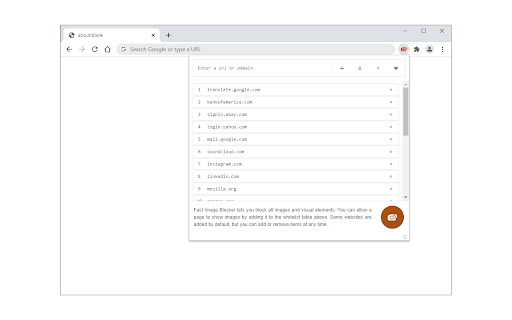
Fast Image Blocker lets you block all images and visual elements. You can allow a page to show images by adding it to the whitelist. Some websites are added by default, but you can add or remove items at any time.
Few features:
1. Allows you to block all image contents (including objects) on all webpages.
2. Easily switch the extension ON or OFF from the toolbar popup interface.
3. Add or remove websites to the whitelist from the toolbar popup.
To report bugs, please visit the addon's homepage (https://mybrowseraddon.com/image-blocker.html) and fill out the bug report form.
| 分类 | 🛠️工具 |
| 插件标识 | khgnndhdnkpmlflndgobodbhgheaegon |
| 平台 | Chrome |
| 评分 |
★★★☆☆
3.6
|
| 评分人数 | 50 |
| 插件主页 | https://chromewebstore.google.com/detail/fast-image-blocker/khgnndhdnkpmlflndgobodbhgheaegon |
| 版本号 | 0.2.4 |
| 大小 | 59.92KiB |
| 官网下载次数 | 9000 |
| 下载地址 | |
| 更新时间 | 2024-06-26 00:00:00 |
CRX扩展文件安装方法
第1步: 打开Chrome浏览器的扩展程序
第2步:
在地址栏输入: chrome://extensions/
第3步: 开启右上角的【开发者模式】
第4步: 重启Chrome浏览器 (重要操作)
第5步: 重新打开扩展程序管理界面
第6步: 将下载的crx文件直接拖入页面完成安装
注意:请确保使用最新版本的Chrome浏览器
同类插件推荐

Image Blocker EX+ 9000
Ridiculously powerful and customizable image block

ImageX
Enable/disable show/hide display of images by alte

Image Hide
This extension hides images by right-clicking and

Hide images with NOPE.
Hide page imagesArticles with images get better en

Fast Image Blocker
Blocks all images and visual content on desired we

Image blocker
Chrome extension for comfortable image blocking.Im

Wizmage Image Hider
Wizmage hides images in a way that minimizes the i

Block image
Block images and videos.Prevent images from "

Block Image|Video
Easily block all images & videos within a webs

Selective Image Blocker
When visiting webpages, blocks photos of keywords
TAG Image Filter
TAG Image Filter -- filters body images by replaci

Tunable Image Block
A browser extension for limit loading of the image

Images ON/OFF
Disable images on current site.Use this extension