
Enhanced Plex Chrome 插件, crx 扩展下载

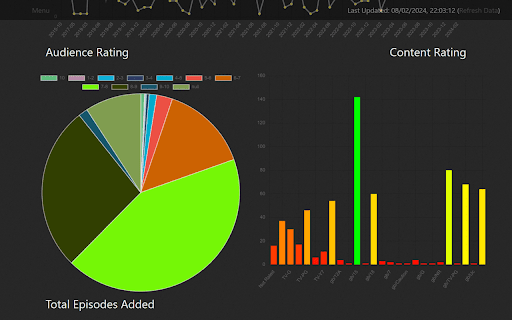



Adds several features to the Plex/Web client for Plex
This extension provides the following to the Plex for Web interface:
Adds link to view the TheMovieDB page for movies
Adds link to view the TVDB page for tv shows
Adds link to view the Trakt.tv page for movies and tv shows
Adds link to view the IMDB page for movies and tv shows
Adds a missing seasons and episodes view
Adds a server statistics page
Adds a bunch of information on TV/Movie pages (E.g. Status, Runtime, Homepage, Trailer Link, etc.)
Can also connect to a Sonarr/Radarr installation (Requires a fully configured Sonarr/Radarr server)
Note: Requires access to a fully configured Plex Server, and a Plex Account
Full Change Log:
https://github.com/Balthier/Enhanced-Plex/blob/master/changelog.md
| 分类 | 🛠️工具 |
| 插件标识 | kjmpdmgijjacblfohigcnpkeaehalmai |
| 平台 | Chrome |
| 评分 |
★★★★★
5
|
| 评分人数 | 7 |
| 插件主页 | https://chromewebstore.google.com/detail/enhanced-plex/kjmpdmgijjacblfohigcnpkeaehalmai |
| 版本号 | 3.3.3 |
| 大小 | 326KiB |
| 官网下载次数 | 693 |
| 下载地址 | |
| 更新时间 | 2024-07-12 00:00:00 |
CRX扩展文件安装方法
第1步: 打开Chrome浏览器的扩展程序
第2步:
在地址栏输入: chrome://extensions/
第3步: 开启右上角的【开发者模式】
第4步: 重启Chrome浏览器 (重要操作)
第5步: 重新打开扩展程序管理界面
第6步: 将下载的crx文件直接拖入页面完成安装
注意:请确保使用最新版本的Chrome浏览器
同类插件推荐

Plex skipper
Automatically clicks the 'Skip Intro', 

Plus for Plex
Save time on adding movies or tv shows into plex t
Web to Plex
Adds a button on various movie & TV show sites

Sonarr/Radarr/Lidarr autosearch
Exposes a context menu that enables direct searchi

Plex Poster Assistant
Extension to assist with managing posters in PlexP

Plexify
Connect to your Plex account and see if you own me

PiPlex
Adds picture in picture support for PlexThis exten

Enhance-O-Tron 用于 Plex
为Plex增加电影预告片,资源整合和宽屏支持。预告片: - 打开一个电影库项目,标题下方会出现预告片

Radarr and Sonarr for Plex
View and manage your movies and series in Radarr a

Plex Playback Speed
Plex Playback SpeedThis extension will allow you t

Enhanced Plex
Adds several features to the Plex/Web client for P

Transmogrify for Plex
Adds several features to the Plex/Web 2.0 client f

Plex Server Stats
Displays information about a Plex Media ServerA pl