
Keboola Dev Tools Chrome 插件, crx 扩展下载
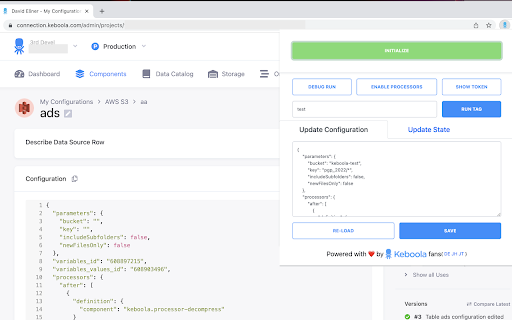
Keboola Connection helper tools to avoid common manual API calls when working with component configurations.
Simple extension allowing operations with Keboola Connection component configurations. The extension simplifies component configuration related tasks for advanced users and developers in Keboola Connection. It allows to perform raw JSON configuration updates, triggering debug jobs, triggering jobs with overridden tag and displaying current user token. Supports both old and new queue, orchestrations-v2 and all other component configurations.
It is very useful for any advanced users that would like to debug component jobs or change some configurations values directly in JSON without need to mingle construct the api calls themselves, reseting the token or mingling with Chrome DevTools. The user token is never required to submit and never stored in the chrome storage. It is only used in the current context.
Supported actions:
- Show current user's API token.
- Storage token is displayed without need to reset it.
- Run Debug job
- Creates debug job (Debug API call)
- Run Tag
- Runs configuration with specified overridden tag
- Update configuration
- Update and save configuration JSON directly
- Update configuration state
- Update and save state JSON directly
| 分类 | 💻开发者工具 |
| 插件标识 | kkajaaimfhkgbefpnpamaahjbpdofboa |
| 平台 | Chrome |
| 评分 |
★★★★☆
4
|
| 评分人数 | 1 |
| 插件主页 | https://chromewebstore.google.com/detail/keboola-dev-tools/kkajaaimfhkgbefpnpamaahjbpdofboa |
| 版本号 | 0.0.9 |
| 大小 | 631KiB |
| 官网下载次数 | 292 |
| 下载地址 | |
| 更新时间 | 2023-02-05 00:00:00 |
CRX扩展文件安装方法
第1步: 打开Chrome浏览器的扩展程序
第2步:
在地址栏输入: chrome://extensions/
第3步: 开启右上角的【开发者模式】
第4步: 重启Chrome浏览器 (重要操作)
第5步: 重新打开扩展程序管理界面
第6步: 将下载的crx文件直接拖入页面完成安装
注意:请确保使用最新版本的Chrome浏览器
同类插件推荐

Papertrail JSON Parser
Parse JSON content in Papertrail log.When you'

LMV Developer Tools
LMV Developer ToolsA set of tools in order to make

Immerx DevTools
Immerx debugging tools in Chrome developer console
Keboola Dev Tools
Keboola Connection helper tools to avoid common ma

Catberry Debugger
Extends Chrome Developer Tools, adding panels that

gist-more-url
Show extend url to clone (by 'ssh' and 

Keen Debugger
Output Keen IO analytics data in the JavaScript co

Mock Proxy
chrome mv3版mock代理工具,支持apifox、oneapi、rap2、yapi等平台代理

Web Developer Tool for Chrome
Web developer toolbox for your browser.⬇️ Easy to

copy-jwt
Search jwt token in local storage and copy to clip

Advanced Dev Tools
This extension extends the capabilities of Chrome

DBmarlin SQL Search
Looks for SQL Statements and adds a 'Find SQL

Continue Without Supporting
Browser extension that auto-clicks on "contin