
Metabase Copilot Chrome 插件, crx 扩展下载

AI assistant for Metabase
Metabase Copilot is a Metabase extension using AI to write SQL queries for you.
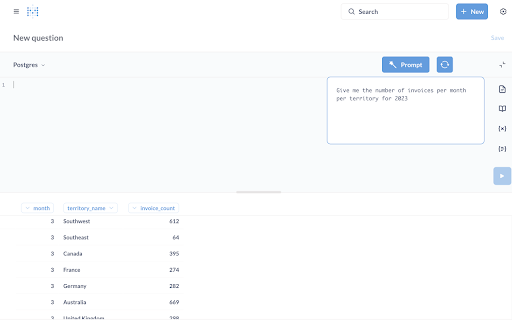
The extension includes 3 main features for the native query editor of Metabase:
- query prompts: enter a prompt and let AI write the SQL query
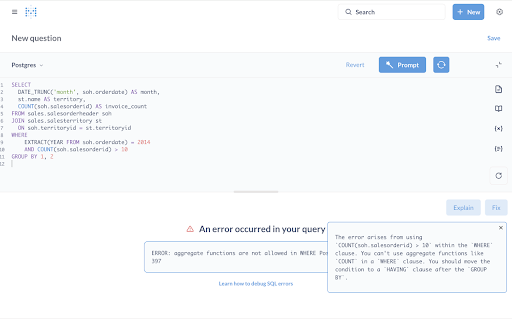
- error explanation: ask the AI to explain why your query created an error
- error fixing: ask the AI to modify your query to fix the error
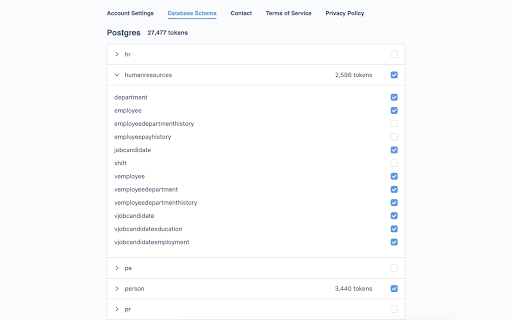
To make the AI queries as relevant as possible, you can select the schemas and tables that you want to include in the system prompt provided to the AI.
You can either log in and benefit from our free tier or enter your own OpenAI API key.
Metabase Copilot has a paid version for companies. It allows you to manage multiple users for your account and to share a common set of options for the schemas/tables included in system prompts.
This extension is open-source, you can find it in Github at https://github.com/RobinPicard/metabase-copilot
Contact: [email protected]
PS: the sign-in with Google feature is only available for Chrome users. Brave or Chromium users can still use Metabase Copilot, but they have to provide their own OpenAI API key.
| 分类 | 💻开发者工具 |
| 插件标识 | kkkpnhdoamjghmnjpailmpndjlegkmnh |
| 平台 | Chrome |
| 评分 |
★★★★★
5
|
| 评分人数 | 1 |
| 插件主页 | https://chromewebstore.google.com/detail/metabase-copilot/kkkpnhdoamjghmnjpailmpndjlegkmnh |
| 版本号 | 3.1.2 |
| 大小 | 239KiB |
| 官网下载次数 | 216 |
| 下载地址 | |
| 更新时间 | 2024-11-11 00:00:00 |
CRX扩展文件安装方法
第1步: 打开Chrome浏览器的扩展程序
第2步:
在地址栏输入: chrome://extensions/
第3步: 开启右上角的【开发者模式】
第4步: 重启Chrome浏览器 (重要操作)
第5步: 重新打开扩展程序管理界面
第6步: 将下载的crx文件直接拖入页面完成安装
注意:请确保使用最新版本的Chrome浏览器
同类插件推荐

Metabase
Metabase Cryptocurrency Tracker Metabase shows th
Metabase Copilot
AI assistant for MetabaseMetabase Copilot is a Met
SayData - Metabase ChatGPT
Data Insights in Plain English - Like ChatGPTSimpl

Avanty
Avanty is your AI assistant for Metabase.Avanty is

ChatGPTEverywhere
Use ChatGPT wherever you wantIn the past, using Ch

Boss Hub | Card
Boss Hub Card | Your Business Card GeneratorBoss H

Batch Cache
Customisable Bookmark Navigation HubThe Batch Cach

HintEd Smart Manuals Editor
Build an interactive onboarding and training exper

Linqbase - LinkedIn CRM & Outreach
Effortlessly collect, organize, and export detaile

Left Unread
Show only unread conversations on Facebook, Messen

Agency Toolchest
The Agency Toolchest Chrome Extension is used to s

Thymeline
Add events to your timeline the easy wayKeep track

BoostPic - Search Google Images on the fly
Uncover the possibility to search Google Images qu