
BoostPic - Search Google Images on the fly Chrome 插件, crx 扩展下载


Uncover the possibility to search Google Images quickly and incredibly, with clip & paste.
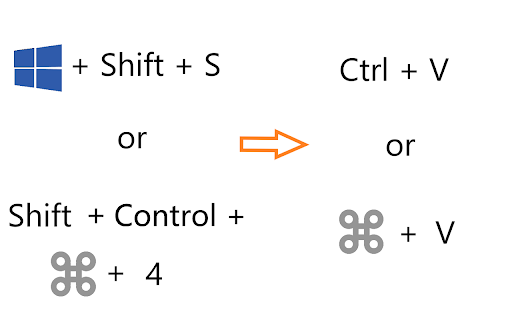
With this extension users can search google images simply with clip & paste. The following is how it works.
1. For win10/11: win+shift+s to clip an image even outside the browser, and for mac: shift+control+command+4;
2. Enter Google Images, click at the search by image icon (or the input box at the extension popup), and then press ctrl+v or command+v;
3. Wait a moment until it returns an URL. If timeout error happens, please delete the error message and ctrl+v or command+v again.
Enjoy !
Open Source Address: https://github.com/BoostPic/BoostPic
| 分类 | 🛠️工具 |
| 插件标识 | pmpogggmiaehmjempogkkklfckignfgl |
| 平台 | Chrome |
| 评分 |
★★★★★
5
|
| 评分人数 | 1 |
| 插件主页 | https://chromewebstore.google.com/detail/boostpic-search-google-im/pmpogggmiaehmjempogkkklfckignfgl |
| 版本号 | 4.5.0 |
| 大小 | 131KiB |
| 官网下载次数 | 83 |
| 下载地址 | |
| 更新时间 | 2024-10-03 00:00:00 |
CRX扩展文件安装方法
第1步: 打开Chrome浏览器的扩展程序
第2步:
在地址栏输入: chrome://extensions/
第3步: 开启右上角的【开发者模式】
第4步: 重启Chrome浏览器 (重要操作)
第5步: 重新打开扩展程序管理界面
第6步: 将下载的crx文件直接拖入页面完成安装
注意:请确保使用最新版本的Chrome浏览器
同类插件推荐

Kloser
Close all tabs and open default tabSimple extensio

Clipp'd .efficiently
Clip and drop finishes and furnishings into your d

Congree Web Interface
Write according to your company's Style GuideT

Michael's Upgrade for TrakED
Upgraded features for TrakED in the THS. (This ext

PromptSync
Ask ChatGPT, Bard AI, and Bing Chat with one singl

GimmeThat - Universal Wishlist for Shopping
Simplify shopping with a universal wishlist. Save

Weeklee
Weeklee browser extensionWeeklee.ai is the ultimat

Suspend tabs
Free up your device's memory and speed up your

The Big Gift List
Easily add items to your 'The Big Gift List

BoostPic - Search Google Images on the fly
Uncover the possibility to search Google Images qu

Stop It Grandpa
Prevents grandpa from lookin' at his favorite

Tanuki Utilities
Provide useful utilities for GitLab users.Title ch