
Bounteous OpenAir Helper Chrome 插件, crx 扩展下载
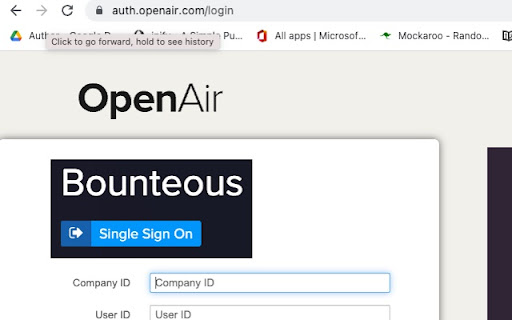
For Bounteous staff to fix some of the most annoying OpenAir usability issues.
Features:
1) Adds Bounteous SSO to OpenAir's login page.
2) Adds red background color on the Timesheet submission button hover.
3) Hides the "Save and Close" button on timesheet notes if the user doesn't first enter the hours worked. By default, if timesheet notes are entered without first entering hours, OpenAir will delete the notes if the user clicks the "Save and Close" button.
4) Adds a quick reference link to the "Where to log your time?" Confluence page.
5) Adds OpenAir session countdown timer to the footer so the user knows when their session is about to expire.
6) Greys out the background on Saturdays and Sundays to discourage accidental weekend entries.
7) Displays celebratory confetti upon timesheet submission.
8) For split weeks, blacks out dates where you cannot enter time and adds a tool tip explanation.
9) Removes the Oracle branded footer, giving you one extra row of working space.
| 分类 | 📝工作流程与规划 |
| 插件标识 | lcpgmdochehenfbeidmfhjjnmbhajchh |
| 平台 | Chrome |
| 评分 |
★★★☆☆
3.3
|
| 评分人数 | 29 |
| 插件主页 | https://chromewebstore.google.com/detail/bounteous-openair-helper/lcpgmdochehenfbeidmfhjjnmbhajchh |
| 版本号 | 1.4.4 |
| 大小 | 23.57KiB |
| 官网下载次数 | 175 |
| 下载地址 | |
| 更新时间 | 2023-01-17 00:00:00 |
CRX扩展文件安装方法
第1步: 打开Chrome浏览器的扩展程序
第2步:
在地址栏输入: chrome://extensions/
第3步: 开启右上角的【开发者模式】
第4步: 重启Chrome浏览器 (重要操作)
第5步: 重新打开扩展程序管理界面
第6步: 将下载的crx文件直接拖入页面完成安装
注意:请确保使用最新版本的Chrome浏览器
同类插件推荐

OpenAir Reborn
OpenAir time tracking with almost no teeth pulling

OpenAir Enhancement Suite
An accessability upgrade for Openair.OpenAir Enhan
Bounteous OpenAir Helper
For Bounteous staff to fix some of the most annoyi

Async Planning Poker for Jira
Async Planning Poker for JiraAsync planning poker

Adobe Experience Platform Debugger
Debug Adobe Experience Platform and Adobe Experien

Debugger for Adobe Analytics
Prints to JavaScript console what data is sent to

Datalayer Checker
The easiest way to debug and check the dataLayer i

dataslayer
Debug and test tag management (Google Tag Manager,

Da Vinci Tools
The Supermetrics Google Marketing Platform power t

Adswerve - dataLayer Inspector+
DataLayer Tools for Digital AnalystsThe Adswerve d

WASP.inspector: Analytics Solution Profiler
Digital analytics quality made easy▶ WASP.inspecto

Quick JIRA
Quickly opens the JIRA with the corresponding tick

Analytics Debugger
Your Single Source of Truth (SSOT) for debugging a