
AIskNet Chrome 插件, crx 扩展下载
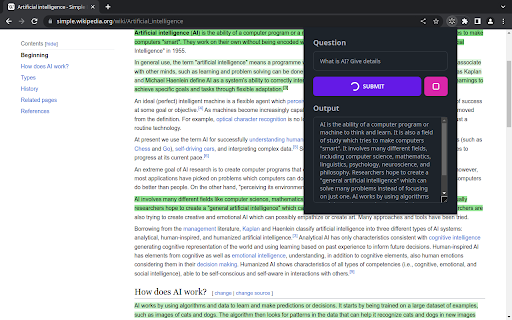
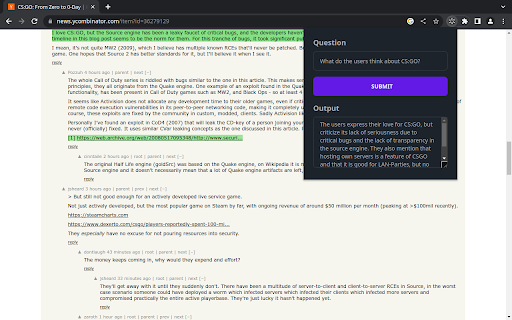

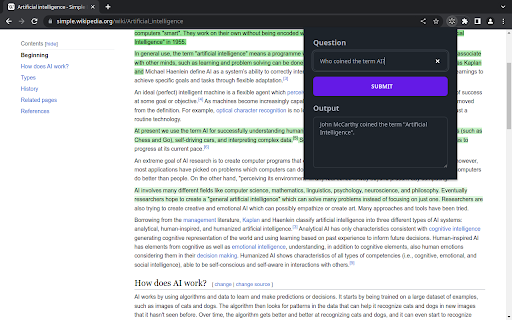
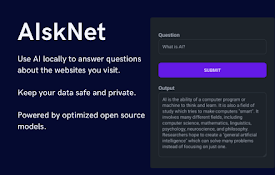
Locally-run AI that answers questions from your current webpage
Introducing "AIskNet" - a browser extension designed to enhance your browsing experience by leveraging open-source AI models locally. This extension fundamentally operates a local AI model that interacts with the content of your current web page, providing answers to your queries and thereby enabling quicker information gathering.
At its core, AIskNet employs state-of-the-art AI models optimized for compact size and efficiency. Operating directly on your local machine, this tool respects your privacy while autonomously employing advanced methods to retrieve information more accurately and swiftly.
Upon navigating to a new site and activating the extension icon, AIskNet automatically indexes the website content into "vector embeddings". When you pose a question, the extension sifts through these embeddings, identifying chunks of information most relevant to your query, and generates a response based on this information.
For transparency and accuracy, AIskNet highlights the text used as the source for generating its answers. This allows you to quickly double-check the answer's accuracy and form your own conclusions.
All data processed by this extension remains on your machine and is never transmitted to a remote server. The only instance where AIskNet interacts with remote servers is during the initial download of AI models upon installation.
AIskNet is a work in progress. With ongoing advancements in the field of artificial intelligence, it's expected to improve over time as more refined and compact open-source models become available. Currently, the model inference is carried out on the CPU, but future updates anticipate utilizing WebGPU to offload processing to your GPU. This will ensure an even more efficient and seamless user experience.
Source code: https://github.com/GarciaLnk/aisknet
| 分类 | 🛠️工具 |
| 插件标识 | liibjfofhopeoojijndnphmgkgfpcfbm |
| 平台 | Chrome |
| 评分 |
★★★★★
5
|
| 评分人数 | 2 |
| 插件主页 | https://chromewebstore.google.com/detail/aisknet/liibjfofhopeoojijndnphmgkgfpcfbm |
| 版本号 | 0.3.1 |
| 大小 | 4.72MiB |
| 官网下载次数 | 28 |
| 下载地址 | |
| 更新时间 | 2024-12-06 00:00:00 |
CRX扩展文件安装方法
第1步: 打开Chrome浏览器的扩展程序
第2步:
在地址栏输入: chrome://extensions/
第3步: 开启右上角的【开发者模式】
第4步: 重启Chrome浏览器 (重要操作)
第5步: 重新打开扩展程序管理界面
第6步: 将下载的crx文件直接拖入页面完成安装
注意:请确保使用最新版本的Chrome浏览器
同类插件推荐

sidellama
sidellamaSidellama is a tiny browser-augmented cha
Offline AI Chat (Ollama)
Chat interface for your local Ollama AI models. Re

MangoFlow: AI 对话侧边栏
上网冲浪的好副手,浏览网页的智能助手欢迎使用 MangoFlow,您的一键人工智能助手!MangoF

WebextLLM
Browser-native LLMs at your fingertipsUnleash the
HighlightX | AI Chat with Ollama, Local AI, Open AI, Claude, Gemini & more
HighlightX is a powerful chat app that connects yo
Smatr-AI | GPT LLM for browser
Be smarter by bringing AI power to your browser. S

Llama
释放Llama的力量:提高生产力,借助AI探索新领域。? Llama:您的Chrome智能助手 借

llama explain
Get an explanation from a llama (or another local

Chatty for LLMs
Helps you to chat and RAG with your LLMs via ollam
AIskNet
Locally-run AI that answers questions from your cu

SemanticFinder
SemanticFinder | In-browser Semantic Search via Tr

Semantic Search
Search webpages or entered text for the answers yo

AI-MultiPrompt
A Web Extension that allows to simultaneously subm