
Site Storage Backup Chrome 插件, crx 扩展下载
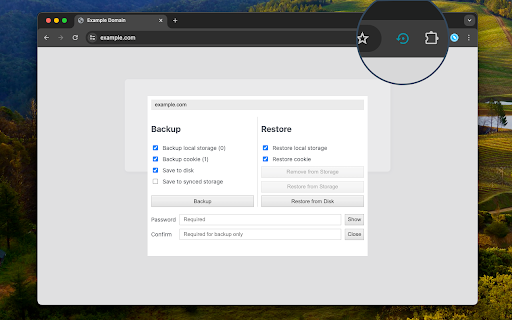
Backup your website and PWA local storage and cookies and restore them to another browser
This extension securely backs up a website's cookies and local storage into an encrypted file, allowing later recovery. It's a convenient tool for preserving a website's state post-login, enabling easy restoration after the browser refreshes or switches to a new profile. Additionally, the encrypted data can restore the state of a PWA application.
Features:
- The extension offers storage options in the browser's synced storage or local files.
- Uses SHA256 encryption to secure the stored data.
- For security purposes, if the password is forgotten, data recovery is impossible.
- Note that the success of restoration depends on the type of storage the website employs for local data. Testing restoration in a clean profile ensures the site's recoverability.
How to Use:
To back up a website, open it in a browser tab, proceed with login, and access the action button (which might be hidden in the extensions bar). Set and confirm a password, then click the backup button. The file, saved in ".enc" format, will be stored in your browser's default download directory.
For recovery, open the same website in a new browser or profile. Click the action button to access the interface, then select the recover option and browse for the "*.enc" file. The extension restores all cookies and local storage data and provides the option to redirect the page to its state at the time of backup. If you have been redirected to the login page, permit this action.
Privacy:
This extension operates entirely offline, ensuring that no data is sent or received from any server whatsoever.
| 分类 | 💻开发者工具 |
| 插件标识 | ljnlplamogokadgbnfjldcjfekckmdnd |
| 平台 | Chrome |
| 评分 |
★★★★★
5
|
| 评分人数 | 1 |
| 插件主页 | https://chromewebstore.google.com/detail/site-storage-backup/ljnlplamogokadgbnfjldcjfekckmdnd |
| 版本号 | 0.1.0 |
| 大小 | 40.92KiB |
| 官网下载次数 | 260 |
| 下载地址 | |
| 更新时间 | 2023-11-09 00:00:00 |
CRX扩展文件安装方法
第1步: 打开Chrome浏览器的扩展程序
第2步:
在地址栏输入: chrome://extensions/
第3步: 开启右上角的【开发者模式】
第4步: 重启Chrome浏览器 (重要操作)
第5步: 重新打开扩展程序管理界面
第6步: 将下载的crx文件直接拖入页面完成安装
注意:请确保使用最新版本的Chrome浏览器
同类插件推荐
Site Storage Backup
Backup your website and PWA local storage and cook

Cookie Backup and Restore
Backups and Encrypts all the cookies and Decrypts

YouTube Streams +
Adds a livestream preview to the YouTube channel l
Data Recovery
Professional data recovery, providing hard drive r

Storage Editor
Editor for Local Storage and Session Storage.You c

WebDataMaster
Export and import web site dataWebDataMaster is a

Storage Manager
An extension that manages the contents of LocalSto

StorageAce
轻松管理所选选项卡的 Cookie、本地存储和会话存储。StorageAce provides us

GetSet Local Storage & Session Storage
Get all the Local/Session Storage values of one do

Local Storage Manager
Manage your local storage variables in one single

Local Storage
A browser extension for managing local storage.Loc
Shweb
The easiest way to export or import any websites l

Extension Manager with Profiles
根据不同的配置文件禁用未使用的扩展程序,以释放其资源占用,并改善你的隐私。Extension man