
Crosslist Magic Chrome 插件, crx 扩展下载
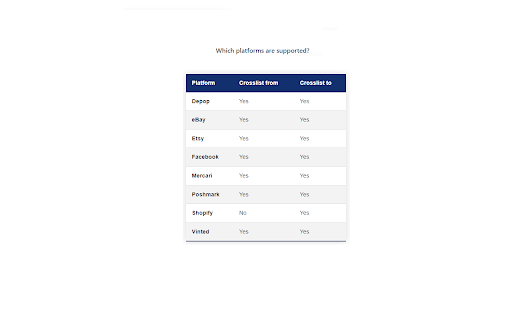
Cross-list between Depop, eBay, Mercari, Poshmark, Vinted and more!
Free for 7 days (no credit card required), then $9.99/month.
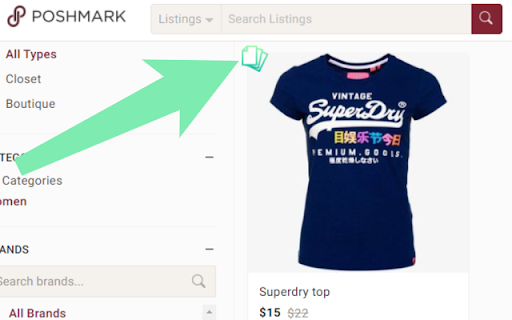
This extension puts a little "copy" icon in the top left corner of your Depop, eBay, Mercari, Poshmark and Vinted listings (check FAQ for full list of supported platforms). Clicking on this creates a draft listing on the other platforms that you can review and submit. Also supports relisting on the same platform.
Currently, the following fields are copied over to the draft:
1. Title
2. Description
3. Photos
4. Price
5. Category
6. Brand
7. Color
Support for Australian, Canadian and UK versions of above platforms is also available.
If you have discovered a possible bug, please send me an email with a link to the specific listing you are having trouble with. Screenshots are also welcome as they usually simplify finding the error.
| 分类 | 📝工作流程与规划 |
| 插件标识 | lkjldebnppchfbcgbeelhpjplklnjfbk |
| 平台 | Chrome |
| 评分 |
★★★★☆
4.8
|
| 评分人数 | 302 |
| 插件主页 | https://chromewebstore.google.com/detail/crosslist-magic/lkjldebnppchfbcgbeelhpjplklnjfbk |
| 版本号 | 0.0.286 |
| 大小 | 1.67MiB |
| 官网下载次数 | 4000 |
| 下载地址 | |
| 更新时间 | 2025-02-09 00:00:00 |
CRX扩展文件安装方法
第1步: 打开Chrome浏览器的扩展程序
第2步:
在地址栏输入: chrome://extensions/
第3步: 开启右上角的【开发者模式】
第4步: 重启Chrome浏览器 (重要操作)
第5步: 重新打开扩展程序管理界面
第6步: 将下载的crx文件直接拖入页面完成安装
注意:请确保使用最新版本的Chrome浏览器
同类插件推荐

Debump
Debump is a chrome extension that helps Depop sell

Closet Pixie | Your Poshmark Bot
Your assistant to grow your Poshmark sales.? Hey y

Crosslister - SellerAider
Crosslist to Marketplaces & Manage InventoryCr

Bot for Depop - Grow - SellerAider
Our Bot will help you start making sales quicker t

Cross-listing & Poshmark Tool by PrimeLister
Cross-listing and Poshmark Automation Tool. Crossl

Poshmark | PosherVA
A Poshmark automated virtual assistant that helps

Vendoo Extension v3
Connect to third party marketplacesThe Go-To Cross

Crosslist
Crosslist allows sellers to list quickly on the wo

Crosslist Tool - Crosslisting Tool
Cross-list on multiple marketplaces with the best

ClosetWitch | Poshmark Magic
Relist from scratch, share in bulk. Just In: your
Crosslist Magic
Cross-list between Depop, eBay, Mercari, Poshmark,

Cross Listing Tool - CrossLister
Cross list items to multiple marketplaces.CrossLis