
Form Vault Chrome 插件, crx 扩展下载
Autosave every change you make to a form so you can easily recover lost data, and create templates to fill out forms instantly.
Form Vault gives you the ability to save form templates and recover lost form data from any webpage. You can also fill out timesheets, job applications, and other forms that you fill out often with just the click of a button! If you’ve ever had a oh $#@*& moment and lost everything you typed into an online form, then this extension is just for you. If not, use this extension to avoid this!
Current features:
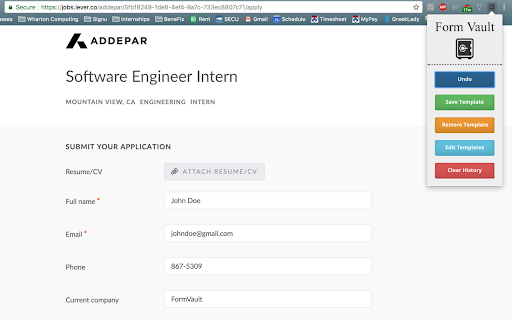
* The ‘Undo’ button will restore autosaved form data for a particular site. Every change to a webpage form is stored locally on your chrome browser and can be restored through this function.
* The ‘Save Template’ button will create a template of current site’s form data. As long as the user has ‘sync’ enabled on their chrome browser, this data will persist offline and across different devices. Note that this button will overwrite previously saved templates.
* The ‘Restore Template’ button will retrieve the template saved to the site’s domain and fill the template data into the appropriate fields on the form.
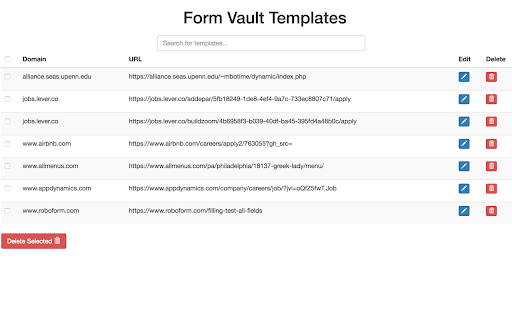
* The ‘Edit Templates’ button will open a new webpage with a table displaying all the user’s currently saved templates. Users can edit and delete templates from this page.
* The ‘Clear History’ button will clear all history - templates and auto-saved data. This data cannot be recovered.
* Works for all text elements, select drop-downs, radio buttons, and checkboxes.
--------------------------------------------------------------
Notice: This extension won't save any personal data. All data is either stored locally on your computer, or synced with your gmail account. This extension will also not save or recover any fields with the name 'Password' or anything similar.
Git Repo: https://github.com/drewsb/FormVault
| 分类 | 📝工作流程与规划 |
| 插件标识 | lmhpmojffnpndeejifmkicggnilnlfem |
| 平台 | Chrome |
| 评分 |
★★★★☆
4.4
|
| 评分人数 | 754 |
| 插件主页 | https://chromewebstore.google.com/detail/form-vault/lmhpmojffnpndeejifmkicggnilnlfem |
| 版本号 | 1.1.3 |
| 大小 | 342KiB |
| 官网下载次数 | 4000 |
| 下载地址 | |
| 更新时间 | 2022-01-12 00:00:00 |
CRX扩展文件安装方法
第1步: 打开Chrome浏览器的扩展程序
第2步:
在地址栏输入: chrome://extensions/
第3步: 开启右上角的【开发者模式】
第4步: 重启Chrome浏览器 (重要操作)
第5步: 重新打开扩展程序管理界面
第6步: 将下载的crx文件直接拖入页面完成安装
注意:请确保使用最新版本的Chrome浏览器
同类插件推荐

FormAssistant - Save & Restore
This extension is used by web developers to make i

Formalizr
Remembers what you type in web pages to be able to

Form Vault
Autosave every change you make to a form so you ca

Web Developer Form Filler
This extension is used by developers to make it ea

Form History Control (II)
Manage form history entries (search, view, edit, c

Auto Form Filler
This extension will help delvelopers to fill rando

WebApp Form Filler
Automatically fills forms in your web applications

Quick Form Filler
Provides a context menu to fill forms quickly.Vers

Lightning Autofill
The most popular autofill extension, boosting prod

Simple Form Fill
Enter text into input fields by choosing items fro

AutoFill Forms
一键式表格填充器,支持多个配置文件和正则表达规则“自动填充表单”扩展程序是一个易于使用的自动Web表

AutoFormer+
该扩展可以载入已保存的数据到表单。载入数据是自动的,而保存数据是手动的(只需要点击鼠标两次)Auto

Fake Filler
A form filler that fills all inputs on a page with