
BigQuery Cost Estimator Chrome 插件, crx 扩展下载
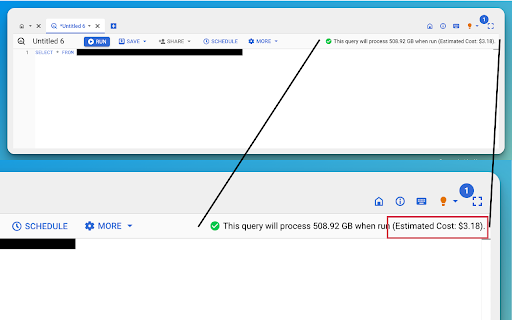
Estimates BigQuery spend based on processed data
Effortlessly keep track of your Google BigQuery spending right from the console! The BigQuery Cost Estimator extension seamlessly integrates into the Google BigQuery Console and provides real-time cost estimates based on the amount of data processed by your queries.
Features:
1. Instant Estimates: No need for manual calculations. As soon as you craft a query, get an immediate cost projection.
2. Accurate Pricing: Estimates are based on Google's standard BigQuery pricing, ensuring accuracy in the costs displayed.
3. Intuitive Integration: Works directly within the Google BigQuery Console. No separate app or dashboard.
Usage:
Just activate the extension and navigate to the Google BigQuery Console. When creating or analyzing a query, look for the "Estimated Cost" notation next to the data processed details.
Optimize your BigQuery usage, avoid unexpected bills, and ensure your projects stay within budget with the BigQuery Cost Estimator.
Calculation: the calculation uses the 6.25$ per TB indicated in the bigquery on-demand pricing https://cloud.google.com/bigquery/pricing#on_demand_pricing.
Code:
You can find the code in github here: https://github.com/carmignanivittorio/BigQuery-Cost-Estimator/tree/main
Privacy Policy:
https://github.com/carmignanivittorio/BigQuery-Cost-Estimator/blob/main/PrivacyPolicy.md
| 分类 | 💻开发者工具 |
| 插件标识 | mampjdchejcfcggmeokhgcaaldojomep |
| 平台 | Chrome |
| 评分 |
★★★★☆
4.3
|
| 评分人数 | 23 |
| 插件主页 | https://chromewebstore.google.com/detail/bigquery-cost-estimator/mampjdchejcfcggmeokhgcaaldojomep |
| 版本号 | 1.2 |
| 大小 | 17.64KiB |
| 官网下载次数 | 814 |
| 下载地址 | |
| 更新时间 | 2023-09-27 00:00:00 |
CRX扩展文件安装方法
第1步: 打开Chrome浏览器的扩展程序
第2步:
在地址栏输入: chrome://extensions/
第3步: 开启右上角的【开发者模式】
第4步: 重启Chrome浏览器 (重要操作)
第5步: 重新打开扩展程序管理界面
第6步: 将下载的crx文件直接拖入页面完成安装
注意:请确保使用最新版本的Chrome浏览器
同类插件推荐

DataHub Chrome Extension
View DataHub insights about data quality, ownershi

BigQuery Cost Estimator
Estimates BigQuery spend based on processed dataBi
BigQuery Cost Estimator
Estimates BigQuery spend based on processed dataEf

superQuery - BigQuery AI optimization engine
Powerful BigQuery IDE powered by AI that turns dat

BigView for BigQuery
Get a bigger view on the BigQuery consoleTurn the

GA4BQ™ - GA4 BigQuery SQL Generator
GA4BQ™ - SQL generator for Google Analytics 4 on G

Omnibug
Omnibug is a browser extension to decode and displ

BigQuery Mate
Companion tool for Google BigQuery UI used by myse

Debugger for Google Analytics 4 (GA4)
Browser DevTools extension for debugging Google An

Da Vinci Tools
The Supermetrics Google Marketing Platform power t

BigQuery Redesign
Improves the BigQuery UXImproves the BigQuery user

Adswerve - dataLayer Inspector+
DataLayer Tools for Digital AnalystsThe Adswerve d

Analytics Debugger
Your Single Source of Truth (SSOT) for debugging a