
MiniMC Chrome 插件, crx 扩展下载
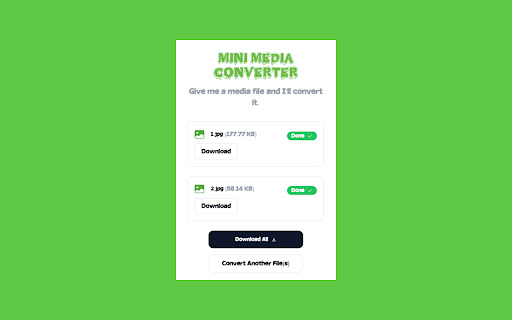


Mini Media Convertor
❇️ Mini Media Converter, affectionately known as Mini-MC, is a versatile and robust software designed to empower users with seamless multimedia conversion capabilities. MiniMC excels at transforming various media formats, catering to a wide range of needs for image, video, and audio files. This open-source gem effortlessly handles the conversion of images, videos, and audio files with utmost efficiency.
? Offline Conversion: One of Mini-MC's standout features is its complete offline functionality. No internet connection is required, as all conversions take place on the client side. Your files remain secure and private, with no data sent to external servers, guaranteeing your data's confidentiality and safety.
?️ Image Conversion: Mini-MC is your reliable companion for converting a myriad of image formats, including JPG, JPEG, PNG, GIF, BMP, WebP, ICO, TIF, TIFF, SVG, RAW, TGA, and more. No matter the source format, MiniMC ensures your images are easily tailored to your preferences.
? Video Conversion: Whether you're dealing with MP4, M4V, MP4V, 3GP, AVI, MOV, WMV, MKV, FLV, OGV, WebM, H.264, or H.265 video files, MiniMC effortlessly transcodes them into your desired format, enabling compatibility with various devices and platforms.
? Audio Conversion: Enjoy the freedom to convert your audio files, including MP3, WAV, OGG, AAC, WMA, FLAC, and M4A. MiniMC allows you to modify audio formats with ease, ensuring your music and sound files are compatible with your preferred media players and devices.
? Open Source: Mini-MC is proudly open source, meaning it is a community-driven project that welcomes contributions from developers and enthusiasts. Its open nature promotes transparency and customization, allowing users to tailor the software to their specific needs.
| 分类 | 🛠️工具 |
| 插件标识 | mbnaeflecnnmflflfihjdhgbkofbmgod |
| 平台 | Chrome |
| 评分 |
★★★★★
5
|
| 评分人数 | 9 |
| 插件主页 | https://chromewebstore.google.com/detail/minimc/mbnaeflecnnmflflfihjdhgbkofbmgod |
| 版本号 | 0.1.0 |
| 大小 | 10.1MiB |
| 官网下载次数 | 144 |
| 下载地址 | |
| 更新时间 | 2023-10-30 00:00:00 |
CRX扩展文件安装方法
第1步: 打开Chrome浏览器的扩展程序
第2步:
在地址栏输入: chrome://extensions/
第3步: 开启右上角的【开发者模式】
第4步: 重启Chrome浏览器 (重要操作)
第5步: 重新打开扩展程序管理界面
第6步: 将下载的crx文件直接拖入页面完成安装
注意:请确保使用最新版本的Chrome浏览器
同类插件推荐
Handbrake - 视频转换器
将视频从几乎任何格式转换为一系列广泛支持的现代编解码器。此扩展允许用户使用 Handbrake 软件
MiniMC
Mini Media Convertor❇️ Mini Media Converter, affec

Minimalist Fullscreen
This extension is a minimalists dream. Simply shif

PRMDB for Bard-Gemini
Create public and private custom prompts for Googl

Easy Clean
一键快捷清理浏览器缓存,且在关闭浏览器后自动清理缓存,保护您的隐私安全。一键快捷清理浏览器缓存,同时

wide.video
Free Online Video Editorwide.video, a free online
1-click quality for Twitch
Adds buttons to change qualities with one click.Ad

BeanShot: Capture Stunning Screenshots Effortlessly
Taking Beautiful Screenshots Has Never Bean That E

Tab Manager
Quickly find open tabs, see all windows in one vie

MultiCopies
Easy to Copy, Paste & Create Documents - Clipb

Focus Search
Automatically focuses the search bar of websites a
YouTube Search Bar
Avoid YouTube home screento be able to concentrate

Search Social Media
Search selected text in Youtube, Facebook, Twitter