
AnySnooze Chrome 插件, crx 扩展下载
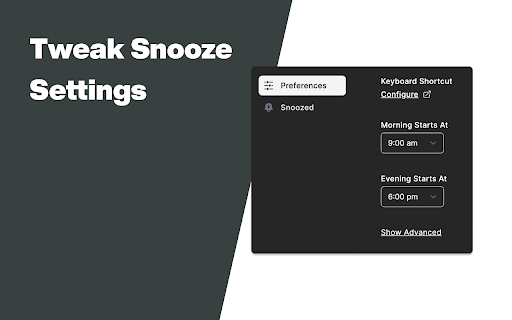
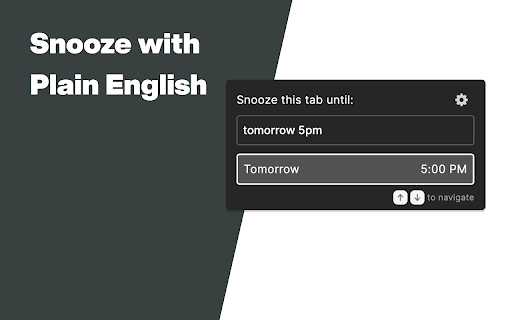

Breeze through snoozing your tabs with plain English
Give your browser (and yourself) some headspace!
Be more productive in your day-to-day online workspace by quickly snoozing non-pressing browser tabs to later times.
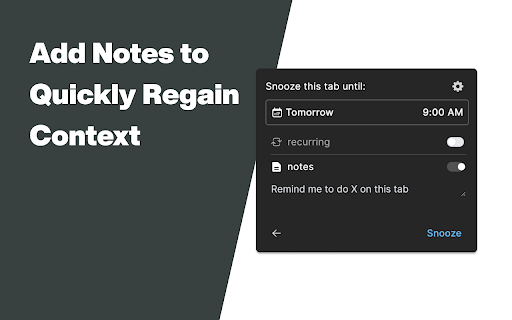
AnySnooze Chrome Extension suggests desired snooze date & time from just plain English, allowing you to snooze through each tab at the speed of thought. Each snooze can be annotated with a custom note so you can instantly regain context later.
➤ Example Snoozes
"Tomorrow 8am"
"In 2 days 5pm"
"2 weeks from now"
"Next Wednesday"
"This Weekend"
"In a month"
"Thursday Evening"
"10m" ->In 10 minutes
"2h" -> In 2 hours
"3w 9pm" -> In 3 weeks at 9pm
➤ What’s included?
~ Free
The free version of AnySnooze includes the core functionalities to help you snooze tabs quicker than ever before.
• Supports parsing dates & times in natural language
• A wide range of date & time shortcuts
• Recurring snoozes
• Annotate snoozes to quickly regain context later
• Date & time preferences for snoozing
~ AnySnooze+ (Sign up on our website to be notified of availability)
AnySnooze+ plan includes everything available for free, plus an expanded range of features to help you be more productive in your online workspace.
• Undo Last Snoozed
• Smart Snoozes: Pick from suggested snooze options based on your snoozing activity.
• Quick Snooze: Instantly snooze a recently un-snoozed tab
• Analytics: See usage patterns
• ...and many more features are being planned!
➤ FAQ
Visit https://www.anysnooze.com/#faq
➤ For General Questions
You can reach us at [email protected]
➤ For Issues or Feedback
Please visit https://www.anysnooze.com/support
----------------------------------------------------------------------------------------------------------------------------
By installing the extension, you agree to AnySnooze's Terms of Service (https://www.anysnooze.com/terms.html) and acknowledge that you have read AnySnooze's Privacy Policy (https://www.anysnooze.com/privacy.html).
| 分类 | 📝工作流程与规划 |
| 插件标识 | mebjcmajkcccdjbonefhlbkledilfnjj |
| 平台 | Chrome |
| 评分 |
★★★★★
5
|
| 评分人数 | 2 |
| 插件主页 | https://chromewebstore.google.com/detail/anysnooze/mebjcmajkcccdjbonefhlbkledilfnjj |
| 版本号 | 1.0.4 |
| 大小 | 4.33MiB |
| 官网下载次数 | 54 |
| 下载地址 | |
| 更新时间 | 2022-11-22 00:00:00 |
CRX扩展文件安装方法
第1步: 打开Chrome浏览器的扩展程序
第2步:
在地址栏输入: chrome://extensions/
第3步: 开启右上角的【开发者模式】
第4步: 重启Chrome浏览器 (重要操作)
第5步: 重新打开扩展程序管理界面
第6步: 将下载的crx文件直接拖入页面完成安装
注意:请确保使用最新版本的Chrome浏览器
同类插件推荐

AnySnooze
Breeze through snoozing your tabs with plain Engli

Multi Monitor Tab Positioner
Chrome extension that allows tab positioning in mu

CC/BC SKU Widget
Instantly copy SKUs and check stock on the Competi

Full Text Tabs Forever
Search your full browsing historySearch everything
Bamboo Bulk
This extension automates the process of entering w

TIO Syntax Highlighter
Syntax highlighter for Try It Online (https://tio.

Friendzy
Browse friendzy directly from twitter!Find your fa

20Q Text Converter with AI
Enhance text editing: remove accents, filter chara

HintEd Smart Manuals Editor
Build an interactive onboarding and training exper

Vind: Keyboard Shortcuts for Every Website
Create keyboard shortcuts for any web element. Boo

BoostPic - Search Google Images on the fly
Uncover the possibility to search Google Images qu

Stop It Grandpa
Prevents grandpa from lookin' at his favorite

Team Bookmarks
Conquer Bookmark Chaos: Boost Team Efficiency. Spe