
xFanatical Safe Doc Chrome 插件, crx 扩展下载

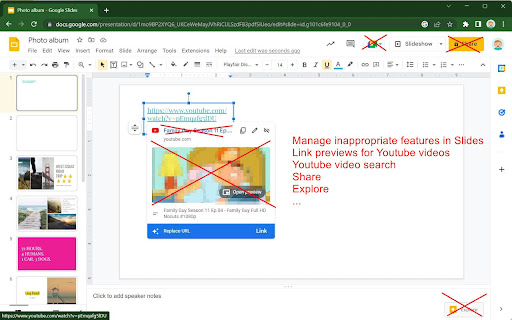
xFanatical Safe Doc smooths the way for schools managing Google Workspace for Education features (Docs, Sheets, Slides, Classroom,…
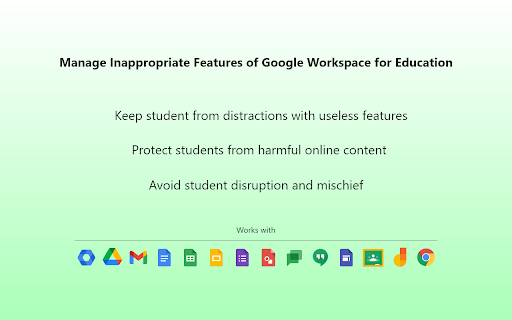
xFanatical Safe Doc smooths the way for schools managing Google Workspace for Education features (Docs, Sheets, Slides, Classroom, Drive etc.) that Google Admin Console doesn't provide. It protects your students from inappropriate content and prevent your students from misusing certain features to disrupt classrooms.
=====================================
Features
=====================================
In Google Docs Editors
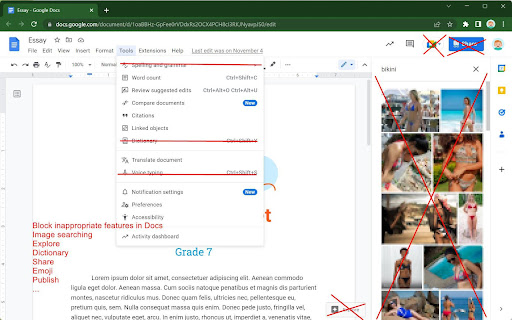
► Block the image searching feature
► Block Youtube video searching feature
► Block the Dictionary feature
► Block inappropriate emojis, e.g. the middle finger emoji, poop emoji or knife emoji.
► Block inserting GIFs and stickers
► Block inserting images by URLs into Docs
► Block the "Publish to the web" feature
► Block the "Email this file" feature (formerly "Email as attachment")
► Block the "Email collaborators" feature
► Disable spell & grammar checking
► Disable the voice typing feature
► Disable the "Translate document" feature
► Disable the "Make a copy" feature
► Disable the Comment feature
► Block certain web-linked functions in Sheets, e.g. IMPORTDATA, IMPORTFEED, IMPORTHTML, IMAGE etc.
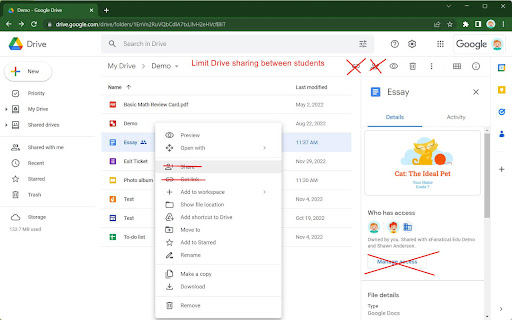
► Stop students from sharing Drive files with each other
► Disable the chat feature when multiple users join in the same document
In Google Classroom
► Remove the "People" tab to protect students' privacy
► Block preview pop ups for unsafe links, and the link preview in Stream > Add Link
► Disable students unsubmitting / resubmitting / late turning in / empty turning in assignment works
In Google Search
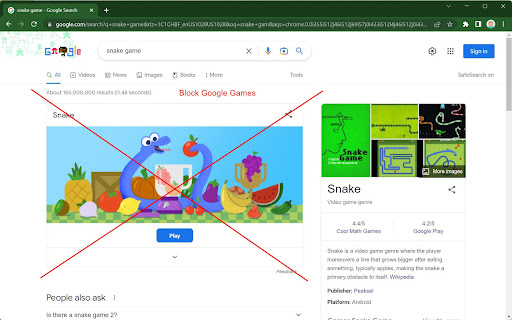
► Block distracting doodle games and toys
► Block Youtube embedded videos in Google Search results
► Block doodles in the search home page and search result pages.
In Google Meet
► Stop students from adding external people
► Hide student identities (full names) for privacy protection
► Remove phone joining options to prevent unauthorized external people from joining the session.
► Block students rejoining old unsupervised meetings (meetings without a nickname and open for students to join)
Generally
► Support configurations for different age groups. Admins can decide which features in GSFE to be disabled or enabled
► Support Managed Chromebooks and Chrome browsers on Windows and Mac
► Support US and UK English
Discover all the xFanatical Safe Doc policies that simply your feature management in Google Workspace for Education. https://xfanatical.com/blog/safe-doc-configuration/#safe-doc-policy-list.
------------------------------
Quick Start
For home use ?
► Login your Chrome profile using an @gmail account and turn on sync.
► Click [Add to Chrome] above to install the extension.
► You will be popped up with guidelines.
► Not all features not
For school use ?
► Request a license in https://xfanatical.com/product/safe-doc/#trial
► Deploy xFanatical Safe Doc in your test OU.
► Configure and explore the features
Pricing
► FREE for any @gmail accounts.
► $899/year for a single student domain with unlimited users, product updates and premier support. See more details in the xFanatical Safe Doc Pricing page https://xfanatical.com/product/safe-doc/#pricing
► Get a 30-days trial license at https://xfanatical.com/product/safe-doc/#trial
Support?
► Self service help documentation at https://xfanatical.com/product/safe-doc/support
► Email us at [email protected] or https://xfanatical.com/contact-us/
► Join xFanatical Safe Doc community (Google Group). Ask questions, request features, report issues and receive software update news. https://groups.google.com/a/xfanatical.com/g/safedoc-community
Google Workspace is a trademark of Google LLC. Use of this trademark is subject to Google Permissions.
| 分类 | 📚教育 |
| 插件标识 | mmhppocgfdombmapajfeafhecobfcjpk |
| 平台 | Chrome |
| 评分 |
★★★☆☆
3.4
|
| 评分人数 | 35 |
| 插件主页 | https://chromewebstore.google.com/detail/xfanatical-safe-doc/mmhppocgfdombmapajfeafhecobfcjpk |
| 版本号 | 1.51.2 |
| 大小 | 737KiB |
| 官网下载次数 | 700000 |
| 下载地址 | |
| 更新时间 | 2025-02-28 00:00:00 |
CRX扩展文件安装方法
第1步: 打开Chrome浏览器的扩展程序
第2步:
在地址栏输入: chrome://extensions/
第3步: 开启右上角的【开发者模式】
第4步: 重启Chrome浏览器 (重要操作)
第5步: 重新打开扩展程序管理界面
第6步: 将下载的crx文件直接拖入页面完成安装
注意:请确保使用最新版本的Chrome浏览器
同类插件推荐

Meet Chat Transcribe
Transcribe Google Meet Chats to a Google Doc.Trans

Google Meet Presenter Mode
Choose whether you can be muted while presenting i
xFanatical Safe Doc
xFanatical Safe Doc smooths the way for schools ma

Google Meet Controls
Control your microphone manners for MeetThis is a

Google Meet Attendance
Save the time joined and left of all attendees wit

Mute All on Meet
Mute all users on Google Meet.Mute all user on Goo

TurboMeet - Turbocharge your Google Meet
Adding productivity features to Google Meet to enh

Meet Mute
Easy muting/unmuting for when you're in a Goog

Easy Mute for Google Meet
A simple extension for mute/unmute Google Meet cal

Meet Plus for Google Meet
Breakout rooms,attendance,dark mode,chat,emojis,re

Google Meet 增强套件
Google Meet 有 40 项新功能,例如全部静音、全部移除、自动承认、表情符号、镜像视频、背

Google Meet Push-To-Talk
Hold <space> in Google Meet to talk instead
Google Meet Attendees & Breakout Rooms
Easily get everyone attending a Google Meet and co