
Tab Tree Chrome 插件, crx 扩展下载
Simplify the way to maintain n+1 tabs when you focus on your thinking
FIRST TIME INSTALL NEED TO RESTART BROWSER
Background:
Sometimes it is quite normal to open tons of tons of websites to find out the sources that you want.
Yet after you get your answers, you probably realize what mess you just created.
To me, I am completely lost and I don't want to make a decision to delete or organize the website.
Then I decided to just leave it there, and move on to the next thing I was interested in.
But the thing is, I got to take a look among the wreckage often to remind me of what I had just found and try to go through all of the tabs to search for useful information.
When I found them, maybe I already forgot why I would need them.
Repeated searching for ideas and websites constantly really drives me crazy.
This project is open-source and non-profit, posted on github(Tab-Tree)
Pure Javascript, feel free to give me advice to improve this extension.
______________________________________________________________________________________________
Handbook:
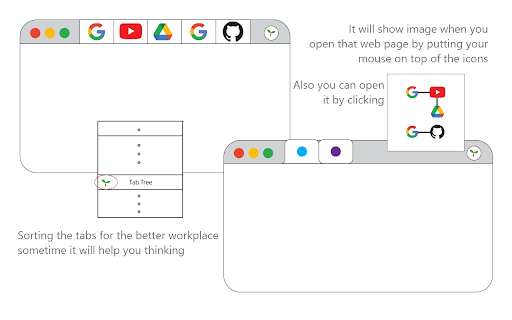
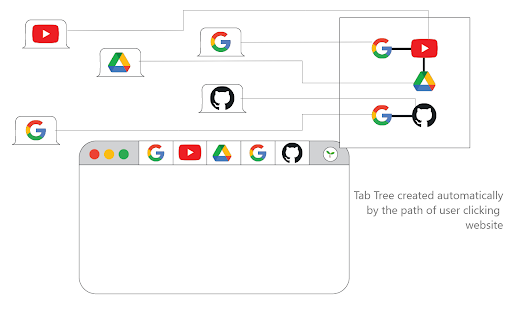
Auto Group the website/tab -> right-click anywhere -> Tab Tree
Map of tabs -> (pin the icon to the taskbar of chrome first) click the icon
The map records the path that you create or click.
May this help you to organize the browser, and close the unnecessary web. Focus on and continue your journey:D
| 分类 | 📝工作流程与规划 |
| 插件标识 | mmjldigjeknijijcnnbepkmlopfignmd |
| 平台 | Chrome |
| 评分 |
★★★★☆
4.2
|
| 评分人数 | 40 |
| 插件主页 | https://chromewebstore.google.com/detail/tab-tree/mmjldigjeknijijcnnbepkmlopfignmd |
| 版本号 | 1.0 |
| 大小 | 12.53MiB |
| 官网下载次数 | 22 |
| 下载地址 | |
| 更新时间 | 2022-06-01 00:00:00 |
CRX扩展文件安装方法
第1步: 打开Chrome浏览器的扩展程序
第2步:
在地址栏输入: chrome://extensions/
第3步: 开启右上角的【开发者模式】
第4步: 重启Chrome浏览器 (重要操作)
第5步: 重新打开扩展程序管理界面
第6步: 将下载的crx文件直接拖入页面完成安装
注意:请确保使用最新版本的Chrome浏览器
同类插件推荐

Tab Tree
Simplify the way to maintain n+1 tabs when you foc

Smart Tab by NoteGPT - AI 智能标签知识管理器
收集并管理你的浏览器标签/链接。借助AI理解、学习、发现新的洞察。创建你的个人AI知识库。你是否疲惫

Tab Nodes Tree
Effortlessly navigate and organize your tabs with

NaviTab-侧边栏树状Tab管理
标签管理1.3.2 版本修复标签页读取失败的问题 增加快捷键: Windows Art+x 呼出

Super Focus Tabs
Quickly find out tab/page. Reduce much more time w

Tab Tag Tree
Organize tabs into a tree structure and tag them f

Forest: Tree Style Tab Manager
Display tabs in a tree-like hierarchical structure

Tree Style Tab
A tree style tab navigatorRefer https://github.com

Tab Tree
Tree view for your browser tabshttps://github.com/

TabTree
Sort your tabs and show them as a tree.Your browse

tabFlow - tabgroups in tree style
Tab groups manager in tree style. Never lose tabgr

Tab Manager in Side Panel
Compatible with built-in and adds more easy-to-use
Link Map
⭐Link Map - 专业标签管理工具,构建自己的链接收藏夹Link Map是一个浏览器标签侧边栏