
YouTube Shorts Watch Buddy Chrome 插件, crx 扩展下载
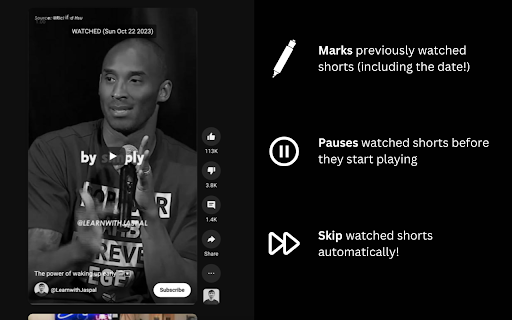
Marks the YT Shorts you've watched before and optionally, skip them automatically
A helpful little extension for YouTube Shorts!
Mainly, it remembers the shorts you've watched and marks them for you (including when you watched it). You can also set the option to automatically skip previously watched shorts.
Setup instructions:
1. Download the extension
2. Start browsing, that's it!
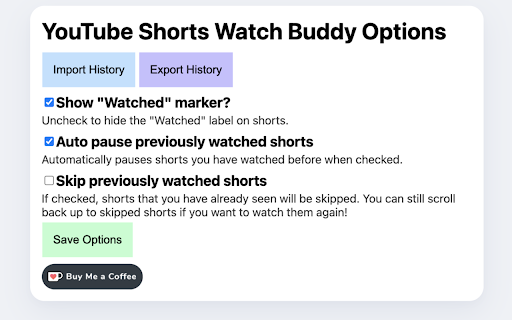
By default, skipping previously watched shorts is off, you can configure that in the Options page (Click the extension icon -> Options -> Don't forget to save!).
If a short is automatically skipped, you can still scroll back up to watch it again if you want.
If you need to move history between devices, the Options page lets you export and import history files.
Feel free to let me know if you have any improvements or feature requests you'd like to see!
If you like this plugin and would like to support me: https://ko-fi.com/rexthebuilder
| 分类 | 🛠️工具 |
| 插件标识 | mncbkjdlnjnanohmijglcaigomjjpkkp |
| 平台 | Chrome |
| 评分 |
★★★★★
5
|
| 评分人数 | 2 |
| 插件主页 | https://chromewebstore.google.com/detail/youtube-shorts-watch-budd/mncbkjdlnjnanohmijglcaigomjjpkkp |
| 版本号 | 1.1 |
| 大小 | 24.01KiB |
| 官网下载次数 | 31 |
| 下载地址 | |
| 更新时间 | 2023-10-30 00:00:00 |
CRX扩展文件安装方法
第1步: 打开Chrome浏览器的扩展程序
第2步:
在地址栏输入: chrome://extensions/
第3步: 开启右上角的【开发者模式】
第4步: 重启Chrome浏览器 (重要操作)
第5步: 重新打开扩展程序管理界面
第6步: 将下载的crx文件直接拖入页面完成安装
注意:请确保使用最新版本的Chrome浏览器
同类插件推荐

Classic View for YouTube Shorts
Watch YouTube Shorts in full screen view. Pin it t

Youtube Helper
Sometimes you may want to remove or disable some r
YouTube Shorts Watch Buddy
Marks the YT Shorts you've watched before and

Lazy Skip | Bot To Auto Remove All YouTube Ad
Web extension that removes all YouTube ads without

Youtube Modal Hider
Hide the modal blocking video playback before they

ULTRA DISLIKE YouTube Shorts
Ultra Dislike button for YouTube Shorts. Enables s

Watchmarker for Youtube
Automatically mark videos on Youtube that you have

Miracle Cache Cleaner
Clean your browser history, cache and cookies in j
Watched It!
YouTube Extension to keep track of the videos you

History quick view
View, delete and search browsing history dataView,

YouTube Watched Marker
Easily mark the YouTube videos you watched as watc

Markers
Add mark as seen buttons to your favorite websites
YouTube WATCHED. Classic View
This extension adds a WATCHED mark to the preview