
Rapid7 AppSec Plugin Chrome 插件, crx 扩展下载

Rapid7 AppSec Plugin
The Rapid7 AppSec plugin works with Rapid7 InsightAppSec and AppSpider dynamic application security testing solutions to improve application scanning coverage and assist in validating vulnerabilities with these capabilities:
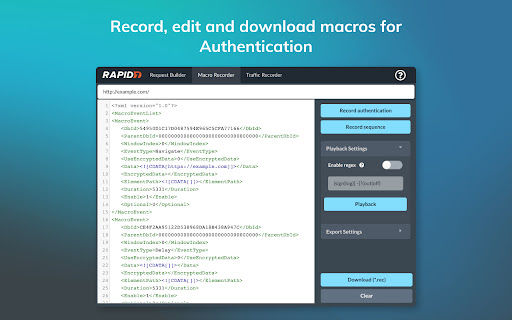
Macro Recording - Use the plugin to record macros required by InsightAppSec and AppSpider Enterprise when selecting the Macro Authentication scan configuration. Macro Authentication enables the crawling engine of InsightAppSec and AppSpider to authenticate with complex login workflows.
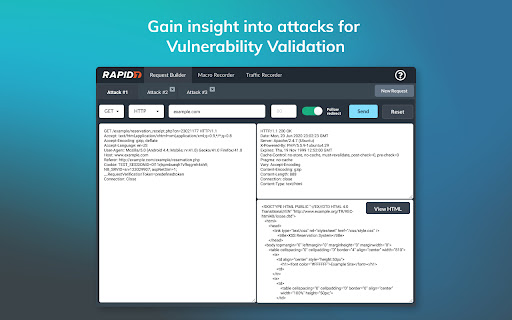
Vulnerability Validator - Use the vulnerability validator in conjunction with the Attack Replay feature in InsightAppSec and AppSpider. This feature of the Chrome plugin enables users to replay and edit recorded traffic generated during an InsightAppSec or AppSpider scan.
Bootstrap Authentication - The Chrome plugin is required to use AppSpider Enterprise's Bootstrap Authentication feature, which gives the user the ability to interactively login to the target application during an active scan. Used for login workflows that require human interaction for example 2FA (Two-factor authentication).
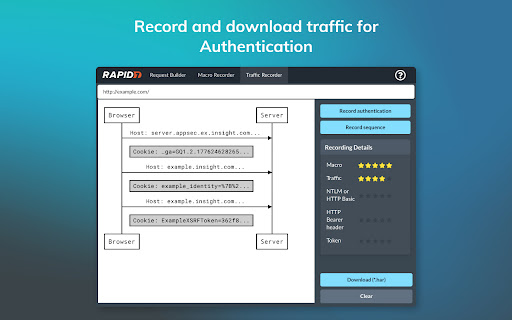
Traffic Recorder - Record the interactions (like HTTP GET and POST requests) between the front end application and the back end server in a Traffic File. InsightAppSec can replay these interactions to authenticate into your application.
For support related to this plugin, please contact [email protected]
| 分类 | 💻开发者工具 |
| 插件标识 | mnmlipalillmakdiildpclhocfgcddnp |
| 平台 | Chrome |
| 评分 |
★★★★☆
4.2
|
| 评分人数 | 31 |
| 插件主页 | https://chromewebstore.google.com/detail/rapid7-appsec-plugin/mnmlipalillmakdiildpclhocfgcddnp |
| 版本号 | 4.6.8 |
| 大小 | 23.55MiB |
| 官网下载次数 | 9000 |
| 下载地址 | |
| 更新时间 | 2024-05-02 00:00:00 |
CRX扩展文件安装方法
第1步: 打开Chrome浏览器的扩展程序
第2步:
在地址栏输入: chrome://extensions/
第3步: 开启右上角的【开发者模式】
第4步: 重启Chrome浏览器 (重要操作)
第5步: 重新打开扩展程序管理界面
第6步: 将下载的crx文件直接拖入页面完成安装
注意:请确保使用最新版本的Chrome浏览器
同类插件推荐

Tenable.io Web Application Scanning
This extension helps you easily create and manage
Qualys Browser Recorder
Qualys Browser Recorder is a free browser extensio

retire.js
Scanning website for vulnerable js librariesScan a

IP, DNS & Security Tools | HackerTarget.com
Quick access to IP, DNS & Network Tools. Check
Rapid7 AppSec Plugin
Rapid7 AppSec PluginThe Rapid7 AppSec plugin works

Burp Suite Navigation Recorder
Improve your Burp Suite scan coverage by manually

Recorded Future
The Recorded Future Browser Extension provides rea

Cyber Web Tools
Chrome extension to analysis your website security

Pulsedive Threat Intelligence
Highlight IPs, domains, and URLs on any website to

Vulners Web Scanner
Tiny vulnerability scanner based on vulners.com vu

HackBar
A browser extension for Penetration Testing## Cont

OWASP Penetration Testing Kit
OWASP Penetration Testing KitThe Penetration Testi

Shodan
The Shodan plugin tells you where the website is h