
Enable Copy Paste & Right Click Chrome 插件, crx 扩展下载

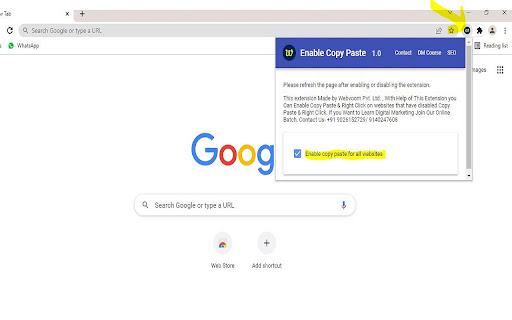


Enable Copy Paste & Right Click on websites that have disabled Copy Paste & Right Click.
Enable Copy Paste & Right Click on websites that have disabled copy paste & Right Click.
How to use this Extension:
- Click on the extension icon
- Pin Icon For Easy Use
- After a popup is opened, use the “Enable copy paste for all websites” checkbox.
- Refresh the page and see if the extension has successfully enabled copy paste & Right Click functionality on the website.
Step for Disable Extension-
- Click on the extension icon.
- After a popup is opened, UNTICK checkbox “Enable copy paste for all websites”.
This Extension Made for Enable Copy Paste and Right Click from Disabled Copy Paste & Right Click Website.
For any Doubt & More Digital Marketing Tricks Visit Our YouTube Channel - webvoom . Where We Explains How to Use Our Extension and Many More Interesting Tricks
I hope you like it, and please review it if you're happy with it!
| 分类 | 📝工作流程与规划 |
| 插件标识 | moomnncijchljipbmkiblfbaaldinhde |
| 平台 | Chrome |
| 评分 |
★★★★☆
4.5
|
| 评分人数 | 184 |
| 插件主页 | https://chromewebstore.google.com/detail/enable-copy-paste-right-c/moomnncijchljipbmkiblfbaaldinhde |
| 版本号 | 1.0 |
| 大小 | 892KiB |
| 官网下载次数 | 10000 |
| 下载地址 | |
| 更新时间 | 2022-02-25 00:00:00 |
CRX扩展文件安装方法
第1步: 打开Chrome浏览器的扩展程序
第2步:
在地址栏输入: chrome://extensions/
第3步: 开启右上角的【开发者模式】
第4步: 重启Chrome浏览器 (重要操作)
第5步: 重新打开扩展程序管理界面
第6步: 将下载的crx文件直接拖入页面完成安装
注意:请确保使用最新版本的Chrome浏览器
同类插件推荐
Enable Copy Paste & Right Click
Enable Copy Paste & Right Click on websites th

Enable Right Click & Copy
Enable right click and copy functionality on websi

Absolute Enable Right Click & Copy
Enable context menus on protected websites. Unbloc

到处启用复制
允许右键单击以复制受限网页中的文本。在所有网站上启用复制 - 播放。Is it a headache