
Let's Compare - Same Product Less Money! Chrome 插件, crx 扩展下载

Let's Compare is a powerful all-in-1 shopping assistant which allows users to shop, compare and save items for future purchases.
Shopping online requires many hours spent toggling between various websites to get the best value for your money. It can become very tiring to memorize price after price in store after store.
Now you can simplify your shopping experience. All you need to shop hassle-free is the Let's Compare Google Chrome Extension.
In a single extension, buyers can easily compare offers on current items across multiple stores simultaneously to take advantage of the best offer.
Let's Compare is a powerful all-in-1 shopping assistant which allows users to shop, compare and save items for future purchases. It saves you time and money by utilizing cutting-edge technology while turning you into the ultimate savvy shopper.
Most importantly, Let's Compare is easily accessible and is saved in your browser window for quick use when the urge to shop arises.
With Let's Compare customers get the best price for high-quality products without the stresses of shopping.
The Let's Compare Extension also has other nifty features such as:
• One Wishlist -Easily save your favorite items for later from thousands of stores, so you can purchase them when you're ready.
• Get offers from multiple vendors such as Walmart and Amazon at the same time, related to your item
----------------------------------------------------
By using this add-on, you agree to the let's compare Terms & Conditions available at:
Privacy Policy - https://letscompare.deals/privacy/
Terms Of Use - https://letscompare.deals/terms/
| 分类 | 🛍️购物 |
| 插件标识 | mpceagkhdfgnfejligiknbkffpcdkooi |
| 平台 | Chrome |
| 评分 |
★★★★★
5
|
| 评分人数 | 3 |
| 插件主页 | https://chromewebstore.google.com/detail/lets-compare-same-product/mpceagkhdfgnfejligiknbkffpcdkooi |
| 版本号 | 2.0.5 |
| 大小 | 458KiB |
| 官网下载次数 | 491 |
| 下载地址 | |
| 更新时间 | 2022-09-23 00:00:00 |
CRX扩展文件安装方法
第1步: 打开Chrome浏览器的扩展程序
第2步:
在地址栏输入: chrome://extensions/
第3步: 开启右上角的【开发者模式】
第4步: 重启Chrome浏览器 (重要操作)
第5步: 重新打开扩展程序管理界面
第6步: 将下载的crx文件直接拖入页面完成安装
注意:请确保使用最新版本的Chrome浏览器
同类插件推荐

CompareKing: Compare the Best Products
Instantly find the best products! CompareKing sum
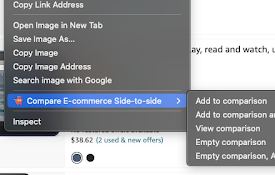
对比亚马逊并排
亚马逊产品(价格、规格)并排比较(右键添加)在亚马逊、沃尔玛、速卖通和其他电子商务网站上创建并排产品

Let's Compare - Same Product Less Money!
Let's Compare is a powerful all-in-1 shopping

PriceWise: Real-time Price Comparison
Save money and shop smarter with PriceWise, a free

Streetify
The biggest price comparison site in the worldCong

Grips – E-commerce Site Analysis
Instant e-commerce website analysis, including rev

Similar Inc | Shopping Comparison Co-Pilot
AI-Powered Shopping Co-Pilot Similar Inc's AI

Product Search
Search any product in one click and find same or s

Online Arbitrage Tool
A chrome extension tool that quickly and automatic

Fetchee: Best Price Offers for Amazon
No sign-up required. Works with Amazon UK/US. Stop

Deals and Discouns Finder - Price Comparison
Deals & Discounts Finder on AliExpress, Ebay,

RebateCodes
RebateCodes official extensionLatest version of ou

CheaperThan. Amazon
Browse Amazon. Shop Cheaper.Are you sure you are g