
Whitaker's Words Helper Chrome 插件, crx 扩展下载
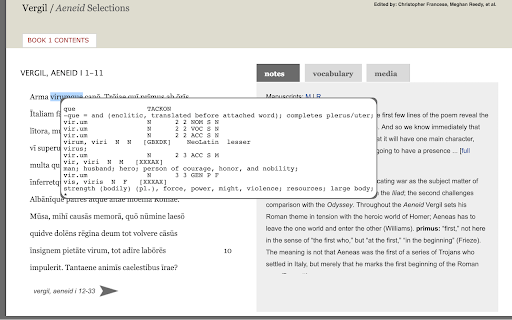
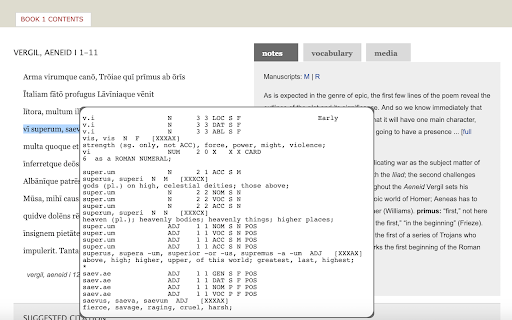
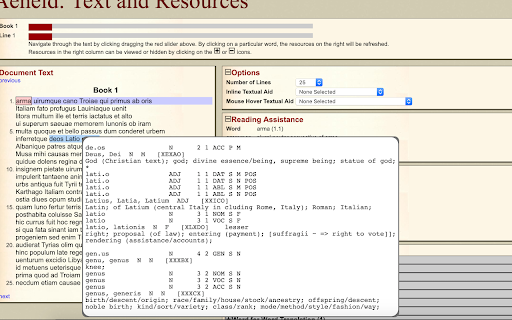
This extension uses the wonderful program, designed by William Whitaker, to easily get detailed and accurate Latin definitions.
Update: The extension has been restored to full functionality and any new bugs will be dealt with as soon as possible. The development team apologizes for the app breaking.
As a Latin student myself I was often frustrated with constantly switching tabs to look up Latin vocabulary and I'm sure I wasn't the only one irritated by this. Wouldn't it be so much better if there was a way to look up words without switching tabs? This extension uses the wonderful application designed by the late William Whitaker (through a website set up by University Notre Dame) to seamlessly bring you Latin definitions while you're working, without ever needing you to leave the page you're working on. Carpe diem!
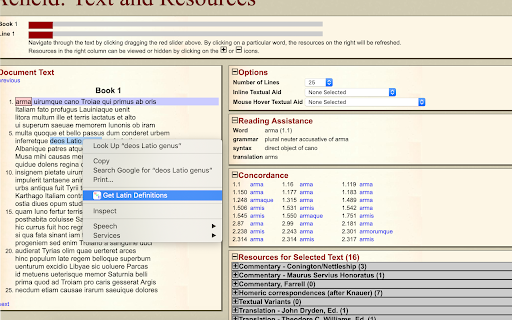
How To Use: Using this extension is incredibly easy, all you have to is double click on a word and the definition will appear. If you want to look up many words at once you can either drag-highlight the words and then right click and select 'Get definitions' from the Whitaker's Words Helper menu, or double click and drag. If you want to see only definitions, without the possible parts of speech, check the definitions only option. The Whitaker's Words Helper right click menu also has a 'Get scansion' option that will scan the selected text for dactylic hexameter. Finally, if you want to disable the extension, click on the icon in the top left, next to the search bar and click the toggle to disable the extension.
The original Whitaker's Words site can be found at https://latin-words.com. Copyright © 1993-2007
The scansion is provided by The Latin Macronizer at www.alatius.com/macronizer/. Copyright 2015-2021 Johan Winge.
| 分类 | 🛠️工具 |
| 插件标识 | mpjaoplmcdeknomnaphnfipccfbppidl |
| 平台 | Chrome |
| 评分 |
☆☆☆☆☆
0
|
| 评分人数 | 1 |
| 插件主页 | https://chromewebstore.google.com/detail/whitakers-words-helper/mpjaoplmcdeknomnaphnfipccfbppidl |
| 版本号 | 2.1.1 |
| 大小 | 36.01KiB |
| 官网下载次数 | 340 |
| 下载地址 | |
| 更新时间 | 2024-08-12 00:00:00 |
CRX扩展文件安装方法
第1步: 打开Chrome浏览器的扩展程序
第2步:
在地址栏输入: chrome://extensions/
第3步: 开启右上角的【开发者模式】
第4步: 重启Chrome浏览器 (重要操作)
第5步: 重新打开扩展程序管理界面
第6步: 将下载的crx文件直接拖入页面完成安装
注意:请确保使用最新版本的Chrome浏览器
同类插件推荐

Whitaker's Words Helper
This extension uses the wonderful program, designe

Greek/Latin Word Lookup
Look up definitions of Greek/Latin words convenien

Latin dictionary
Translate single Latin words to English easily wit

LatTab 2.0 - Latin proverbs and root words
Learn Latin - each time you open up a new tabRepla

VOX Music Player Helper
Easy way to import and play any track from YouTube

All Find Seek
Extension adding All Find Seek search engine to br

Friendzy
Browse friendzy directly from twitter!Find your fa

LeadhuntAI - Chrome Extension
This extension will allow you to easily retrieve s
Time Tracker, Todo, Sprint Manager - Basecamp
Sync daily tasks or work between Basecamp & Mo

GoldDust
Ask a question about a company or a person. If the

Clear Portal Cache
Clearing the cache with a single click!Easily clea

BoostPic - Search Google Images on the fly
Uncover the possibility to search Google Images qu

Tanuki Utilities
Provide useful utilities for GitLab users.Title ch