
Nexial WebEZ Chrome 插件, crx 扩展下载
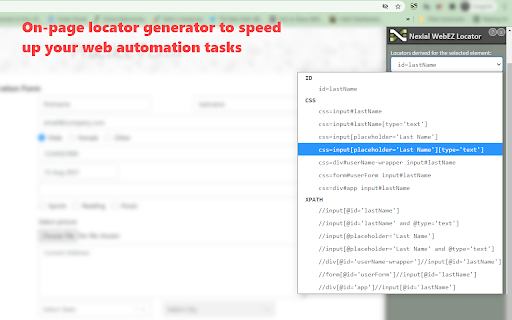

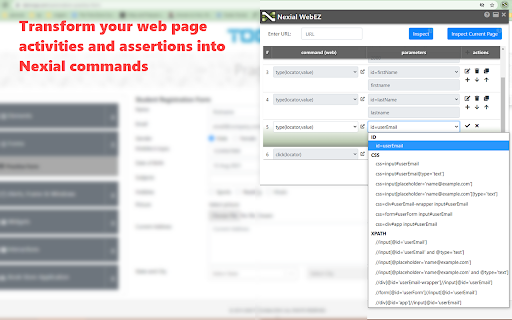
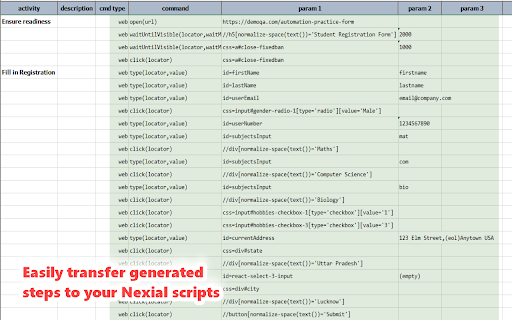
Kick your web automation into high gear with Nexial WebEZ!
Nexial WebEZ [/ wɛb ˈi zi /] is a Chrome browser extension designed to expedite Web automation, especially (but not limited to) with the use of Nexial Automation. The main objectives of this tool are:
- To speed up the tasks of associating Web elements to a Web commands,
- To easily create (and edit) a basic Nexial script, for the purpose of Web automation,
- To learn about Web automation,
- To learn about Nexial Automation Platform,
- To learn about the Web application you are targeting for automation
Nexial WebEZ takes out the guesswork of figuring out locators and significantly compresses the distance between the "What" and the "How" (What to automation vs How to automate). With Nexial WebEZ, you can create a “Web automation ready” script in a reasonably short amount of time. With less time spent on scripting, you can focus more on Testing and Quality-related concerns!
To learn more about Nexial WebEZ, this Chrome extension:
https://nexiality.github.io/documentation/webez
For more information about Nexial Automation:
https://nexiality.github.io/
To install and try out Nexial Automation:
https://nexiality.github.io/documentation/userguide/InstallingNexial
| 分类 | 💻开发者工具 |
| 插件标识 | ncngjmjcpjonbilhgolpdloabaemdngk |
| 平台 | Chrome |
| 评分 |
☆☆☆☆☆
0
|
| 评分人数 | 1 |
| 插件主页 | https://chromewebstore.google.com/detail/nexial-webez/ncngjmjcpjonbilhgolpdloabaemdngk |
| 版本号 | 92 |
| 大小 | 1.42MiB |
| 官网下载次数 | 41 |
| 下载地址 | |
| 更新时间 | 2023-07-10 00:00:00 |
CRX扩展文件安装方法
第1步: 打开Chrome浏览器的扩展程序
第2步:
在地址栏输入: chrome://extensions/
第3步: 开启右上角的【开发者模式】
第4步: 重启Chrome浏览器 (重要操作)
第5步: 重新打开扩展程序管理界面
第6步: 将下载的crx文件直接拖入页面完成安装
注意:请确保使用最新版本的Chrome浏览器
同类插件推荐

Autobot
A browser automation tool (extension)Web Automatio
Nexial WebEZ
Kick your web automation into high gear with Nexia

Web Recorder for Rocketbot
Rocketbot extension to record actions in the brows

Aiwozo
AI Work Zone Web Automation Extension is an compon

Programming Browser: Web Automation Toolkit
Web automation toolkitProgramming Browser is a web
Drivably
We get inventoryDrivably combines proprietary algo
FreeBID
Freelancer ChatGPT bid bot.Freelancer ChatGPT bid

WinTask Browser Automation
WinTask component browser automation. This extensi

Microbots AI Platform
This extention allows to build automations using p

AuTomato - Easy E2E tests and web automation
Automate your web tasks or make E2E testing easier

Follow GitHub Organization
Follow GitHub organizations and get activities on

Active Group Users
Find the MOST ACTIVE people so you can help them g

GM Assistant
GM AssistantUse this chrome extension to join all